EasyManua.ls Logo

Aiwa NSX-SZ310 - Adjustments Before Operations; DEMO Mode Control; Power and Volume Control; Sound Adjustments

Aiwa NSX-SZ310
12 pages
Print Icon
To Next Page IconTo Next Page
To Previous Page IconTo Previous Page
Loading...
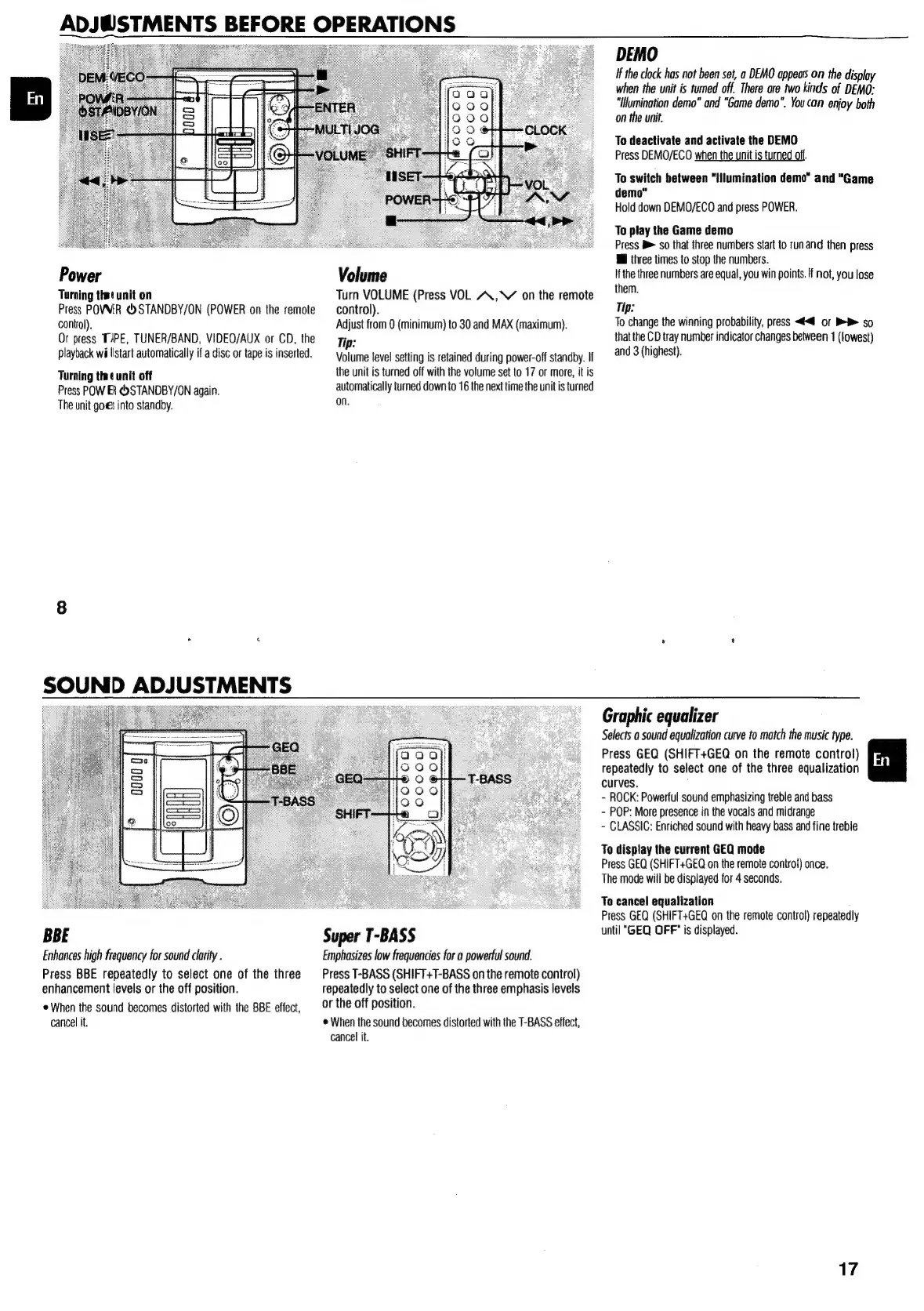
Power
Turning
thet
unit
on
Press
POVWER
<>STANDBY/ON
(POWER
on
the
remote
control).
Or
press
TAPE,
TUNER/BAND,
VIDEO/AUX
or
CD,
the
playback
wi
listart
automatically
if
a
disc
or
tape
is
inserted.
Turning
that
unit
off
Press
POW
ER
&)STANDBY/ON
again.
The
unit
goes
into
standby.
SOUND
ADJUSTMENTS
BBE
Enhances
high
frequency
for
sound
clarity
.
Press
BBE
repeatedly
to
select
one
of
the
three
enhancement
levels
or
the
off
position.
When
the
sound
becomes
distorted
with
the
BBE
effect,
cancel
it.
ADJW@STMENTS
BEFORE
OPERATIONS
Volume
Turn
VOLUME
(Press
VOL
AA,
on
the
remote
control).
Adjust
from
0
(minimum)
to
30
and
MAX
(maximum).
Tip:
Volume
level
setting
is
retained
during
power-off
standby.
If
the
unit
is
turned
off
with
the
volume
set
to
17
or
more,
it
is
automatically
turned
down
to
16
the
next
time
the
unit
is
turned
on.
Super
T-BASS
Emphasizes
low
frequencies
for
a
powerful
sound.
Press
T-BASS
(SHIFT+T-BASS
on
the
remote
control)
repeatedly
to
select
one
of
the
three
emphasis
levels
or
the
off
position.
©
When
the
sound
becomes
distorted
with
the
T-BASS
effect,
cancel
it.
DEMO
if
the
clock
has
not
been
set,
a
DEMO
apes
on
the
display
when
the
unit
is
tumed
off.
There
are
two
kinds
of
DEMO:
"Ilumination
demo”
and
“Game
demo".
You
can
enjoy
both
on
the
unit.
To
deactivate
and
activate
the
DEMO
Press
DEMO/ECO
when
the
unit
is
turned
off.
To
switch
between
“Iilumination
demo”
and
“Game
demo"
Hold
down
DEMO/ECO
and
press
POWER.
To
play
the
Game
demo
Press
B>
so
that
three
numbers
start
fo
run
and
then
press
@
three
times
to
stop
the
numbers.
Ifthe
three
numbers
are
equal,
you
win
points.
If
not,
you
lose
them.
Tip:
To
change
the
winning
probability,
press
<4<@
or
>
so
that
the
CD
tray
number
indicator
changes
between
1
(lowest)
and
3
(highest).
Graphic
equalizer
Selects
a
sound
equalization
curve
to
match
the
music
type.
Press
GEQ
(SHIFT+GEQ
on
the
remote
control)
repeatedly
to
select
one
of
the
three
equalization
curves.
-
ROCK:
Powerful
sound
emphasizing
treble
and
bass
-
POP:
More
presence
in
the
vocals
and
midrange
-
CLASSIC:
Enriched
sound
with
heavy
bass
and
fine
treble
To
display
the
current
GEQ
mode
Press
GEQ
(SHIFT+GEQ
on
the
remote
control)
once.
The
mode
will
be
displayed
for
4
seconds.
To
cancel
equalization
Press
GEQ
(SHIFT+GEQ
on
the
remote
control)
repeatedly
until
"GEQ
OFF"
is
displayed.
17

Other manuals for Aiwa NSX-SZ310

Related product manuals