EasyManua.ls Logo

Aiwa NSX-SZ310 - Timer Operations; Sleep Timer Function; Timer Playback Setup; Remote Control Overview

Aiwa NSX-SZ310
12 pages
Print Icon
To Next Page IconTo Next Page
To Previous Page IconTo Previous Page
Loading...
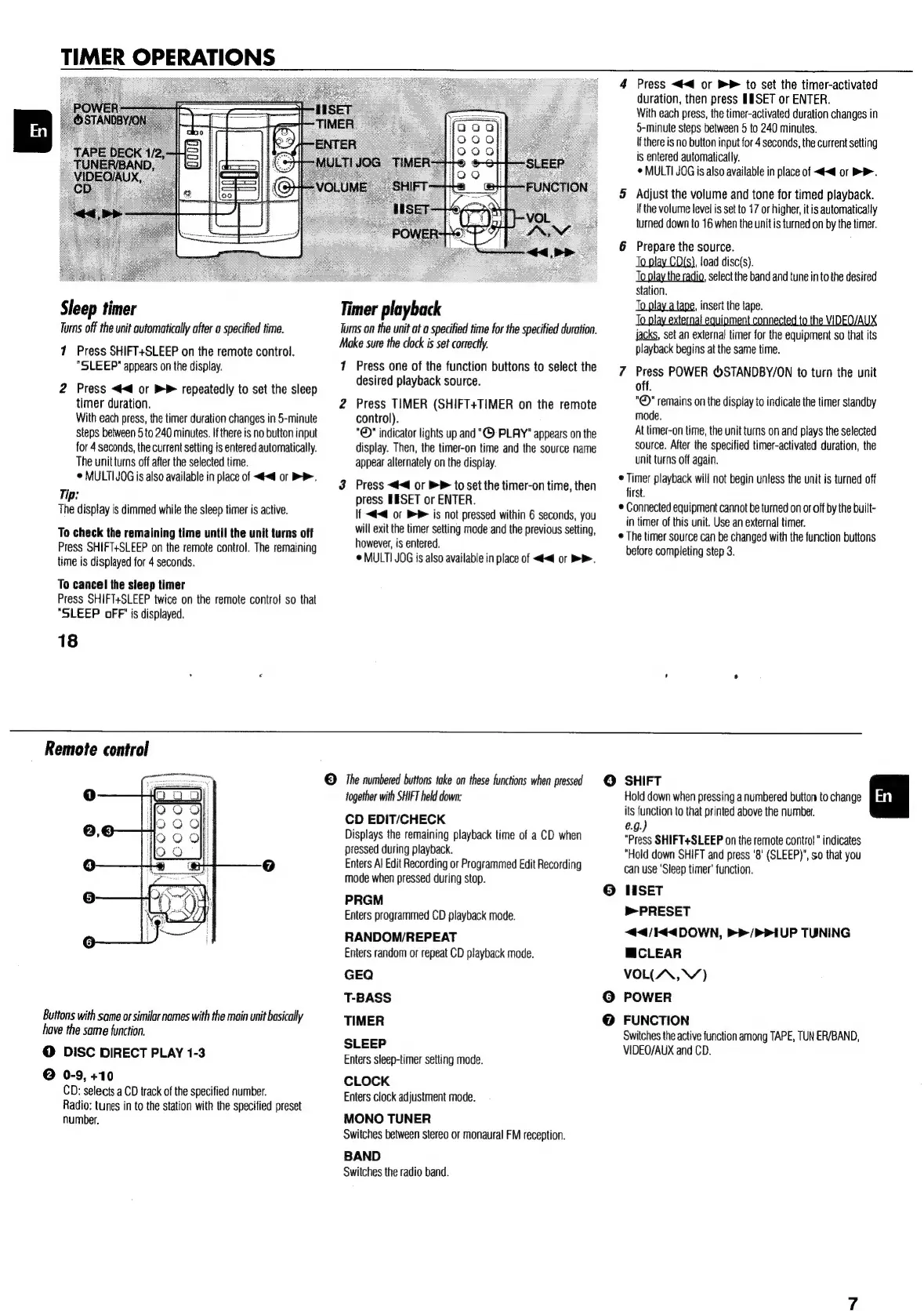
TIMER
OPERATIONS
Sleep
timer
Turns
off
the
unit
automatically
after
a
specified
time.
1
Press
SHIFT+SLEEP
on
the
remote
control.
"SLEEP"
appears
on
the
display.
2
Press
<4
or
>
repeatedly
to
set
the
sleep
timer
duration.
With
each
press,
the
timer
duration
changes
in
5-minute
steps
between
5
to
240
minutes.
If
there
is
no
button
input
for
4
seconds,
the
current
setting
is
entered
automatically.
The
unit
turns
off
after
the
selected
time.
©
MULTI
JOG
is
also
available
in
place
of
<<
or
>>.
Tip:
The
display
is
dimmed
while
the
sleep
timer
is
active.
To
check
the
remaining
time
until
the
unit
turns
off
Press
SHIFT+SLEEP
on
the
remote
control.
The
remaining
time
is
displayed
for
4
seconds.
To
cancel
the
sieep
timer
Press
SHIFT+SLEEP
twice
on
the
remote
control
so
that
“SLEEP
oFF’
js
displayed.
18
Remote
control
Buttons
with
same
or
similar
names
with
the
main
unit
basically
have
the
same
function.
@
DISC
DIRECT
PLAY
1-3
©
0-9,
+10
CD:
selects
a
CD
track
of
the
specified
number.
Radio:
tunes
in
to
the
station
with
the
specified
preset
number.
Timer
playback
Turns
on
the
unit
at
a
specified
time
for
the
specified
duration.
Make
sure
the
clock
is set
correctly.
1
Press
one
of
the
function
buttons
to
select
the
desired
playback
source.
2
Press
TIMER
(SHIFT+TIMER
on
the
remote
control).
"©"
indicator
lights
up
and
“©
PLAY"
appears
on
the
display.
Then,
the
timer-on
time
and
the
source
name
appear
alternately
on
the
display.
3
Press
<4<4
or
BP
to
set
the
timer-on
time,
then
press
EESET
or
ENTER.
If
<4
of
BP
is
not
pressed
within
6
seconds,
you
will
exit
the
timer
setting
mode
and
the
previous
setting,
however,
is
entered.
¢
MULTI
JOG
is
also
available
in
place
of
<4<4
or
>>.
©
The
numbered
buttons
take
on
these
functions
when
pressed
together
with
SHIFT
held
down:
CD
EDIT/CHECK
Displays
the
remaining
playback
time
of
a
CD
when
pressed
during
playback.
Enters
Al
Edit
Recording
or
Programmed
Edit
Recording
mode
when
pressed
during
stop.
PRGM
Enters
programmed
CD
playback
mode.
RANDOM/REPEAT
Enters
random
or
repeat
CD
playback
mode.
GEQ
T-BASS
TIMER
SLEEP
Enters
sleep-timer
setting
mode.
CLOCK
Enters
clock
adjustment
mode.
MONO
TUNER
Switches
between
stereo
or
monaural
FM
reception.
BAND
Switches
the
radio
band.
4
Press
<4
or
>
to
set
the
timer-activated
duration,
then
press
HESET
or
ENTER.
With
each
press,
the
timer-activated
duration
changes
in
5-minule
steps
between
5
to
240
minutes.
If
there
is
no
button
input
for
4
seconds,
the
current
setting
is
entered
automatically.
©
MULTI
JOG
is
also
available
in
place
of
<<
or
D>.
5
Adjust
the
volume
and
tone
for
timed
playback.
if
the
volume
level
is
set
to
17
or
higher,
itis
automatically
turned
down
to
16
when
the
unit
is
turned
on
by
the
timer.
6
Prepare
the
source.
To
play
CD(s),
load
disc(s).
Toplay
the
radio,
select
the
band
and
tune
in
to
the
desired
station.
Jo
play
a
tape,
insert
the
tape.
To
play
externa!
equipment
connected
to
the
VIDEO/AUX
jacks,
set
an
external
timer
for
the
equipment
so
that
its
playback
begins
at
the
same
time.
7
Press
POWER
®STANDBY/ON
to
turn
the
unit
off.
"©"
remains
on
the
display
to
indicate
the
timer
standby
mode.
At
timer-on
time,
the
unit
turns
on
and
plays
the
selected
source.
After
the
specified
timer-activated
duration,
the
unit
turns
off
again.
¢
Timer
playback
will
not
begin
unless
the
unit
is
turned
off
first.
*
Connected
equipment
cannot
be
turned
on
or
off
by
the
built-
in
timer
of
this
unit.
Use
an
external
timer.
e
The
timer
source
can
be
changed
with
the
function
buttons
before
completing
step
3.
©
SHIFT
Hold
down
when
pressing
a
numbered
button
to
change
its
function
to
that
printed
above
the
number.
e.g.)
"Press
SHIFT+SLEEP
on
the
remote
control”
indicates
“Hold
down
SHIFT
and
press
'8'
(SLEEP)’,
so
that
you
can use
‘Sleep
timer’
function.
LISET
»>PRESET
<44/I44DOWN,
PP
/PPIUP
TUNING
MCLEAR
VOL(AA,
VY)
POWER
FUNCTION
Switches
the
active
function
among
TAPE,
TUN
ER/BAND,
VIDEO/AUX
and
CD.

Other manuals for Aiwa NSX-SZ310

Related product manuals