12
A: The amplitude of electrical signals output by different playback devices is different. example,
mobile phones are usually 0.35V, while CDs are 1V. The natural sound size is different.
Q: Why does the volume of the machine remain the same, but the sound level
is different when connecting to different audio sources (for example,
connect a CD first, then a mobile phone)?
A: This is because some computer systems can only display a maximum of 192KHz but in
reality using FOOBAR ASIO can play the source code DSD256/PCM 384KHz.
Q: Why can the DAC decoder only display 24 Bit / 192 KHz on the computer?
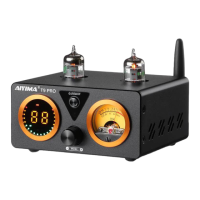
A: The color automatically adjusts with the size of the music signal, with different colors
representing different gains. Orange represents high gain, blue represents medium gain,
and white represents low gain (the system automatically switches to high gain when the
signal is low, and to low gain when the signal is high to ensure sufficient swing of the VU
meter)
Q: Why do the colors in the input mode/audio format/sampling rate display
area change, and what do they represent?
A: This is normal, the sound of DSD is 3dB lower than PCM.
Q: Why is the volume of playing DSD lower than that of playing PCM?
A: This is usually because the computer system lacks a digital signature patch or the USB DAC
has been disabled by antivirus software. Please close the antivirus software to reinstall.
Q: Why can the computer recognize the USB DAC but can not install the driver?
A: Please confirm the optical and coaxial of the connected device is output or input. For
example, if connected to the TV optical output, please set the output mode and sampling
rate on TV (usually with PCM output mode option).
Q: Why is there no sound output when optical and coaxial inputs are used?
A: Please turn the computer system volume to 100: click the small speaker in the lower right
corner of the computer-play device-double click the USB device to turn the volume to 100.
Q: Why is there noise when playing DSD music, and the music sound is
very low?
A: No, the MAC system is drive-free and can be used directly, MAC System highest support
DOP128.
Q: Do Apple computers need to install drivers?
A: Please switch to a different USB interface,or replace a USB cable, or switch to a different
computer. If there is still no response, please contact us.
Q: After connecting DAC to the computer, but there is no response? After
connecting, but the computer prompts that USB DAC cannot be recognized?
A: 1. If you have not used the original factory standard power supply, please replace the power
supply and test again.Many power supplies in the market have interference, which will
cause current sound.
Q: Why does the horn emit a loud electrical current sound or buzzing sound?


 To Next Page
 Loading...