Hi5-Plus Mini-Converter v1.7r1 12 www.aja.com
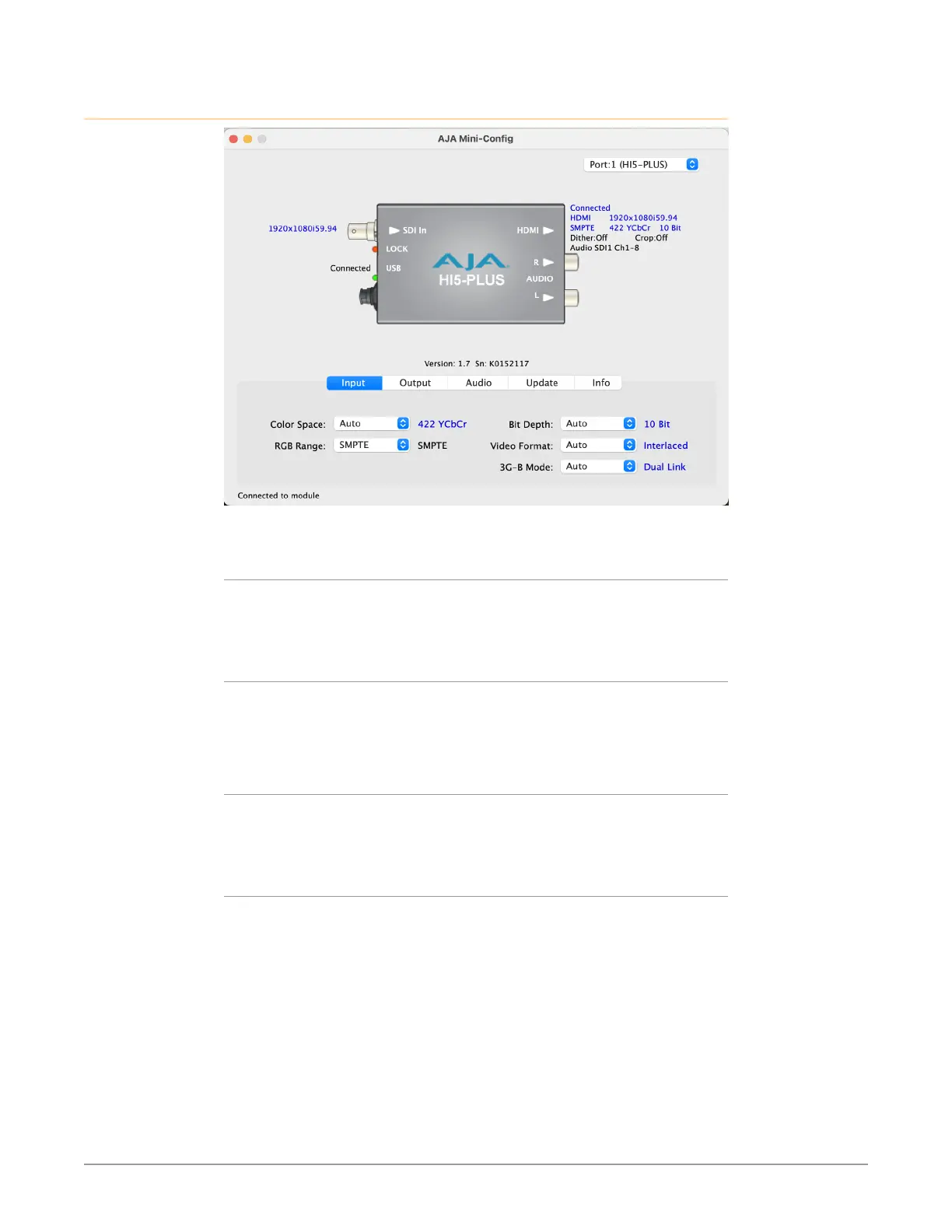
Input Tab Screen
Click on the Input tab to view and make changes to the converter’s input settings.
Color Space
Selects the Input Video Color Space. Choose Auto, 422 YCbCr, or 444 RGB, or 444
YCbCr. Choosing “Auto” will automatically select color mode based on the input
video parameters and the payload ID.
RGB Range
Selects the Input Video Color Range. Choose SMPTE or Full range.
NOTE: The RGB range setting effects input range only when in RGB mode. YCbCr inputs
are always SMPTE levels.
Bit Depth
Selects the input video bit depth. Choose Auto, 8-bit, 10-bit, or 12-bit. Choosing
“Auto” automatically selects the bit depth based on the input video parameters
and payload ID.
Video Format
Selects the Input Video Format. Choose from Auto, Progressive (P), Interlaced, or
PsF (Progressive Segmented Frame). Choosing “Auto” automatically selects the
format based on the input video parameters and the payload ID.



 To Next Page