Hi5-Plus Mini-Converter v1.7r1 13 www.aja.com
3G-B Mode
Selects the 3G level B Video Mode. Choose from the following:
• Auto - automatically selects the format based on the input video parameters
• Dual Link - Select this option if you have a Dual Link signal coming in through
SDI
• 1 x HD DS1 - Select this option if you have 3GB-Dual Stream input and want to
extract Data Stream A (first raster) and send to an output
• 1 x HD DS2 - Select this option if you have 3GB-Dual Stream input and want to
extract Data Stream A (first raster) and send to an output
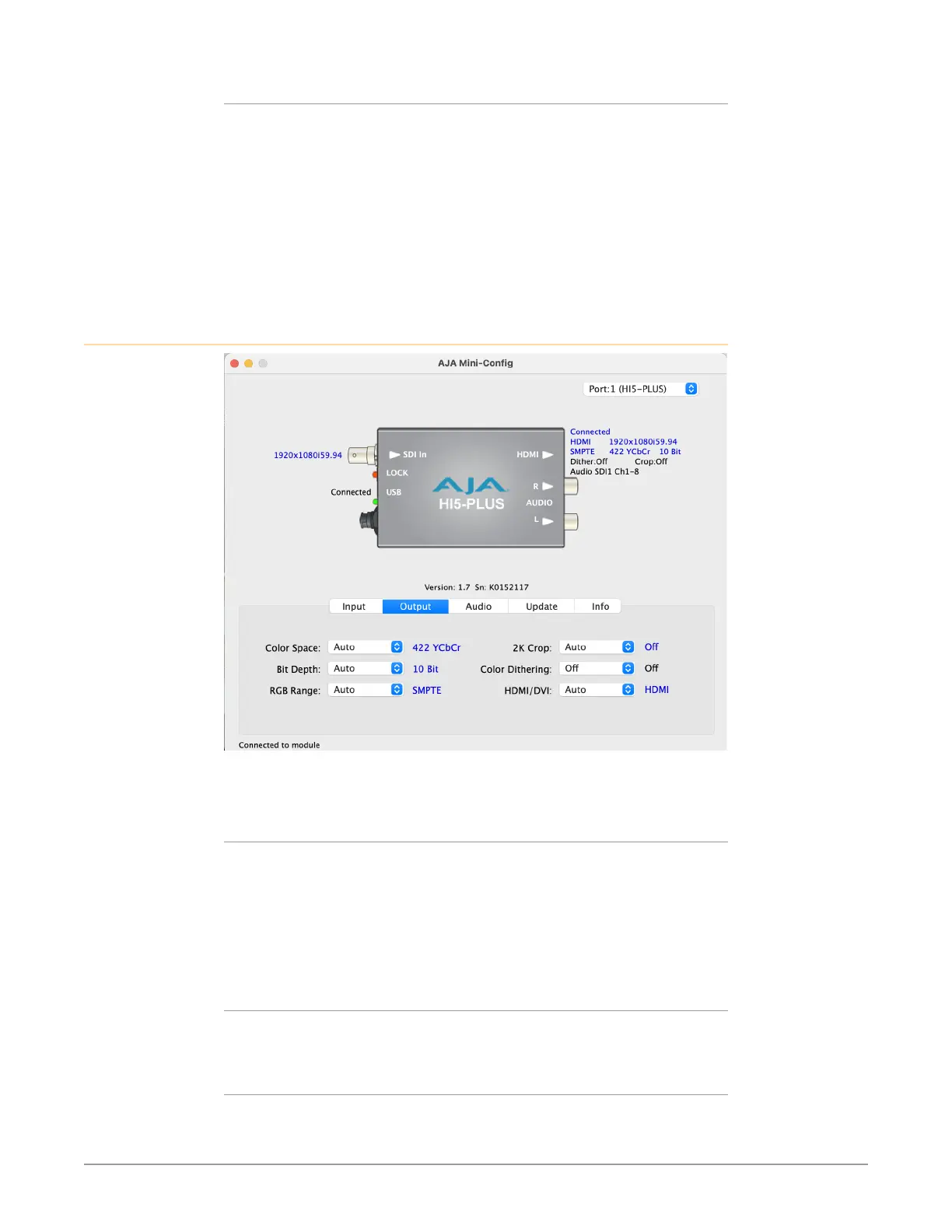
Output Tab Screen
Click on the Output tab to view and make changes to the Hi5-Plus Output
settings.
Color Space
Selects the desired output video format. Choose from the following:
• Auto - selects the video format based on the input video and the attached
device’s capabilities.
• 4:2:2 YCbCr
• 4:4:4 RGB
• 4:4:4 YCbCr
Bit Depth
Choose from Auto, 8-bit, 10-bit, or 12-bit. Choosing “Auto” automatically selects
the bit depth based on the input video and the attached device’s capabilities.
RGB Range
Choose Auto, SMPTE or Full. Choosing “Auto” automatically selects the output
color range setting.



 To Next Page