Hi5-Plus Mini-Converter v1.7r1 15 www.aja.com
Output Channel Count
Choose Auto, 2 of 8 channels or 8-channel embedded audio. Choosing “Auto”
automatically selects the audio channels based on the attached device’s
capabilities.
Analog Audio Select
Permits selecting the pair of audio channels to be sent to the analog audio RCA
connectors. The audio pairs routed depend on the Input Source (1-8 or 9-16)
setting above. Choose Ch 1-2 (or 9-10), through Ch 7-8 (or 15-16).
Audio Offset In Frames
Permits time shifting the embedded audio in relationship to the video (for
example, to correct for lip sync problems), in 1/16 of a frame increments. Range is
from 0 video frame to +7 video frames. The actual time duration of delay will vary
depending on the frame rate of the format being converted.
NOTE: One frame of delay is automatically added when the input video is PsF.
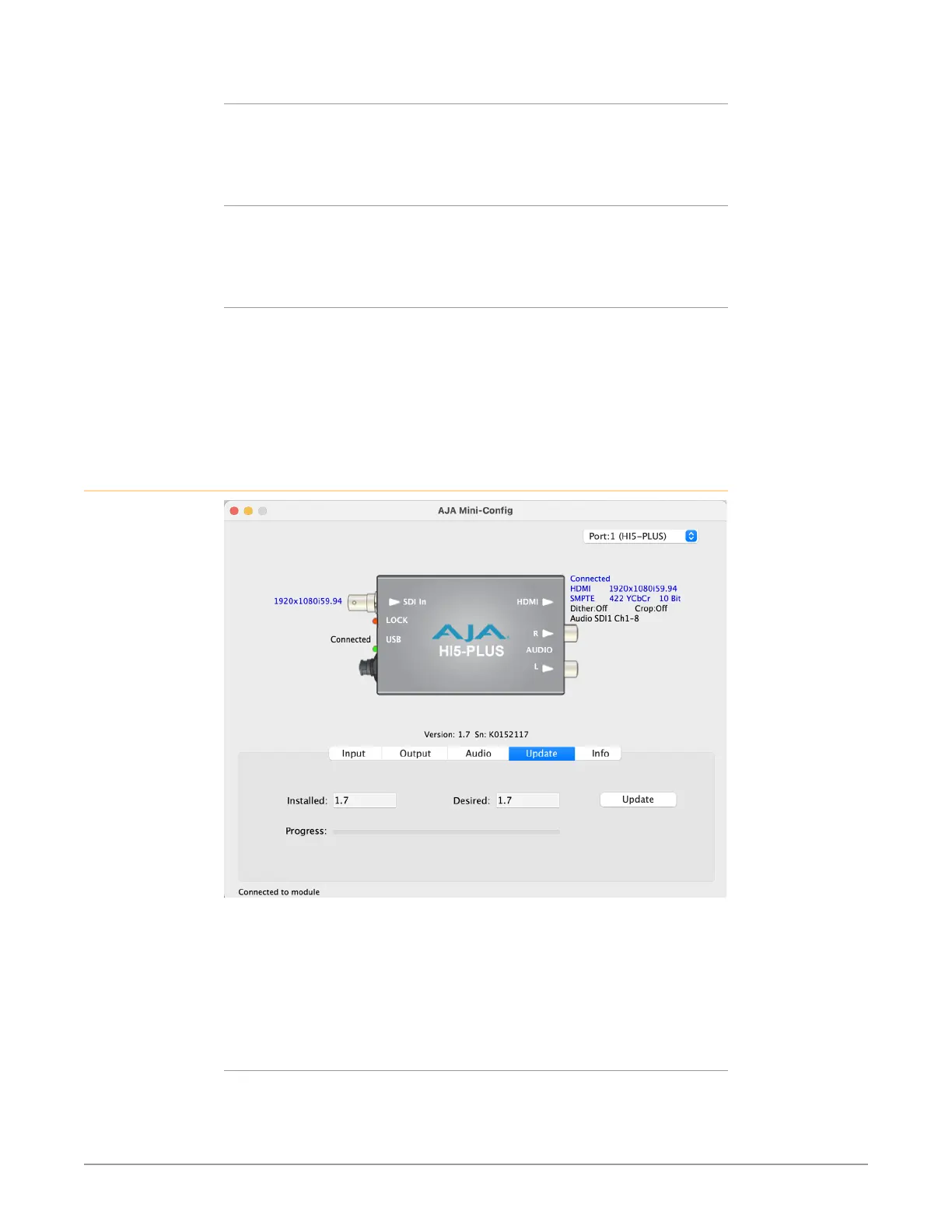
Update Tab Screen
Use this Update screen to view the software version currently installed on the
converter or install new software.
NOTE: When discussing Mini-Converters, “Firmware” is software that will be stored in
the Mini-Converter’s non-volatile memory and used when it is powered up. This
is something different than the Mini-Config application software. The version
numbers shown in the Update screen refer only to the firmware.
Installed
This field shows the version of the firmware currently installed inside the Mini-
Converter.



 To Next Page