KiPro Mini v4.2 www.aja.com
28
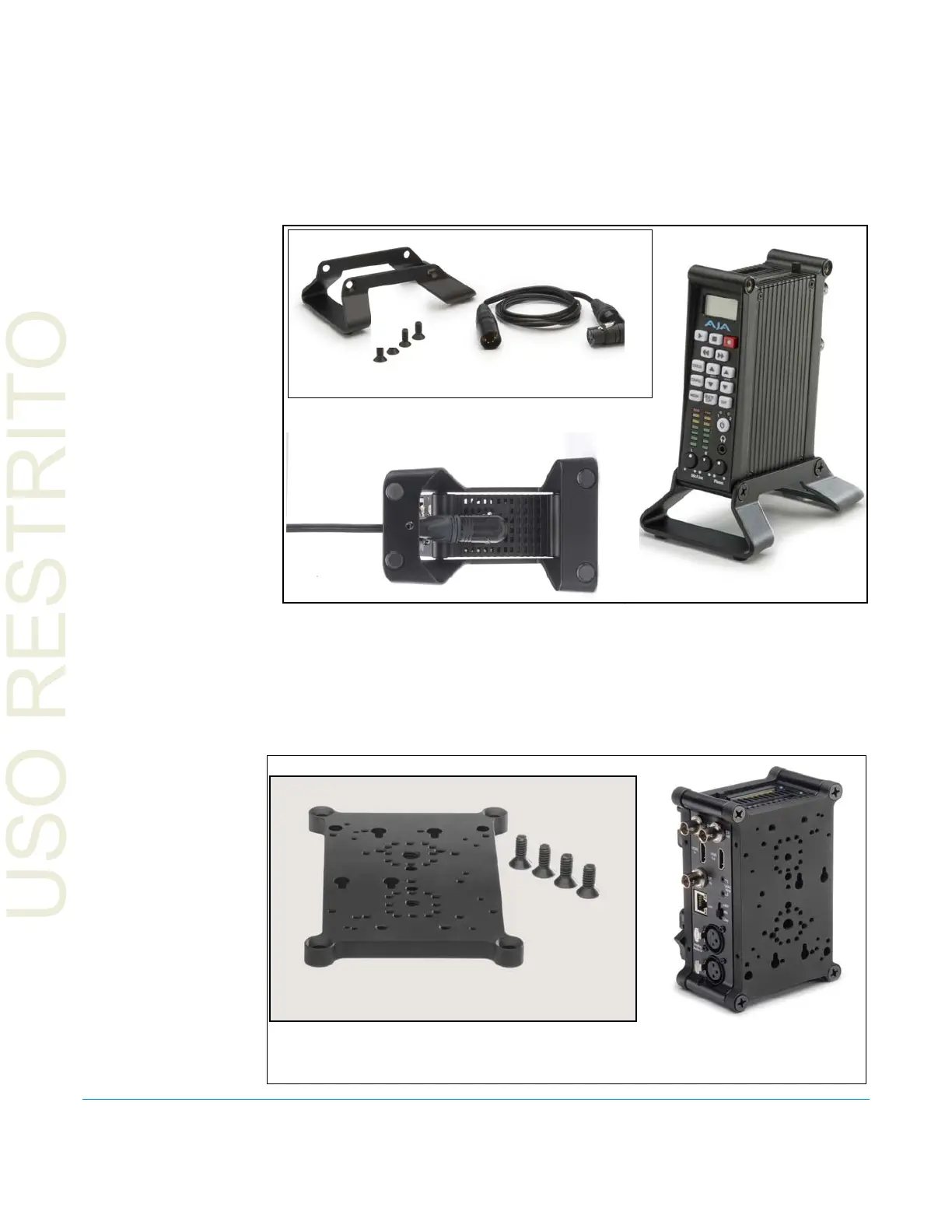
Desktop Mounting When using Ki Pro Mini on a desktop, you can simply lay the unit on a desktop or flat
surface—or for a low-footprint, purchase a Ki Pro Mini stand kit to locate the Ki Pro Mini
vertically on the desktop. The stand comes with a power adapter cable having a 90
degree connector so the power cord can run underneath the Ki Pro Mini, exiting to the
rear of the stand. The optional stand comes with 2 mounting screws and a 90 degree
power cord adapter.
Figure 10. Optional Ki Pro Mini Stand Kit
Camera Mounting Camera mounting requires the use of either user-provided brackets or use of one or
more AJA optional Ki Pro Mini mounting plates. The AJA mounting plate option is a
single aluminum plate unit with recessed mounting holes that have been matched for
mating with a wide array of 3rd-party mounts, battery plates, and accessories.
Figure 11. Optional Ki Pro Mini Mounting Plate, with Screws (supplied)
Ki Pro Mini in Stand
90-degree Power
Cable Adapter
Mounting
Screws
Mounting Stand
Detail View of Power Cable Under Unit
Kit Contents
Kit Contents
Example: Two mounting plates
attached to a Ki Pro Mini



 To Next Page