OG-UDC 3G-SDI Up, Down, Cross-Converter v1.0 17 www.aja.com
General Configuration DIP Switch Settings
The functions of the general configuration DIP switches and what they control are
described in the following tables.
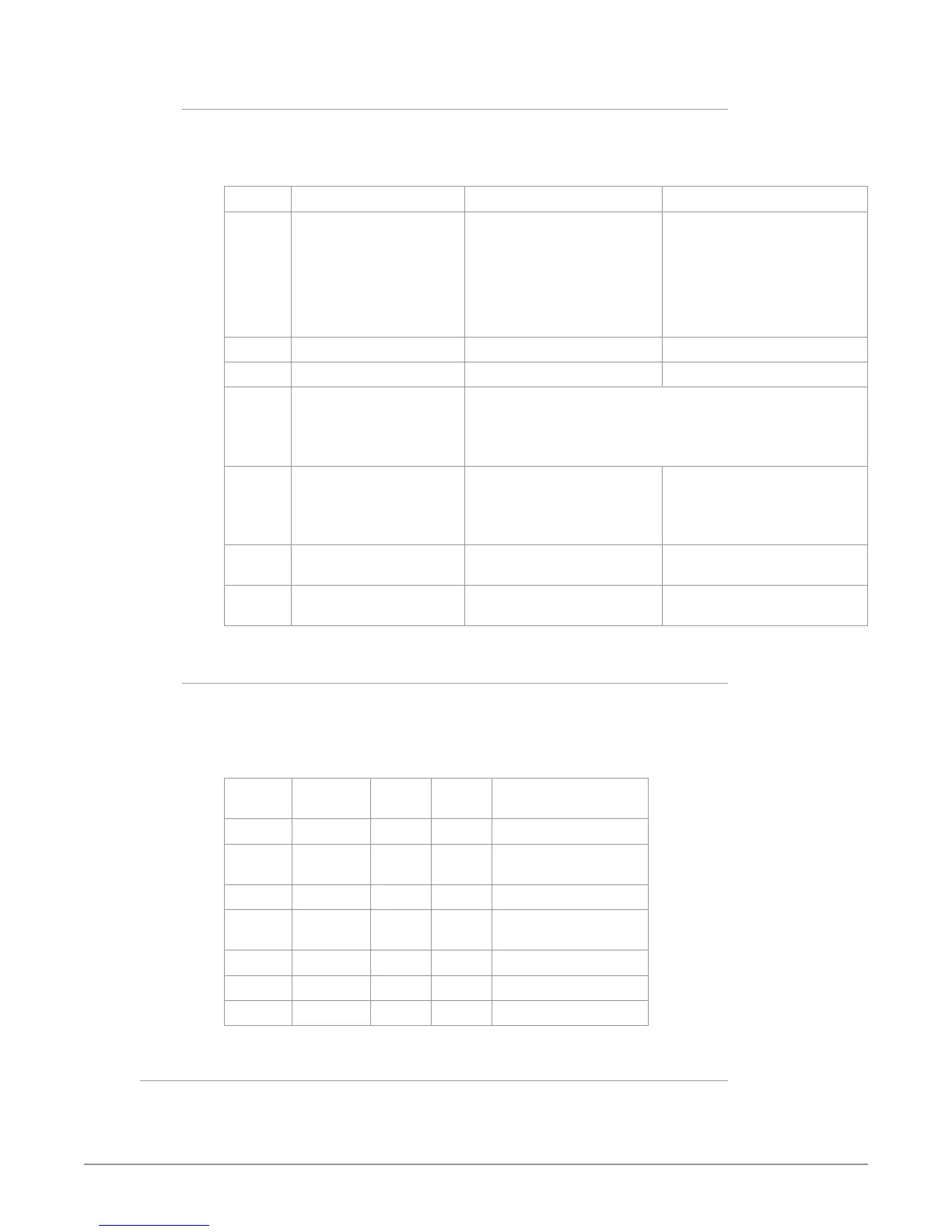
Table 1. General Configuration DIP Switch Setting Descriptions
SWITCH FUNCTION DIP Set LEFT (default) DIP Set RIGHT
1 Control Selects LOCAL (DIP),
and blocks DashBoard
conguration control.
When in “Local” mode, the
remaining DIP switches will
support a subset of the user
controls.
Selects REMOTE (DashBoard),
and disables DIP switches 2-8.
When in “Remote” mode,
the normal DashBoard non-
volatile registers (as last set),
control the unit.
2 HD/SD Selects HD output mode. Selects SD output mode.
3 1080/720 (HD mode only) Selects 1080 output. Selects 720 output.
4 & 5 Alternate HD formats These two DIP switches (FMT0, FMT1) act together to select
alternate HD output formats. Zero (0) is Left position, one (1) is
Right position.
See Table 2 below for setting information.
6 3:2 Conversion (23.98/24
inputs only)
3:2 conversion is OFF.
A 23.98/24 fps input results in
a 23.98/24 fps output.
3:2 conversion is ON.
A 23.98/24 fps input results in
either a 29.97/30 or 59.94/60
fps output.
7 Up Conversion Sets upconversion to Sidebar
(SIDEB).
Sets upconversion to Full
screen (FULL).
8 Down Conversion Sets downconversion to
Letterbox (LTRBX).
Sets downconversion to Full
screen (FULL).
DIP Switches 4 & 5 (FMT0, FMT1)
General DIP switches 4 and 5 together select alternate HD formats. Switches 1
and 2 can also affect the HD output format. In the table below an X indicates a
“Don’t Care” setting.
Table 2. Output Formats for DIP Switch 2,3, 4, & 5 Settings
SW2
HD/SD
SW3
1080/720
SW 4
FMT0
SW 5
FMT1
Output
Left Left Left Left 1080i 50/59.94/60
Left Left Left Right 1080pSF
23.98/24/25/29.97/30
Left Left Right Left 1080p 50/59.94/60
Left Left Right Right 1080p
23.98/24/25/29.97/30
Left Right X Left 720p 50/59.94/60
Left Right X Right -
Right X X X 525i/625i
Reference Selection DIP Switches
The Reference DIP switch module located on the right is used only for Reference
selection.


 To Next Page