OG-UDC 3G-SDI Up, Down, Cross-Converter v1.0 8 www.aja.com
Conversion Mode Discussion and Examples
Upconvert Mode
The OG-UDC allows you to select the type of Upconversion performed on an SD
source input. This mode is in effect only when the input is SD (525i or 625i) and
the selected output format is HD (720p, 1080i, or 1080p).
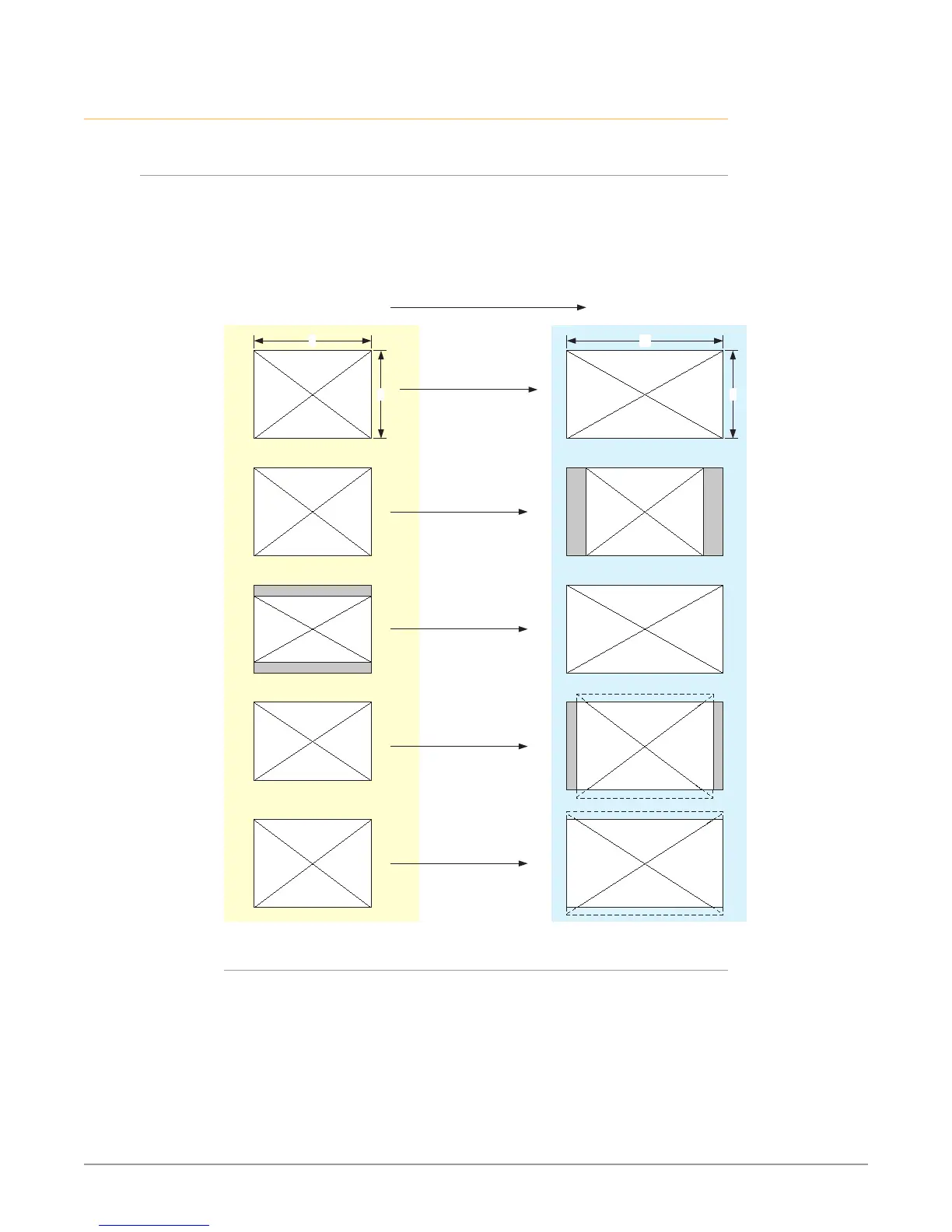
Figure 4. Upconvert Mode Examples
Upconvert Illustrations
Full Screen
4:3 Pillar
LB to Full
14:9 Pillar
Wide Zoom
16
9
4
3
4:3 Upconverts To These displays on 16:9
Selection Description
• Full Screen – 4x3 image is stretched horizontally to ll a 16x9 frame.
• 4x3 Pillar – 4x3 image at center screen with black sidebars.
• LB to Full – 4x3 letterboxed image is scaled to t horizontally in a 16x9 frame.
Black bars top and bottom are cropped o.
• 14x9 Pillar (default) – 4x3 image is scaled to create a 14x9 image with black
sidebars and slightly cropping top and bottom of original image.
• Wide Zoom – A combination of scaling and stretching is used to t to a 16x9
frame. Slight cropping of top and bottom and a small aspect ratio change.


 To Next Page