EasyManua.ls Logo

AJAX MultiTransmitter - User Manual

AJAX MultiTransmitter
28 pages
Print Icon
To Next Page IconTo Next Page
Loading...
MultiTransmitter User Manual
Updated December 29, 2020
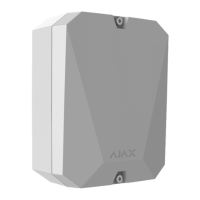
MultiTransmitter is an integration module with 18 wired zones for connecting third-
party detectors to the Ajax security system. To protect against dismantling,
MultiTransmitter is equipped with two tampers. It is powered from the mains 100–
240 V AC, and can also run on a 12 V backup battery. It can supply 12 V power to
connected detectors.
MultiTransmitter operates as part of the Ajax security system by connecting via the
secure radio communication protocol to the hub. The hub communication
range is up to 2,000 meters provided there are no obstacles. If jamming or
interference is detected, the “high level of interference at Jeweller frequencies”
event is transmitted to the central monitoring station of the security company and
system users.
Jeweller
What jamming of a security system is
Question and Answer IconNeed help?

Do you have a question about the AJAX MultiTransmitter and is the answer not in the manual?

Summary

Device Components

Body Elements

Details the external physical parts of the MultiTransmitter, including screw points and battery cavity.

Card Elements

Identifies the components on the MultiTransmitter's circuit board, like power terminals and buttons.

Terminals and Connections

Explains the left-hand and right-hand terminals for connecting detectors and power supply.

LED Indicator Status

Explains the meaning of different LED light indications for device status.

System Integration and Setup

Operating Principle

Explains how the MultiTransmitter functions within the Ajax security system.

Event Transmission

How alarms and events are transmitted from the MultiTransmitter to the monitoring station.

Connecting to the Hub

Step-by-step guide for connecting the MultiTransmitter to the Ajax hub and initial setup.

MultiTransmitter States

Explains the various states and parameters of the MultiTransmitter as displayed in the Ajax app.

Managing Connected Devices

States of Connected Detectors

How to view the operational status and malfunctions of detectors connected via the MultiTransmitter.

Settings for Connected Devices

Configuration options for individual wired detectors and devices connected to the MultiTransmitter.

Installation, Maintenance, and Testing

Connecting Wired Detectors

Step-by-step guide on how to physically connect wired detectors and devices to the MultiTransmitter.

Functionality Testing

How to perform tests to ensure the MultiTransmitter and connected devices are functioning correctly.

Installation and Placement

Recommendations for optimal placement and physical installation of the MultiTransmitter unit.

Maintenance and Malfunctions

Covers routine maintenance, avoiding installation pitfalls, and understanding malfunction notifications.

Specifications and Support

Technical Specifications

Provides detailed technical data including power, range, dimensions, and supported types.

Complete Set and Warranty

Lists the items included in the complete set and warranty information for the product.

Summary

Device Components

Body Elements

Details the external physical parts of the MultiTransmitter, including screw points and battery cavity.

Card Elements

Identifies the components on the MultiTransmitter's circuit board, like power terminals and buttons.

Terminals and Connections

Explains the left-hand and right-hand terminals for connecting detectors and power supply.

LED Indicator Status

Explains the meaning of different LED light indications for device status.

System Integration and Setup

Operating Principle

Explains how the MultiTransmitter functions within the Ajax security system.

Event Transmission

How alarms and events are transmitted from the MultiTransmitter to the monitoring station.

Connecting to the Hub

Step-by-step guide for connecting the MultiTransmitter to the Ajax hub and initial setup.

MultiTransmitter States

Explains the various states and parameters of the MultiTransmitter as displayed in the Ajax app.

Managing Connected Devices

States of Connected Detectors

How to view the operational status and malfunctions of detectors connected via the MultiTransmitter.

Settings for Connected Devices

Configuration options for individual wired detectors and devices connected to the MultiTransmitter.

Installation, Maintenance, and Testing

Connecting Wired Detectors

Step-by-step guide on how to physically connect wired detectors and devices to the MultiTransmitter.

Functionality Testing

How to perform tests to ensure the MultiTransmitter and connected devices are functioning correctly.

Installation and Placement

Recommendations for optimal placement and physical installation of the MultiTransmitter unit.

Maintenance and Malfunctions

Covers routine maintenance, avoiding installation pitfalls, and understanding malfunction notifications.

Specifications and Support

Technical Specifications

Provides detailed technical data including power, range, dimensions, and supported types.

Complete Set and Warranty

Lists the items included in the complete set and warranty information for the product.

Overview

The MultiTransmitter is an integration module designed to connect third-party wired detectors and devices to the Ajax security system. It features 18 wired zones and is equipped with two tampers to protect against dismantling. The module is powered from the mains (100–240 V AC) and can also run on a 12 V backup battery, which can supply 12 V power to connected detectors.

The MultiTransmitter operates as part of the Ajax security system by connecting via the Jeweller secure radio communication protocol to the hub. The hub communication range is up to 2,000 meters, provided there are no obstacles. If jamming or interference is detected, the system indicates a "high level of interference at Jeweller frequencies," and this event is transmitted to the central monitoring station of the security company and system users. The device connects to the hub and is configured through Ajax apps on iOS, Android, macOS, and Windows. All alarms and user events are reported by push notifications, SMS, and calls if enabled. The Ajax security system can connect to the CMS and transmit alarms to the monitoring station in Sur-Gard (ContactID) and SIA protocol formats.

The integration module receives information about alarms and the triggering of detector tampers via wires connected to its terminals. It can be used to connect various types of third-party wired detectors and devices, including panic and medical alarm buttons, indoor and outdoor motion detectors, and detectors tracking opening, vibration, breaking, fire, gas, and leakage. The type of device is indicated in the zone settings. The text of notifications about alarms and events of the connected device, as well as event codes transmitted to the Central Monitoring Station (CMS) of the security company, depend on the selected device type.

The MultiTransmitter supports 18 wired zones. The number of connected devices depends on their power consumption, with a total maximum current consumption of 1 A for all connected devices or detectors. Supported connection types include Normally Open (NO), Normally Closed (NC), EOL (NC with resistors), and EOL (NO with resistors). The integration module has three power supply lines of 12 V: one dedicated line for fire detectors and two for other devices. After a fire alarm, fire detectors require a power reset to restore normal operation. Therefore, the fire detectors' power supply should only be connected to a dedicated line. Connecting other detectors and devices to the power terminals of fire detectors may lead to false alarms or incorrect operation of the devices.

To connect the MultiTransmitter, first install the Ajax app and create an account, then add a hub to the app and create at least one room. Ensure the hub is on and has access to the internet (via Ethernet cable, Wi-Fi, or mobile network). The hub logo on the front panel should light up white or green if connected to the network. Ensure the hub is disarmed and does not start updates by checking its status in the app. Only users with administrator rights can add the MultiTransmitter to the hub.

To connect the MultiTransmitter:

  1. Go to the Devices tab in the Ajax app and click Add Device.
  2. Name the integration module, scan or enter the QR code manually (located on the body and packaging), and select the placement room.
  3. Click Add; the countdown will begin.
  4. Turn on MultiTransmitter by holding the power button for 3 seconds. The connection to the hub is transmitted only when the integration module is turning on.

If the connection fails, disconnect MultiTransmitter for 5 seconds and try again. If the integration module has already been assigned to another hub, turn off the integration module and follow the standard addition procedure. The connected integration module will appear in the app, in the hub's list of devices. Updating device statuses in the list depends on the ping time defined in Jeweller settings, with a default value of 36 seconds.

The MultiTransmitter LED indicator may light up white, red, or green, depending on the status of the device. The LED indicator is not visible when the body lid is closed. The status of the device can be found in the Ajax app.

  • Lights white: Connection with the hub is established, external power supply is connected.
  • Lights red: There is no connection with the hub, external power supply is connected. For example, the hub is turned off or MultiTransmitter is outside the coverage area of the hub's wireless network.
  • Goes out for 0.5 seconds, then lights up green and turns off: Switching off the MultiTransmitter.
  • Blinks red once per second: MultiTransmitter is not assigned to the hub.
  • Lights up for a second once every 10 seconds: No external power supply is connected to MultiTransmitter. Lights up white if there is connection with hub, lights up red if there is no hub connection.
  • During an alarm, gradually lights up and goes out once every 10 seconds: No external power supply and discharged external battery of MultiTransmitter. Lights up white if there is connection with hub, lights up red if there is no hub connection.

If MultiTransmitter is not assigned to the hub or has lost connection with it, the integration module will not give an indication of the battery status or the presence of external power supply.

To connect a wired detector or device:

  1. Select the MultiTransmitter zone to which you would like to connect a detector or device.
  2. Route the wires of the detector or device into the integration module body.
  3. Connect a wired detector or device to the appropriate MultiTransmitter terminals. The wiring diagram can be found in the User Guide provided by the manufacturer of the wired detector or device.
  4. Securely fasten the cable to the terminals.

If the detector or device requires 12 V power supply for operation, it can be connected to the power terminals of the corresponding MultiTransmitter zone. Separate terminals are provided for fire detectors. Do not connect the external power supply to the detector power terminals, as this may damage the device.

To add a wired detector or device:

  1. In the Ajax app, go to the Devices tab.
  2. Select MultiTransmitter in the device list.
  3. Click on Devices.
  4. Click Add Wired Device.
  5. Name the detector or device, select the wired zone to which the device or detector is connected, and select a placement room and a group.
  6. Click Add. The device or detector will be then added within 30 seconds. If for some reason this does not happen, try again. If you encounter connection problems, contact Support Service.

MultiTransmitter functionality tests do not begin immediately but not later than over a single ping period of the hub detector (36 seconds with the standard settings of the hub). You can change the ping period of devices in the Jeweller menu of the hub settings. Tests available in the device settings menu (Ajax app → Devices → MultiTransmitter → Settings) include:

  • Jeweller Signal Strength Test
  • Attenuation Test

When selecting MultiTransmitter placement, consider its distance from the hub and the presence of obstacles between them that impede the passage of the radio signal, such as walls, inter-floor constructions, or large-sized objects located in the room. Be sure to check the signal strength at the installation site. If the signal strength is low (a single bar), a stable operation of the security system cannot be guaranteed. At the very least, relocate the device as repositioning even by 20 cm can significantly improve the signal reception. If poor or unstable signal strength is still reported after the relocation of the device, use the ReX radio signal range extender of the security system. When choosing the installation location, consider the distance between the integration module and wired devices or detectors — the cable length should be sufficient for connection. The maximum length of the signal cable for connecting a device or a detector is 400 meters (cable material is copper-plated aluminum, cross-section is 0.22 mm²). The value may vary if a different type of cable is used. No tests were conducted on other types of cables.

To install the MultiTransmitter:

  1. Secure the body to the surface with bundled screws using at least two fixing points. In order for the integration module tamper to respond to a dismantling attempt, be sure to fix the body at the point with the perforated section.
  2. Install the MultiTransmitter card into the body on the racks.
  3. If available, connect a backup battery. Don't connect external power supply! It is recommended to use a 12 V battery with a capacity of 4 or 7 A·h. For such batteries, special racks in the body are designed. You can also use similar batteries of a different capacity, of matching size, with the maximum full charge time of no more than 30 hours. The maximum battery size for installation in the body is 150 × 64 × 94 mm.
  4. Connect wired detectors and devices to the integration module. Turn on the integration module.
  5. Install the lid on the body and secure it with the bundled screws. After installation, be sure to check the MultiTransmitter tamper status in the Ajax app.

Do not install the integration module:

  • Outdoors.
  • Near metal objects and mirrors causing radio signal attenuation or screening.
  • Inside premises with temperature and humidity outside the permissible limits.
  • At a distance of less than 1 meter from the hub.

Maintenance involves regularly checking the functionality of the integration module. Clean the body from dust, cobwebs, and other contaminants as they emerge. Use a soft dry cloth that is suitable for equipment care. Do not use any substances containing alcohol, acetone, gasoline, and other active solvents to clean the device.

MultiTransmitter can report malfunctions to the central monitoring station of the security company, as well as to users through push notifications and SMS.

  • Contact is shorted out, [device name] in [room name]: MultiTransmitter terminals for connecting the wired device are shorted. Check the connection of the wired device or detector for short circuit. Notification can only be received if an EOL NC connection is used. After the normal state of the terminals is resumed, you will receive respective notification.
  • Lost contact, [device name] in [room name]: The connected wired detector is torn off. Check the connection of the wired device or detector to the integration module. Notification can be obtained if an EOL NO connection is used.
  • External power has been disconnected, [device name] in [room name]: MultiTransmitter does not have a 100–240 V power supply. Check for external power supply on the integration module.
  • Battery has been disconnected, [device name] in [room name]: The backup battery is disconnected from MultiTransmitter. Check the connection of the backup battery to the integration module.
  • Power supply terminal for detectors is shorted out, [device name] in [room name]: One of the two MultiTransmitter power supply outputs is shorted. Check the power supply connection of wired devices or detectors for short circuit. After the normal state of the terminals is resumed, you will receive respective notification.
  • Fire detector power supply terminal is shorted out, [device name] in [room name]: MultiTransmitter fire detector power supply output is shorted. Check the power supply connection of the wired fire detector for short circuit. After the normal state of the terminals is resumed, you will receive respective notification.
  • Battery is charging too long: MultiTransmitter battery charges for over 40 hours. The battery is most likely defective. Install another backup battery.
  • Displayed in integration module statuses: MultiTransmitter battery charges for over 40 hours. The battery is most likely defective. Install another backup battery.

In case of alarms from the fire detectors connected to MultiTransmitter, the window prompting of the need to reset the alarms is displayed in the Ajax app. If the detectors are not reset after the fire alarm, they will not respond to the next fire, as they will remain in alarm mode. There are two ways to reset fire detectors:

  1. By clicking the button in the notification in the app.
  2. Via MultiTransmitter menu: click on the red button opposite the integration module.

AJAX MultiTransmitter Specifications

General IconGeneral
Number of wired zones18
Tamper protectionYes
Communication ProtocolJeweller
IP RatingIP50
CompatibilityAjax hubs, Hub Plus, Hub 2, Hub 2 Plus, ReX
Types of supported contactsNO, NC
Power Supply12 V DC
Operating Temperature-10°C to +40°C
Operating humidityUp to 75%
Communication range with hubUp to 2, 000 m in an open space
Frequency868.0–868.6 MHz

Related product manuals