EasyManua.ls Logo

Akai AA-A35 - Tuner Performance

Akai AA-A35
70 pages
Print Icon
To Next Page IconTo Next Page
To Previous Page IconTo Previous Page
Loading...
5-2.
TUNER
PERFORMANCE
5-2-1
General
Description
(1)
Functions
a)
20-Ch
or
16-Ch
Random
Presetting
of
Stations
When
initialized,
discrimates
between
A45
and
A35/25,
and
against
A45,
enables
10
stations
each
front
(1
to
10)
and
back
(11
to
20)
or
a
total
of
20
stations
to
be
preset,
while
against
A35/25,
enables
8
stations
each
front
(1
to
8)
and
back
(9
to
16)
or
a
total
of
16
stations
to
be
preset.
The
presetting
permits
the
random
storage
of
station
data
irrespective
of
band,
and
for
FM
stations,
the
MONO/STEREO
segregating
data
will
also
be
contained
in
the
storage.
b)
Two
Tuning
Styles:
AUTO
and
MANUAL
The
AUTO
Scan
Tuning
that
once
the
UP/DOWN
key
is
pushed,
will
continue
scanning
until
a
station
is
captured,
and
once
it
is
captured,
will
stop
scanning,
and
the
MANUAL
Tuning
that
will
scan
only
when
the
key
is
held
down,
and
when
it
is
released,
will
stop
scanning,
are
the
two
tuning
styles
enabled.
(LW
is
shifted
in
1K
steps
for
MANUAL
and
9K
steps
for
AUTO.)
c)
Switching
of
MONO
and
STEREO
Receiving
Modes
The
MONO/STEREO
mode
switching
function
has
been
incorporated
for
FM
reception,
and
is
also
included
in
the
stored
station
presetting
data.
5-2-2
Acceptance
of
Key
Input
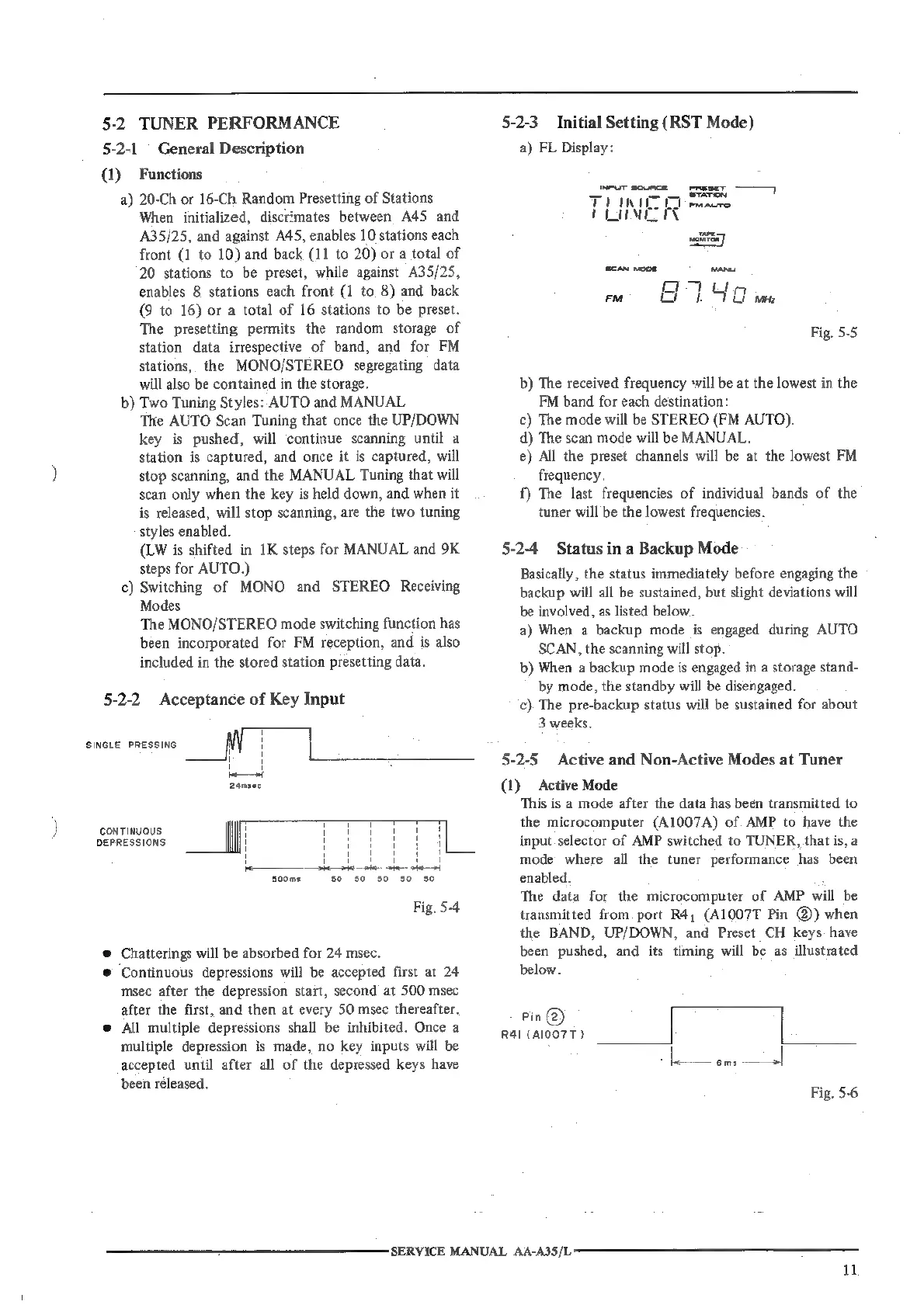
SINGLE
PRESSING
i
2amsec
CONTINUOUS
DEPRESSIONS
ee!
Pele
te
te
ate
Soom:
50
50
50 $0
50
Fig.
5-4
©
Chatterings
will
be
absorbed
for
24
msec.
©
Continuous
depressions
will
be
accepted
first
at
24
msec
after
the
depression
start,
second
at
500
msec
after
the
first,
and
then
at
every
50
msec
thereafter.
@
All
multiple
depressions
shall
be
inhibited.
Once
a
multiple
depression
is
made,
no
key
inputs
will
be
accepted
until after
all
of
the
depressed
keys
have
been
released.
5-2-3
Initial
Setting
(RST
Mode)
a)
FL
Display:
INPUT
SOURCE
=
pmEser
———>
TUT
fo
ewacre
TM
scan
woos
it
Fig.
5-5
b)
The
received
frequency
will
be
at
the
lowest
in
the
FM
band
for
each
destination:
c)
The
mode
will
be
STEREO
(FM
AUTO).
d)
The
scan
mode
will
be
MANUAL.
e)
All
the
preset
channels
will
be
at
the
lowest
FM
frequency.
f)
The
last
frequencies
of
individual
bands
of
the
tuner
will
be
the
lowest
frequencies.
5-2-4
Status
in
a
Backup
Mode
Basically,
the
status
immediately
before
engaging
the
backup
will
all
be
sustained,
but
slight
deviations
will
be
involved,
as
listed
below.
a)
When
a
backup
mode
is
engaged
during
AUTO
SCAN,
the
scanning
will
stop.
b)
When
a
backup
mode
is
engaged
in
a
storage
stand-
by
mode,
the
standby
will
be
disengaged.
c)
The
pre-backup
status
will
be
sustained
for
about
3
weeks.
5-2-5
Active
and
Non-Active
Modes
at
Tuner
(1)
Active
Mode
This
is
a
mode
after
the
data
has
been
transmitted
to
the
microcomputer
(A1007A)
of
AMP
to
have
the
input
selector
of
AMP
switched
to
TUNER,
that
is,
a
mode
where
all
the
tuner
performance
has
been
enabled.
:
The
data
for
the
microcomputer
of
AMP
will
be
transmitted
from
port
R4,
(A1007T
Pin
@)
when
the
BAND,
UP/DOWN,
and
Preset
CH
keys
have
been
pushed,
and
its
timing
will
be
as
illustrated
below.
Pin
@)
R4I
(A007
T)
SERVICE
MANUAL
AA-A35/L:

Related product manuals