EasyManua.ls Logo

Akai AA-A35 - Page 20

Akai AA-A35
70 pages
Print Icon
To Next Page IconTo Next Page
To Previous Page IconTo Previous Page
Loading...
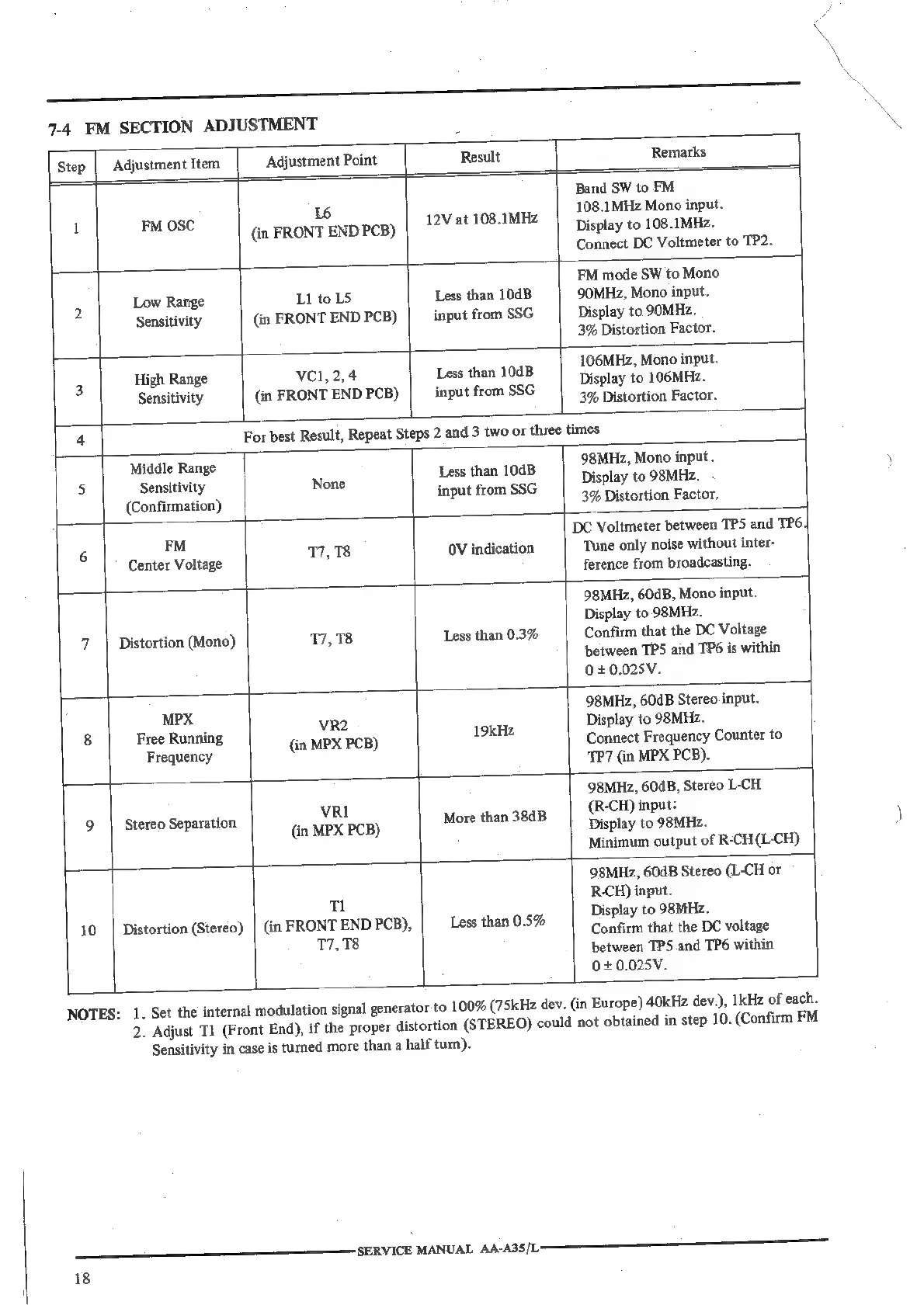
7-4
FM
SECTION
ADJUSTMENT
|
Remarks
Step
|
Adjustment
Item
Adjustment
Point
Result
Band
SW
to
FM
L6
108.1MHz
Mono
input.
!
FALOSe
(in
FRONT
ENDPcB)
|
?V*
108.1MHZ
|
Display
to
108.1MHz.
Connect
DC
Voltmeter
to
TP2.
FM
mode
SW
to
Mono
2
Low
Range
L1
to
LS
Less
than
10dB
90MHz,
Mono
input.
Sensitivity
(in
FRONT
END
PCB)
input
from
SSG
Display
to
90MHz.
3%
Distortion
Factor.
L
High
Range
VC1,
2,4
Less
than
104B
Seay
a
dnenie
Sensitivity
(in
FRONT
END
PCB)
input
from
SSG
3%
Distortion
Factor.
4
For
best
Result,
Repeat
Steps
2
and
3
two
or
three
times
Middle
Range
98MHz,
Mono
input.
5
Sensitivity
None
i
boii
a
Display
to
98MHz.
(Confirmation)
a
aa
3%
Distortion
Factor.
FM
DC
Voltmeter
between
TPS
and
TP6,|
6
17,78
OV
indication
Tune
only
noise
without
inter-
Center
Voltage
?
ference
from
broadcasting.
98MHz,
60dB,
Mono
input.
Display
to
98MHz.
7
Distortion
(Mono)
17,78
Less
than
0.3%
Confirm
that
the
DC
Voltage
between
TPS
and
TP6
is
within
0+0.025V.
MPX
98MHz,
60dB
Stereo
input.
3
|
Free
Running
VRE.
19kHz
Display
to
98MHz.
Frequenc
(in
MPX
PCB)
Connect
Frequency
Counter
to
ees
TP7
(in
MPX
PCB).
98MHz,
60dB,
Stereo
L-CH
"7
VRI
(R-CH)
input:
9
Stereo
Separation
(in
MPX
PCB)
More
than
38dB
Display
to
98MHZz.
Minimum
output
of
R-CH
(L-CH)
98MHz,
60dB
Stereo
(L-CH
or
Tl
R-CH)
input.
7
rt
1
Display
to
98MHz.
10
|
Distortion
(Stereo)
|
(in
eyes
a
PCB),
Less
than
0.5%
Confirm
that
the
DC
voltage
°
between
TPS
and
TP6
within
0+0.025V.
NOTES:
1.
Set the
internal
modulation
signal
generator
to
1
2.
Adjust
Tl
(Front
End),
if
the
proper
distortion
SERVICE
MANUAL
AAA3S
[LS
18
Sensitivity
in
case
is
turned
more
than
a
half
turn).
00%
(75kHz
dev.
(in
Europe)
40kHz
dev.),
1kHz
of
each.
(STEREO)
could
not
obtained
in
step
10.
(Confirm
FM

Related product manuals