EasyManua.ls Logo

Akai Reference Master AM-73 - Page 11

Akai Reference Master AM-73
57 pages
Print Icon
To Next Page IconTo Next Page
To Previous Page IconTo Previous Page
Loading...
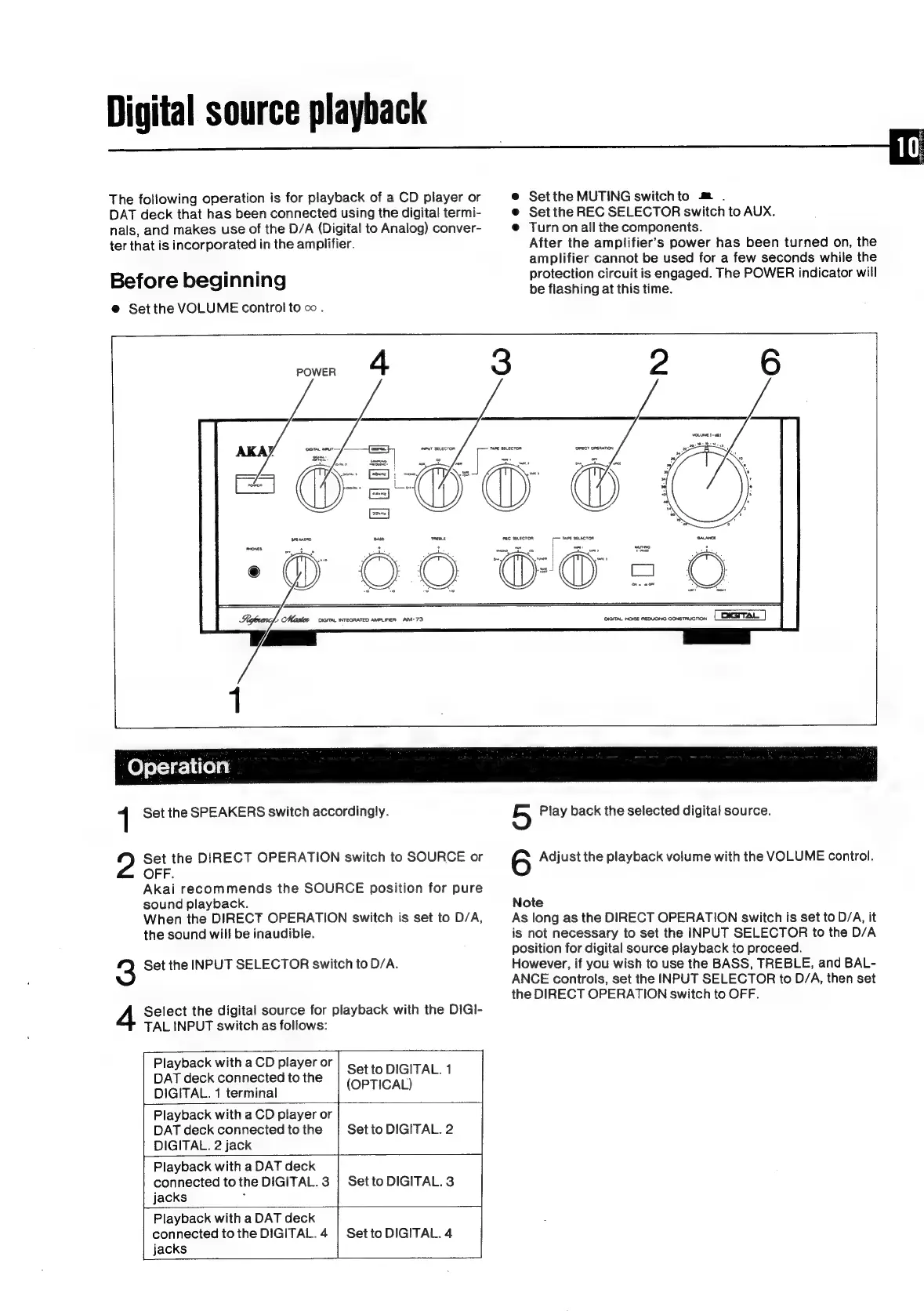
Digital
source
playback
The
following
operation
is
for
playback
of
a
CD
player
or
DAT
deck
that
has
been
connected
using
the
digital
termi-
nals,
and
makes
use
of
the
D/A
(Digital
to
Analog)
conver-
ter
that
is
incorporated
in
the
amplifier.
Before
beginning
@
Set
the
VOLUME
control
to
oo.
e@
Setthe
MUTING
switchto
m
.
@
Set
the
REC
SELECTOR
switch
to
AUX.
@
Turn
on
all
the
components.
After
the
amplifier’s
power
has
been
turned
on,
the
amplifier
cannot
be
used
for
a
few
seconds
while
the
protection
circuit
is
engaged.
The
POWER
indicator
will
be
flashing
at
this
time.
r
POWER
L,
Master
ccm
WTeGRATED
AMPLIFIER
AM-73
1
[66
G26
DIGITAL
NOISE
REDUGNG
Cons
TRUCTON
nec
SELECTOR
1
Set
the
SPEAKERS
switch
accordingly.
Set
the
DIRECT
OPERATION
switch
to
SOURCE
or
OFF.
Akai
recommends
the
SOURCE
position
for
pure
sound
playback.
When
the
DIRECT
OPERATION
switch
is
set
to
D/A,
the
sound
wil!
be
inaudible.
3
Set
the
INPUT
SELECTOR
switch
to
D/A.
Select
the
digital
source
for
playback
with
the
DiGI-
TAL
INPUT
switch
as
follows:
Playback
with
a
CD
player
or
DAT
deck
connected
to
the
DIGITAL.
1
terminal
Playback
with
a
CD
player
or
DAT
deck
connected
to
the
DIGITAL.
2
jack
Playback
with
a
DAT
deck
connected
to
the
DIGITAL.
3
jacks
:
Playback
with
a
DAT
deck
connected
to
the
DIGITAL.
4
jacks
Set
to
DIGITAL.
1
(OPTICAL)
|
Set
to
DIGITAL.
2
Set
to
DIGITAL.
3
Set
to
DIGITAL.
4
5
Play
back
the
selected
digital
source.
6
Adjust
the
playback
volume
with
the
VOLUME
control.
Note
As
long
as
the
DIRECT
OPERATION
switch
is
set
to
D/A,
it
is
not
necessary
to
set
the
INPUT
SELECTOR
to
the
D/A
position
for
digital
source
playback
to
proceed.
However,
if
you
wish
to
use
the
BASS,
TREBLE,
and
BAL-
ANCE
controls,
set
the
INPUT
SELECTOR
to
D/A,
then
set
the
DIRECT
OPERATION
switch
to
OFF.

Related product manuals