EasyManua.ls Logo

Akai Reference Master AM-73 - Digital Source Recording

Akai Reference Master AM-73
57 pages
Print Icon
To Next Page IconTo Next Page
To Previous Page IconTo Previous Page
Loading...
——§_
fin
Before
beginning
@
Turn
on
all
the
components.
®
Setthe
DAT
deck
for
digital
recording.
e@
Some
digital
sources
cannot
be
recorded
digitally.
Refer
to
your
DAT
deck’s
operator’s
manual
for
details.
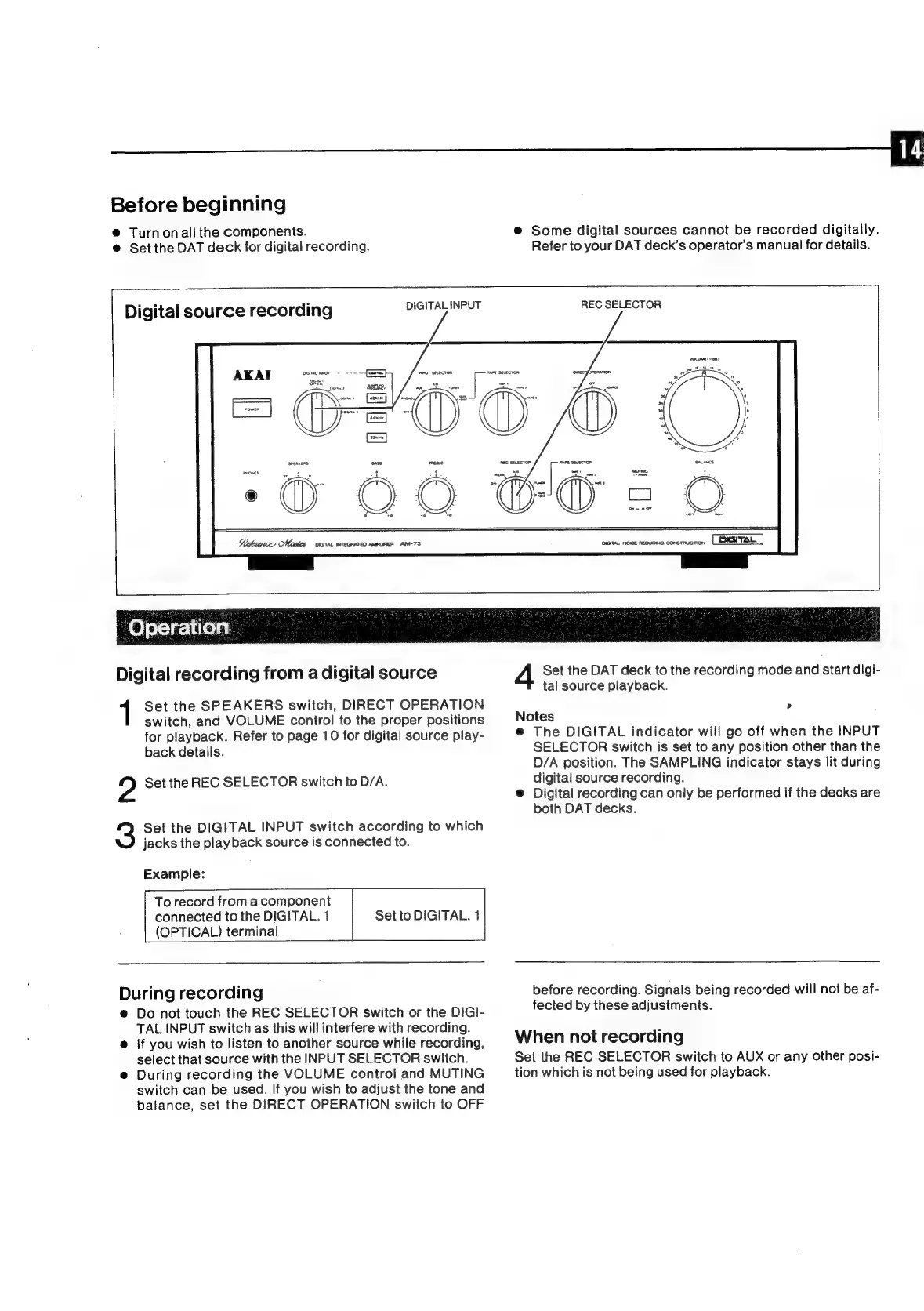
DIGITAL
INPUT
Digital
source
recording
2
Sigkrence,
Mister
oan.
wrecaaren
aweuren
AM-73
REC
SELECTOR
Operation
Digital
recording
from
a
digital
source
Set
the
SPEAKERS
switch,
DIRECT
OPERATION
switch,
and
VOLUME
control
to
the
proper
positions
for
playback.
Refer
to
page
10
for
digital
source
play-
back
details.
?
Set
the
REC
SELECTOR
switch
to
D/A.
Set
the
DIGITAL
INPUT
switch
according
to
which
jacks
the
playback
source
is
connected
to.
Example:
To
record
from
a
component
connected
to
the
DIGITAL.
1
(OPTICAL)
terminal
Set
to
DIGITAL.
4
During
recording
@
Do
not
touch
the
REC
SELECTOR
switch
or
the
DIGI-
TAL
INPUT
switch
as
this
will
interfere
with
recording.
@
|f
you
wish
to
listen
to
another
source
while
recording,
select
that
source
with
the
INPUT
SELECTOR
switch.
e
During
recording
the
VOLUME
control
and
MUTING
switch
can
be
used.
If
you
wish
to
adjust
the
tone
and
balance,
set
the
DIRECT
OPERATION
switch
to
OFF
Set
the
DAT
deck
to
the
recording
mode
and
start
digi-
tal
source
playback.
Notes
:
@
The
DIGITAL
indicator
will
go
off
when
the
INPUT
SELECTOR
switch
is
set
to
any
position
other
than
the
D/A
position.
The
SAMPLING
indicator
stays
lit
during
digital
source
recording.
@
Digital
recording
can
only
be
performed
if
the
decks
are
both
DAT
decks.
before
recording.
Signals
being
recorded
will
not
be
af-
fected
by
these
adjustments.
When
not
recording
Set
the
REC
SELECTOR
switch
to
AUX
or
any
other
posi-
tion
which
is
not
being
used
for
playback.

Related product manuals