EasyManua.ls Logo

Akai Reference Master AM-73 - Digital Component Connections

Akai Reference Master AM-73
57 pages
Print Icon
To Next Page IconTo Next Page
To Previous Page IconTo Previous Page
Loading...
Digital
component
connections
oo
ia
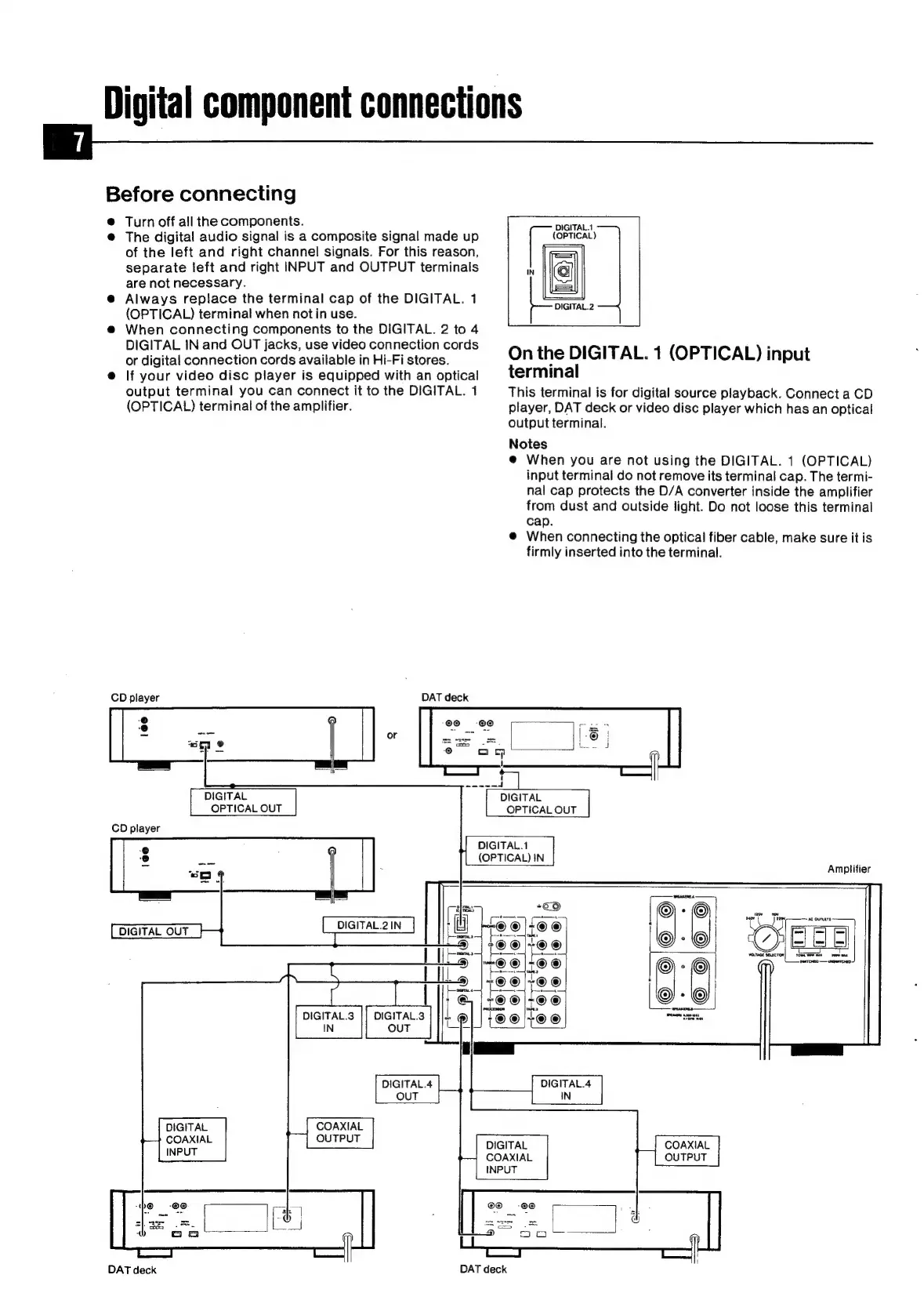
Before
connecting
@
Turn
off
all
the
components.
@
The
digital
audio
signal
is
a
composite
signal
made
up
of
the
left
and
right
channel
signals.
For
this
reason,
separate
left
and
right
INPUT
and
OUTPUT
terminals
are
not
necessary.
@
Always
replace
the
terminal
cap
of
the
DIGITAL.
1
(OPTICAL)
terminal
when
not
in
use.
@
When
connecting
components
to
the
DIGITAL.
2
to
4
DIGITAL
IN
and
OUT
jacks,
use
video
connection
cords
or
digital
connection
cords
available
in
Hi-Fi
stores.
@
If
your
video
disc
player
is
equipped
with
an
optical
output
terminal
you
can
connect
it
to
the
DIGITAL.
1
(OPTICAL)
terminal
of
the
amplifier.
DAT
deck
CD
player
DIGITAL.1
(OPTICAL)
IN
DIGITAL.1
(OPTICAL)
DIGITAL.2
On
the
DIGITAL.
1
(OPTICAL)
input
terminal
This
terminal
is
for
digital
source
playback.
Connect
a
CD
player,
DAT
deck
or
video
disc
player
which
has
an
optical
output
terminal.
Notes
@
When
you
are
not
using
the
DIGITAL.
1
(OPTICAL)
input
terminal
do
not
remove
its
terminal
cap.
The
termi-
nal
cap
protects
the
D/A
converter
inside
the
amplifier
from
dust
and
outside
light.
Do
not
loose
this
terminal
cap.
@
When
connecting
the
optical
fiber
cable,
make
sure
it
is
firmly
inserted
into
the
terminal.
Amplifier
DIGITAL
OUT
DIGITAL.3
IN
DIGITAL
COAXIAL
DAT
deck
DIGITAL
COAXIAL
DAT
deck

Related product manuals