EasyManua.ls Logo

Akai Reference Master AM-73 - Analog;Digital Source Recording

Akai Reference Master AM-73
57 pages
Print Icon
To Next Page IconTo Next Page
To Previous Page IconTo Previous Page
Loading...
Recording
Before
beginning
@
Turn
on
ali
the
components.
@
\f
using
a
DAT
deck
for
recording
set
it
for
analog
re-
cording.
rs
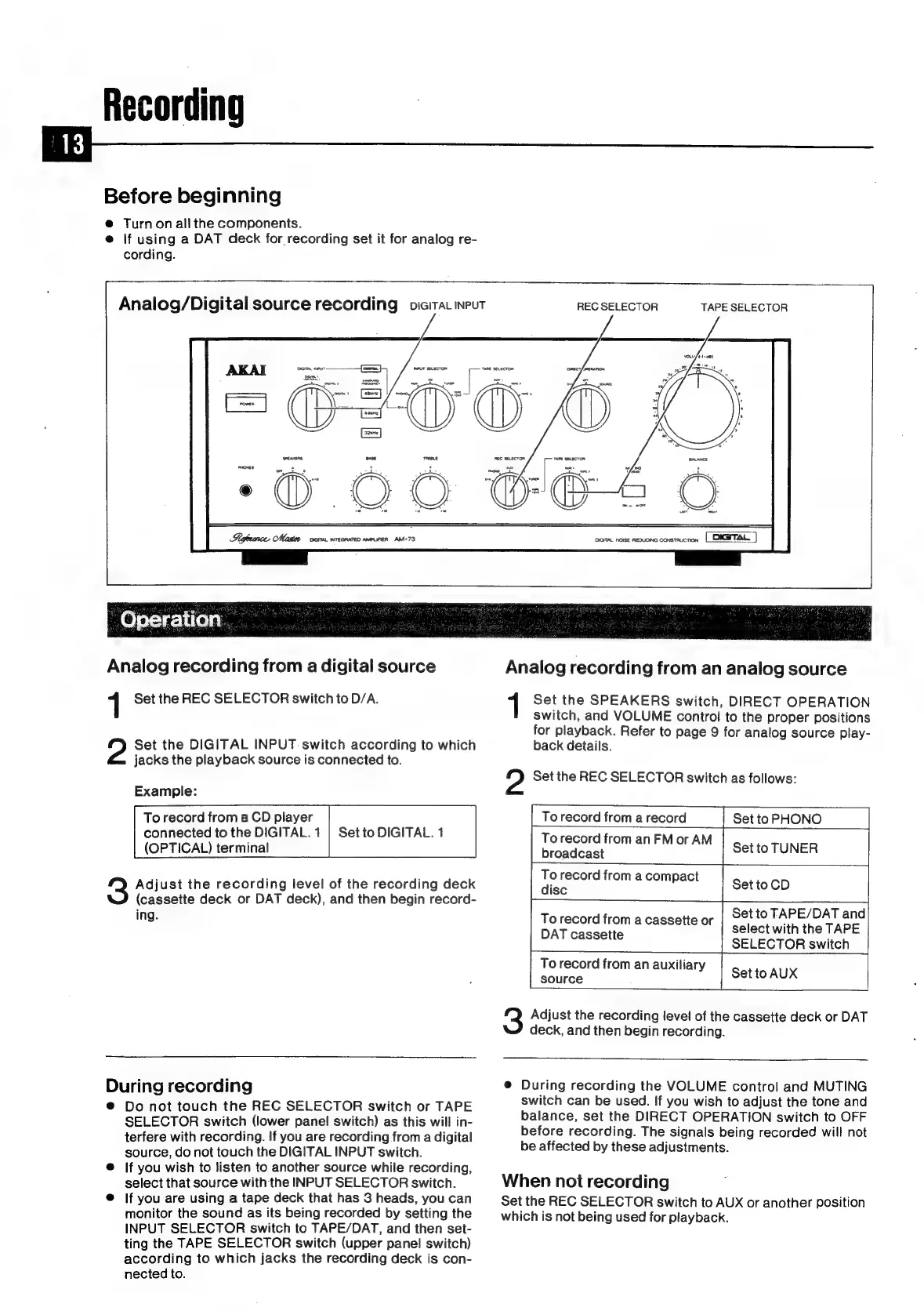
Analog/Digital
source
recording
oieitat
input
Shofrarce
Master
vera.
wreanaten
aveunien
AM-73
REC
SELECTOR
TAPE
SELECTOR
OIGTAL
NOISE
REDUCING
CONSTALCTION
-
Operation
Analog
recording
from
a
digital
source
1
Set
the
REC
SELECTOR
switch
to
D/A.
Set
the
DIGITAL
INPUT
switch
according
to
which
jacks
the
playback
source
is
connected
to.
Example:
To
record
from
a
CD
player
connected
to
the
DIGITAL.
1
(OPTICAL)
terminal
Set
to
DIGITAL.
1
Adjust
the
recording
level
of
the
recording
deck
(cassette
deck
or
DAT
deck),
and
then
begin
record-
ing.
During
recording
®
Do
not
touch
the
REC
SELECTOR
switch
or
TAPE
SELECTOR
switch
(lower
panel
switch)
as
this
will
in-
terfere
with
recording.
If
you
are
recording
from
a
digital
source,
do
not
touch
the
DIGITAL
INPUT
switch.
@
If
you
wish
to
listen
to
another
source
while
recording,
select
that
source
with
the
INPUT
SELECTOR
switch.
@
If
you
are
using
a
tape
deck
that
has
3
heads,
you
can
monitor
the
sound
as
its
being
recorded
by
setting
the
INPUT
SELECTOR
switch
to
TAPE/DAT,
and
then
set-
ting
the
TAPE
SELECTOR
switch
(upper
panel
switch)
according
to
which
jacks
the
recording
deck
is
con-
nected
to.
Analog
recording
from
an
analog
source
Set
the
SPEAKERS
switch,
DIRECT
OPERATION
switch,
and
VOLUME
control
to
the
proper
positions
for
playback.
Refer
to
page
9
for
analog
source
play-
back
details.
2
Set
the
REC
SELECTOR
switch
as
follows:
To
record
from
a
record
Set
to
PHONO
To
record
from
an
FM
or
AM
broadcast
Set
to
TUNER
|
To
record
from
a
compact
ise
Set
toCD
|
To
record
from
a
cassette
or
Set
to
TAPE/
DAT
and
DAT
cassette
select
with
the
TAPE
SELECTOR
switch
To
record
from
an
auxiliary
eatikce
Set
to
AUX
Adjust
the
recording
level
of
the
cassette
deck
or
DAT
deck,
and
then
begin
recording.
@
During
recording
the
VOLUME
control
and
MUTING
switch
can
be
used.
If
you
wish
to
adjust
the
tone
and
balance,
set
the
DIRECT
OPERATION
switch
to
OFF
before
recording.
The
signals
being
recorded
will
not
be
affected
by
these
adjustments.
When
not
recording
Set
the
REC
SELECTOR
switch
to
AUX
or
another
position
which
is
not
being
used
for
playback.

Related product manuals