EasyManua.ls Logo

Akai Reference Master AM-73 - Page 13

Akai Reference Master AM-73
57 pages
Print Icon
To Next Page IconTo Next Page
To Previous Page IconTo Previous Page
Loading...
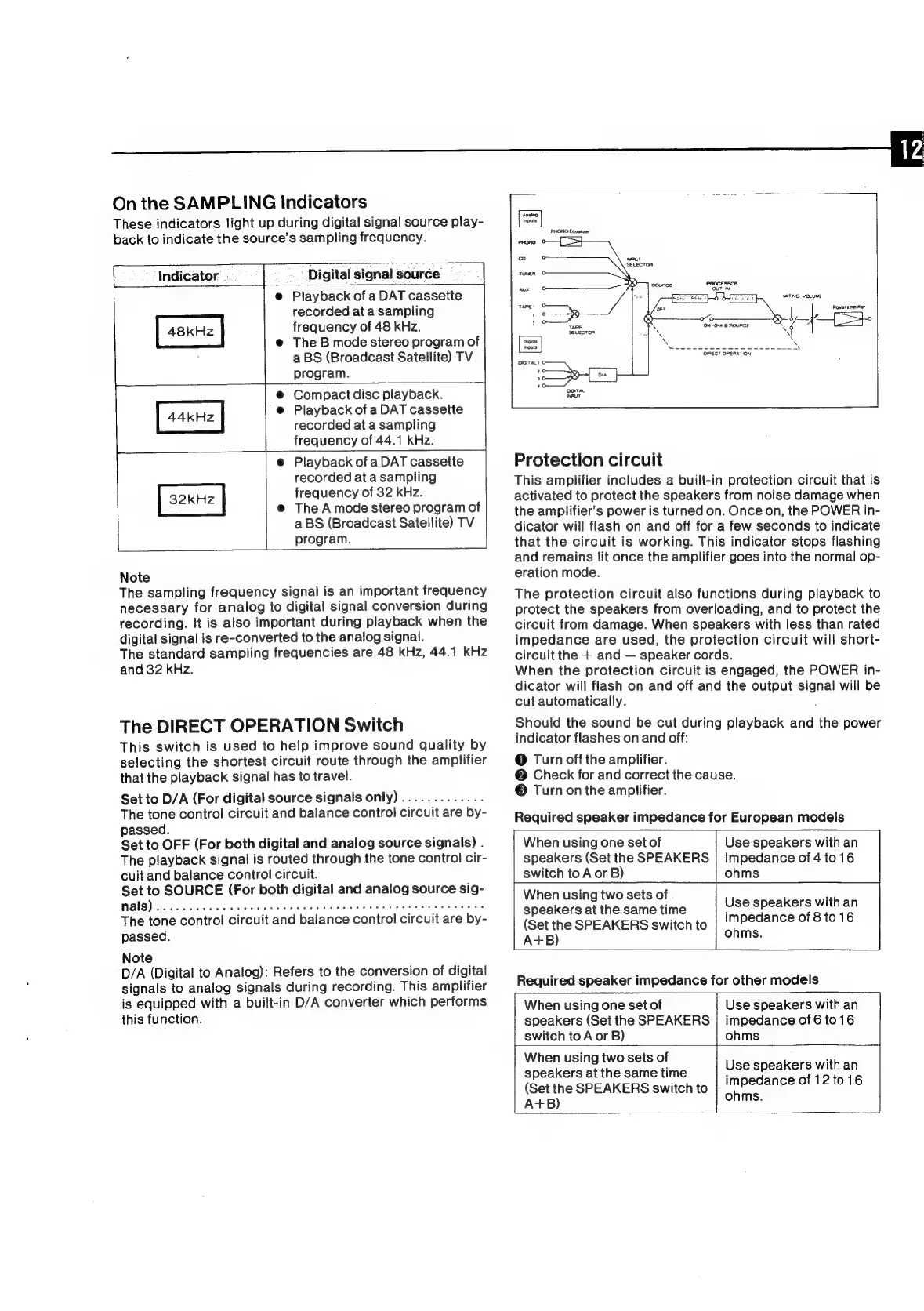
On
the
SAMPLING
Indicators
These
indicators
light
up
during
digital
signal
source
play-
back
to
indicate
the
source’s
sampling
frequency.
Digital
signal
source
e@
Playback
of
a
DAT
cassette
recorded
at
a
sampling
frequency
of
48
kHz.
@
The
B
mode
stereo
program
of
a
BS
(Broadcast
Satellite)
TV
program.
@
Compact
disc
playback.
'@
Playback
of
a
DAT
cassette
recorded
at
a
sampling
frequency
of
44.1
kHz.
@
Playback
of
a
DAT
cassette
recorded
at
a
sampling
frequency
of
32
kHz.
@
The
A
mode
stereo
program
of
a
BS
(Broadcast
Satellite)
TV
program.
[
Indicator
=.
i;
44kHz
32kHz
Note
The
sampling
frequency
signal
is
an
important
frequency
necessary
for
analog
to
digital
signal
conversion
during
recording.
It
is
also
important
during
playback
when
the
digital
signal
is
re-converted
to
the
analog
signal.
The
standard
sampling
frequencies
are
48
kHz,
44.1
kHz
and
32
kHz.
The
DIRECT
OPERATION
Switch
This
switch
is
used
to
help
improve
sound
quality
by
selecting
the
shortest
circuit
route
through
the
amplifier
that
the
playback
signal
has
to
travel.
Set
to
D/A
(For
digital
source
signals
only)
.............
The
tone
control
circuit
and
balance
control
circuit
are
by-
passed.
Set
to
OFF
(For
both
digital
and
analog
source
signals)
.
The
playback
signal
is
routed
through
the
tone
control
cir-
cuit
and
balance
control
circuit.
Set
to
SOURCE
(For
both
digital
and
analog
source
sig-
HalS).
pecca
Lew
aws
head
seaden
Hi
aaein
Po
henie
teeter
ew ee
As
The
tone
control
circuit
and
balance
control
circuit
are
by-
passed.
Note
D/A
(Digital
to
Analog):
Refers
to
the
conversion
of
digital
signals
to
analog
signals
during
recording.
This
amplifier
is
equipped
with
a
built-in
D/A
converter
which
performs
this
function.
SATING
VOLUME
QWRECT
OPERATION
Protection
circuit
This
amplifier
includes
a
built-in
protection
circuit
that
is
activated
to
protect
the
speakers
from
noise
damage
when
the
amplifier’s
power
is
turned
on.
Once
on,
the
POWER
in-
dicator
will
flash
on
and
off
for
a
few
seconds
to
indicate
that
the
circuit
is
working.
This
indicator
stops
flashing
and
remains
lit
once
the
amplifier
goes
into
the
normal
op-
eration
mode.
The
protection
circuit
also
functions
during
playback
to
protect
the
speakers
from
overloading,
and
to
protect
the
circuit
from
damage.
When
speakers
with less
than
rated
impedance
are
used,
the
protection
circuit
will
short-
circuit
the
+
and
speaker
cords.
When
the
protection
circuit
is
engaged,
the
POWER
in-
dicator
will
flash
on
and
off
and
the
output
signa!
will
be
cut
automatically.
Should
the
sound
be
cut
during
playback
and
the
power
indicator
flashes
on
and
off:
@
Turn
off
the
amplifier.
@
Check
for
and
correct
the
cause.
®
Turn
on
the
amplifier.
Required
speaker
impedance
for
European
modeis
When
using
one
set
of
speakers
(Set
the
SPEAKERS
switch
to
A
or
B)
When
using
two
sets
of
speakers
at
the
same
time
(Set
the
SPEAKERS
switch
to
A+B)
Use
speakers
with
an
impedance
of
4
to16
ohms
Use
speakers
with
an
impedance
of
8
to
16
ohms.
Required
speaker
impedance
for
other
models
When
using
one
set
of
speakers
(Set
the
SPEAKERS
switch
to
A
or
B)
When
using
two
sets
of
speakers
at
the
same
time
(Set
the
SPEAKERS
switch
to
A+B)
Use
speakers
with
an
impedance
of
6
to
16
ohms
Use
speakers
with
an
impedance
of
12
to16
ohms.

Related product manuals