EasyManua.ls Logo

Akai Reference Master AM-73 - Controls (Rear Panel)

Akai Reference Master AM-73
57 pages
Print Icon
To Next Page IconTo Next Page
To Previous Page IconTo Previous Page
Loading...
Controls
(Rear
panel)
@
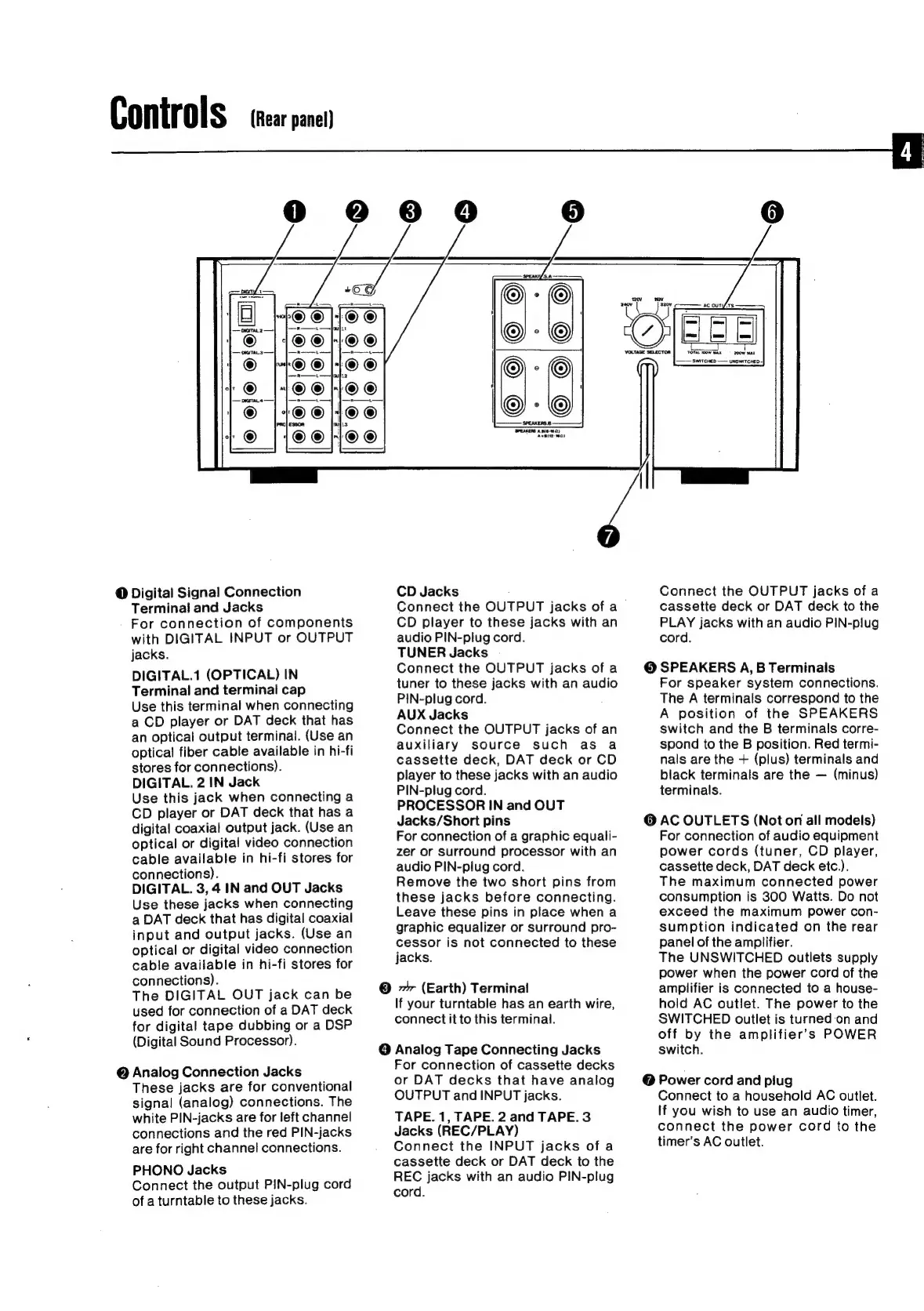
Digital
Signal
Connection
Terminal
and
Jacks
For
connection
of
components
with
DIGITAL
INPUT
or
OUTPUT
jacks.
DIGITAL.1
(OPTICAL)
IN
Terminal
and
terminal
cap
Use
this
terminal
when
connecting
a
CD
player
or
DAT
deck
that
has
an
optical
output
terminal.
(Use
an
optical
fiber
cable
available
in
hi-fi
stores
for
connections).
DIGITAL.
2
IN
Jack
Use
this
jack
when
connecting
a
CD
player
or
DAT
deck
that
has
a
digital
coaxial
output
jack.
(Use
an
optical
or
digital
video
connection
cable
available
in
hi-fi
stores
for
connections).
DIGITAL.
3,
4.
IN
and
OUT
Jacks
Use
these
jacks
when
connecting
a
DAT
deck
that
has
digital
coaxial
input
and
output
jacks.
(Use
an
optical
or
digital
video
connection
cable
available
in
hi-fi
stores
for
connections).
The
DIGITAL
OUT
jack
can
be
used
for
connection
of
a
DAT
deck
for
digital
tape
dubbing
or
a
DSP
(Digital
Sound
Processor).
@
Analog
Connection
Jacks
These
jacks
are
for
conventional
signal
(analog)
connections.
The
white
PIN-jacks
are
for
left
channel
connections
and
the
red
PIN-jacks
are
for
right
channel
connections.
PHONO
Jacks
Connect
the
output
PIN-plug
cord
of
a
turntable
to
these
jacks.
CD
Jacks
Connect
the
OUTPUT
jacks
of
a
CD
player
to
these
jacks
with
an
audio
PIN-plug
cord.
TUNER
Jacks
Connect
the
OUTPUT
jacks
of
a
tuner
to
these
jacks
with
an
audio
PIN-plug
cord.
AUX
Jacks
Connect
the
OUTPUT
jacks
of
an
auxiliary
source
such
as
a
cassette
deck,
DAT
deck
or
CD
player
to
these
jacks
with
an
audio
PIN-plug
cord.
PROCESSOR
IN
and
OUT
Jacks/Short
pins
For
connection
of
a
graphic
equali-
zer
or
Surround
processor
with
an
audio
PIN-plug
cord.
Remove
the
two
short
pins
from
these
jacks
before
connecting.
Leave
these
pins
in
place
when
a
graphic
equalizer
or
surround
pro-
cessor
is
not
connected
to
these
jacks.
©
7
(Earth)
Terminal
If
your
turntable
has
an
earth
wire,
connect
it
to
this
terminal.
O
Analog
Tape
Connecting
Jacks
For
connection
of
cassette
decks
or
DAT
decks
that
have
analog
OUTPUT
and
INPUT
jacks.
TAPE.
1,
TAPE.
2
and
TAPE.
3
Jacks
(REC/PLAY)
Connect
the
INPUT
jacks
of
a
cassette
deck
or
DAT
deck
to
the
REC
jacks
with
an
audio
PIN-plug
cord.
TOTAL
‘OW
MAX
=
200W
max
SWITCHED
~—
UNSWITCHED-
Connect
the
OUTPUT
jacks
of
a
cassette
deck
or
DAT
deck
to
the
PLAY
jacks
with
an
audio
PIN-plug
cord.
©
SPEAKERS
A,
B
Terminals
For
speaker
system
connections.
The
A
terminals
correspond
to
the
A
position
of
the
SPEAKERS
switch
and
the
B
terminals
corre-
spond
to
the
B
position.
Red
termi-
nals
are
the
+
(plus)
terminals
and
black
terminals
are
the
(minus)
terminals.
@
AC
OUTLETS
(Not
on
all
models)
For
connection
of
audio
equipment
power
cords
(tuner,
CD
player,
cassette
deck,
DAT
deck
etc.).
The
maximum
connected
power
consumption
is
300
Watts.
Do
not
exceed
the
maximum
power
con-
sumption
indicated
on
the
rear
panel
of
the
amplifier.
The
UNSWITCHED
outlets
supply
power
when
the
power
cord
of
the
amplifier
is
connected
to
a
house-
hold
AC
outlet.
The
power
to
the
SWITCHED
outlet
is
turned
on
and
off
by
the
amplifier’s
POWER
switch.
@
Power
cord
and
piug
Connect
to
a
household
AC
outlet.
If
you
wish
to
use
an
audio
timer,
connect
the
power
cord
to
the
timer’s
AC
outlet.

Related product manuals