EasyManua.ls Logo

Akai Reference Master AM-73 - Tape Dubbing

Akai Reference Master AM-73
57 pages
Print Icon
To Next Page IconTo Next Page
To Previous Page IconTo Previous Page
Loading...
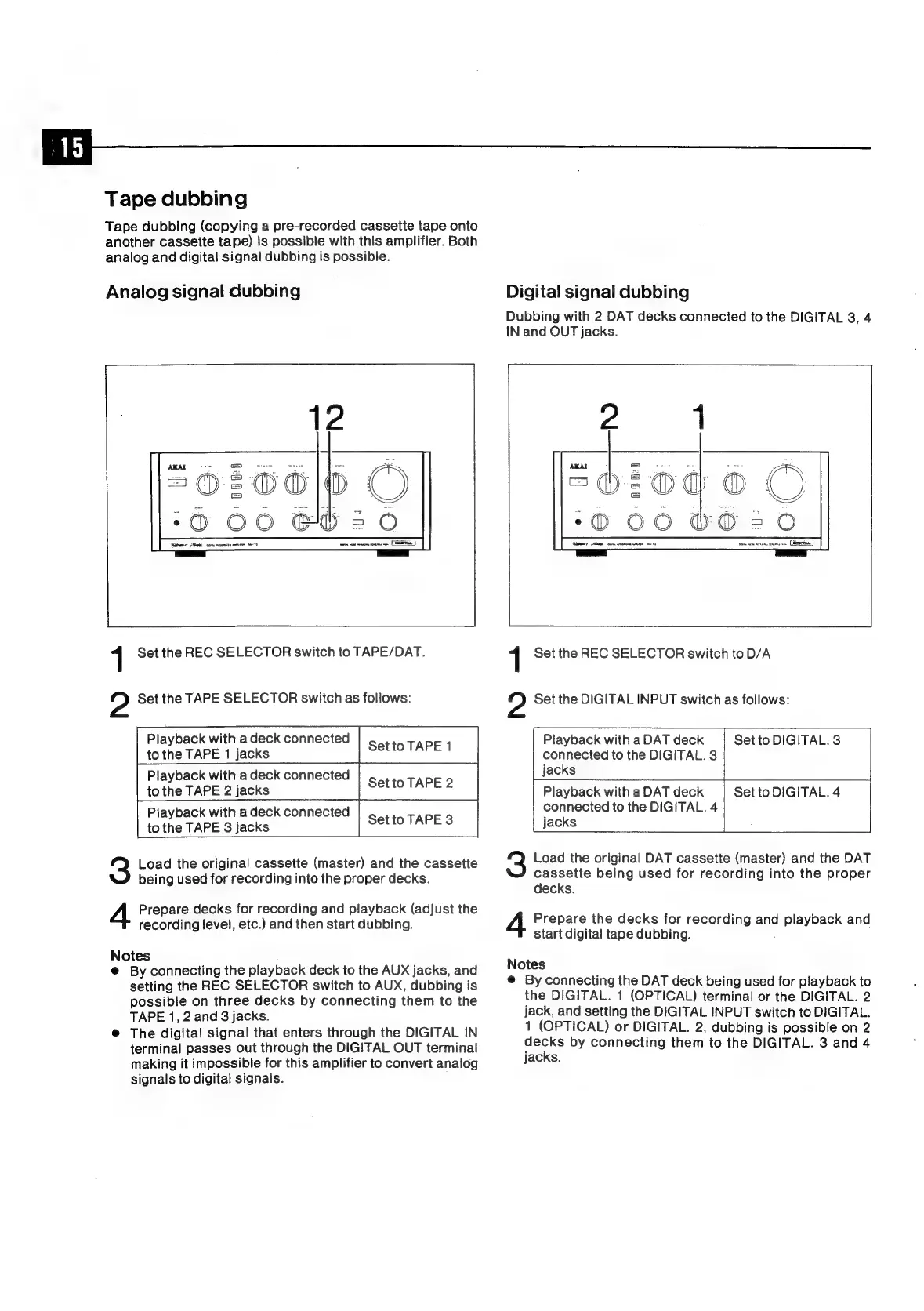
Tape
dubbing
Tape
dubbing
(copying
a
pre-recorded
cassette
tape
onto
another
cassette
tape)
is
possible
with
this
amplifier.
Both
analog
and
digital
signal
dubbing
is
possible.
Analog
signal
dubbing
|
a
ara
Digital
signal
dubbing
Dubbing
with
2
DAT
decks
connected
to
the
DIGITAL
3,
4
IN
and
OUT
jacks.
1
Set
the
REC
SELECTOR
switch
to
TAPE/DAT.
a
Set
the
TAPE
SELECTOR
switch
as
follows:
Playback
with
a
deck
connected
to
the
TAPE
1
jacks
Setto
TAPE
1
Playback
with
a
deck
connected
to
the
TAPE
2
jacks
Set
to
TAPE
2
Playback
with
a
deck
connected
to
the
TAPE
3
jacks
Set
to
TAPE
3
Load
the
original
cassette
(master)
and
the
cassette
being
used
for
recording
into
the
proper decks.
Prepare
decks
for
recording
and
playback
(adjust
the
recording
level,
etc.)
and
then
start
dubbing.
Notes
@
By
connecting
the
playback
deck
to
the
AUX
jacks,
and
setting
the
REC
SELECTOR
switch
to
AUX,
dubbing
is
possible
on
three
decks
by
connecting
them
to
the
TAPE
1,
2
and
3
jacks.
@
The
digital
signal
that
enters
through
the
DIGITAL
IN
terminal
passes
out
through
the
DIGITAL
OUT
terminal
making
it
impossible
for
this
amplifier
to
convert
analog
signals
to
digital
signals.
AKAI
36200
©
©
5060
bG626
idem
Matt
core
anon
mee
1
1
Set
the
REC
SELECTOR
switch
to
D/A
?
Set
the
DIGITAL
INPUT
switch
as
follows:
Playback
with
a
DAT
deck
connected
to
the
DIGITAL.
3
jacks
Playback
with
a
DAT
deck
connected
to
the
DIGITAL.
4
jacks
Set
to
DIGITAL.
3
Set
to
DIGITAL.
4
Load
the
original
DAT
cassette
(master)
and
the
DAT
cassette
being
used
for
recording
into
the
proper
decks.
Prepare
the
decks
for
recording
and
playback
and
start
digital
tape
dubbing.
Notes
@
By
connecting
the
DAT
deck
being
used
for
playback
to
the
DIGITAL.
1
(OPTICAL)
terminal
or
the
DIGITAL.
2
jack,
and
setting
the
DIGITAL
INPUT
switch
to
DIGITAL.
1
(OPTICAL)
or
DIGITAL.
2,
dubbing
is
possible
on
2
decks
by
connecting
them
to
the
DIGITAL.
3
and
4
jacks.

Related product manuals