EasyManua.ls Logo

Akai Reference Master AM-73 - Page 17

Akai Reference Master AM-73
57 pages
Print Icon
To Next Page IconTo Next Page
To Previous Page IconTo Previous Page
Loading...
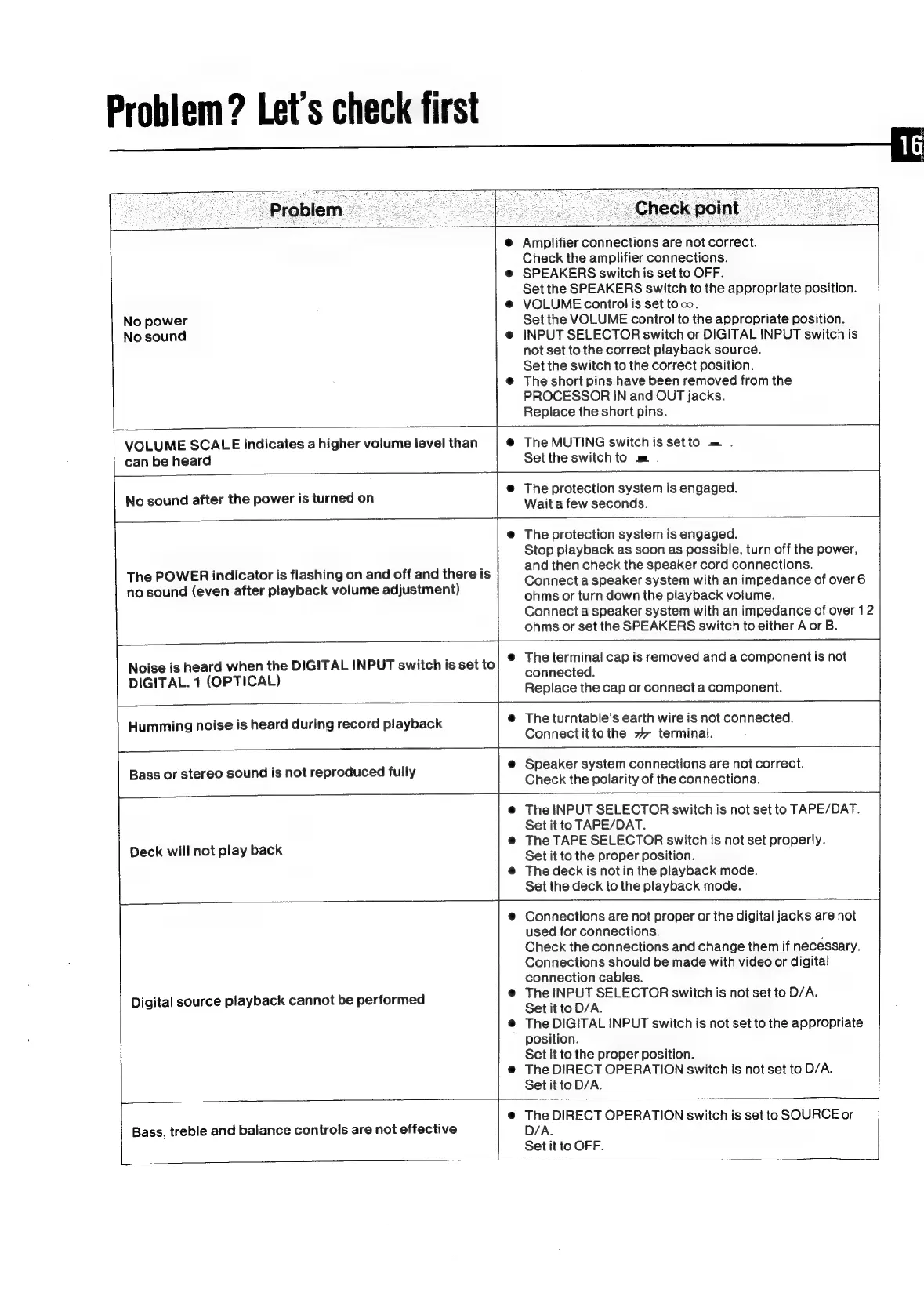
Problem?
Let’s
check
first
G6)
Problem)
Checkpoint
@
Amplifier
connections
are
not
correct.
Check
the
amplifier
connections.
e@
SPEAKERS
switch
is
set
to
OFF.
Set
the
SPEAKERS
switch
to
the
appropriate
position.
@
VOLUME
control
is
set
toco.
No
power
Set
the
VOLUME
control
to
the
appropriate
position.
No
sound
e@
INPUT
SELECTOR
switch
or
DIGITAL
INPUT
switch
is
not
set
to
the
correct
playback
source.
Set
the
switch
to
the
correct
position.
@
The
short
pins
have
been
removed
from
the
PROCESSOR
IN
and
OUT
jacks.
Replace
the
short
pins.
VOLUME
SCALE
indicates
a
higher
volume
level
than
@
The
MUTING
switch
is
setto
.
can
be
heard
Settheswitchto
m
.
@
The
protection
system
is
engaged.
No
sound
after
the
power
is
turned
on
Wait
a
few
seconds.
@
The
protection
system
is
engaged.
Stop
playback
as
soon
as
possible,
turn
off
the
power,
and
then
check
the
speaker
cord
connections.
Connect
a
speaker
system
with
an
impedance
of
over
6
ohms
or
turn
down
the
playback
volume.
Connect
a
speaker
system
with
an
impedance
of
over
12
ohms
or
set
the
SPEAKERS
switch
to
either
A
or
B.
The
POWER
indicator
is
flashing
on
and
off
and
there
is
no
sound
(even
after
playback
volume
adjustment)
The
terminal
cap
is
removed
and
a
component
is
not
connected.
Replace
the
cap
or
connect
a
component.
Noise
is
heard
when
the
DIGITAL
INPUT
switch
is
set
to
DIGITAL.
1
(OPTICAL)
i
ise
is
heard
during
record
playback
@
The
turntable’s
earth
wire
is
not
connected.
ee
9
pea
Connectit
tothe
7
terminal.
@
Speaker
system
connections
are
not
correct.
Bass
or
stereo
sound
is
not
reproduced
fully
Check
the
polarity
of
the
connections
@
The
INPUT
SELECTOR
switch
is
not
set
to
TAPE/DAT.
Set
it
to
TAPE/DAT.
@
The
TAPE
SELECTOR
switch
is
not
set
properly.
Set
it
to
the
proper
position.
@
The
deck
is
not
in
the
playback
mode.
Set
the
deck
to
the
playback
mode.
Deck
will
not
play
back
@
Connections
are
not
proper
or
the
digital
jacks
are
not
used
for
connections.
:
Check
the
connections
and
change
them
if
necessary.
Connections
should
be
made
with
video
or
digital
connection
cables.
@
The
INPUT
SELECTOR
switch
is
not
set
to
D/A.
Set
it
to
D/A.
@
The
DIGITAL
INPUT
switch
is
not set
to
the
appropriate
position.
Set
it
to
the
proper
position.
@
The
DIRECT
OPERATION
switch
is
not
set
to
D/A.
Set
it
to
D/A.
Digital
source
playback
cannot
be
performed
@
The
DIRECT
OPERATION
switch
is
set
to
SOURCE
or
Bass,
treble
and
balance
controls
are
not
effective
D/A.
Set
it
to
OFF.

Related product manuals