EasyManua.ls Logo

Akai Reference Master AM-73 - Page 18

Akai Reference Master AM-73
57 pages
Print Icon
To Next Page IconTo Next Page
To Previous Page IconTo Previous Page
Loading...
:
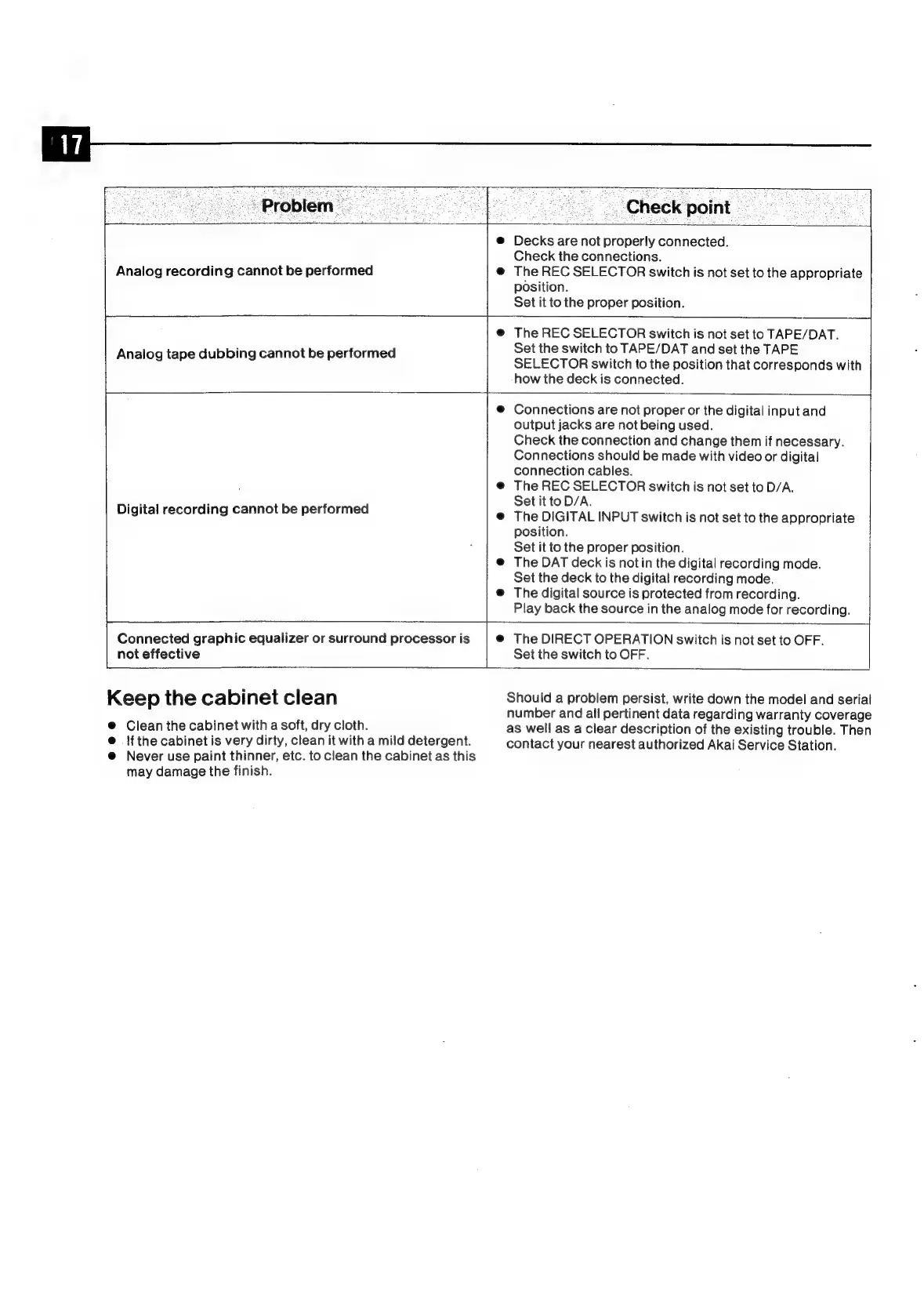
ā€˜Check
point
ee
:
Analog
recording
cannot
be
performed
Decks
are
not
properly
connected.
Check
the
connections.
The
REC
SELECTOR
switch
is
not
set
to
the
appropriate
position.
Set
it
to
the
proper
position.
Analog
tape
dubbing
cannot
be
performed
The
REC
SELECTOR
switch
is
not
set
to
TAPE/DAT.
Set
the
switch
to
TAPE/DAT
and
set
the
TAPE
SELECTOR
switch
to
the
position
that
corresponds
with
how
the
deck
is
connected.
Digital
recording
cannot
be
performed
Connected
graphic
equalizer
or
surround
processor
is
not
effective
Keep
the
cabinet
clean
@
Clean
the
cabinet
with
a
soft,
dry
cloth.
@
{fthe
cabinet
is
very
dirty,
clean
it
with
a
mild
detergent.
@
Never
use
paint
thinner,
etc.
to
clean
the
cabinet
as
this
may
damage
the
finish.
Connections
are
not
proper
or
the
digital
input
and
output
jacks
are
not
being
used.
Check
the
connection
and
change
them
if
necessary.
Connections
should
be
made
with
video
or
digital
connection
cables.
The
REC
SELECTOR
switch
is
not
set
to
D/A.
Set
it
to
D/A.
The
DIGITAL
INPUT
switch
is
not
set
to
the
appropriate
position.
Set
it
to
the
proper
position.
The
DAT
deck
is
notin
the
digital
recording
mode.
Set
the
deck
to
the
digital
recording
mode.
The
digital
source
is
protected
from
recording.
Play
back
the
source
in
the
analog
mode
for
recording.
The
DIRECT
OPERATION
switch
is
not
set
to
OFF.
Set
the
switch
to
OFF.
Should
a
problem
persist,
write
down
the
model
and
serial
number
and
all
pertinent
data
regarding
warranty
coverage
as
well
as
a
clear
description
of
the
existing
trouble.
Then
contact
your
nearest
authorized
Akai
Service
Station.

Related product manuals