EasyManua.ls Logo

Akai Reference Master AM-73 - Operation Details

Akai Reference Master AM-73
57 pages
Print Icon
To Next Page IconTo Next Page
To Previous Page IconTo Previous Page
Loading...
Operation
details
MUTING:
Reducing
playback
volume
instantly
The
muting
system
can
be
used
to
instantly
reduce
play-
back
volume
without
using
the
VOLUME
control
for
conve-
nience
during
a
sudden
phone
call
etc.
Press
the
MUTING
switch
to
=
ON.
The
playback
volume
will
be
instantly
reduced.
To
resume
the
normal
volume
level
Press
the
MUTING
switch
again.
Note
During
muting,
the
volume
level
is
reduced
by
—20
dB
(1/10)
from
the
set
volume
level.
For
example,
when
you
have
the
volume
set
at
—30
dB
and
turn
on
the
MUTING
switch,
the
playback
volume
is
reduced
to
—50
dB.
Tone
adjustment
during
playback
1
Set
the
DIRECT
OPERATION
switch
to
OFF.
a
Use
the
BASS
and
TREBLE
tone
controls
as
follows:
Adjusting
bassj|
Use
the
BASS
tone
control
notes
To
increase
the
level
hebisen
Turn
the
contro!
toward
+10
To
decrease
the
level
saeees
Turn
the
control
toward
—10
To
defeat
the
control
Use
the
TREBLE
tone
control
To
increase
the
level
sseykuendte
Turn
the
control
toward
+10
To
decrease
the
level
pane
o4
Turn
the
control
toward
—10
To
defeat
the
control
Adjusting
high
notes
Right
and
Left
channel
volume
balance
adjustment
1
Set
the
DIRECT
OPERATION
switch
to
OFF.
2
Use
the
BALANCE
control
as
follows:
To
decrease
the
right
Turn
the
control
to
the
channel
volume
LEFT
To
decrease
the
left
Turn
the
control
to
the
channel
volume
RIGHT
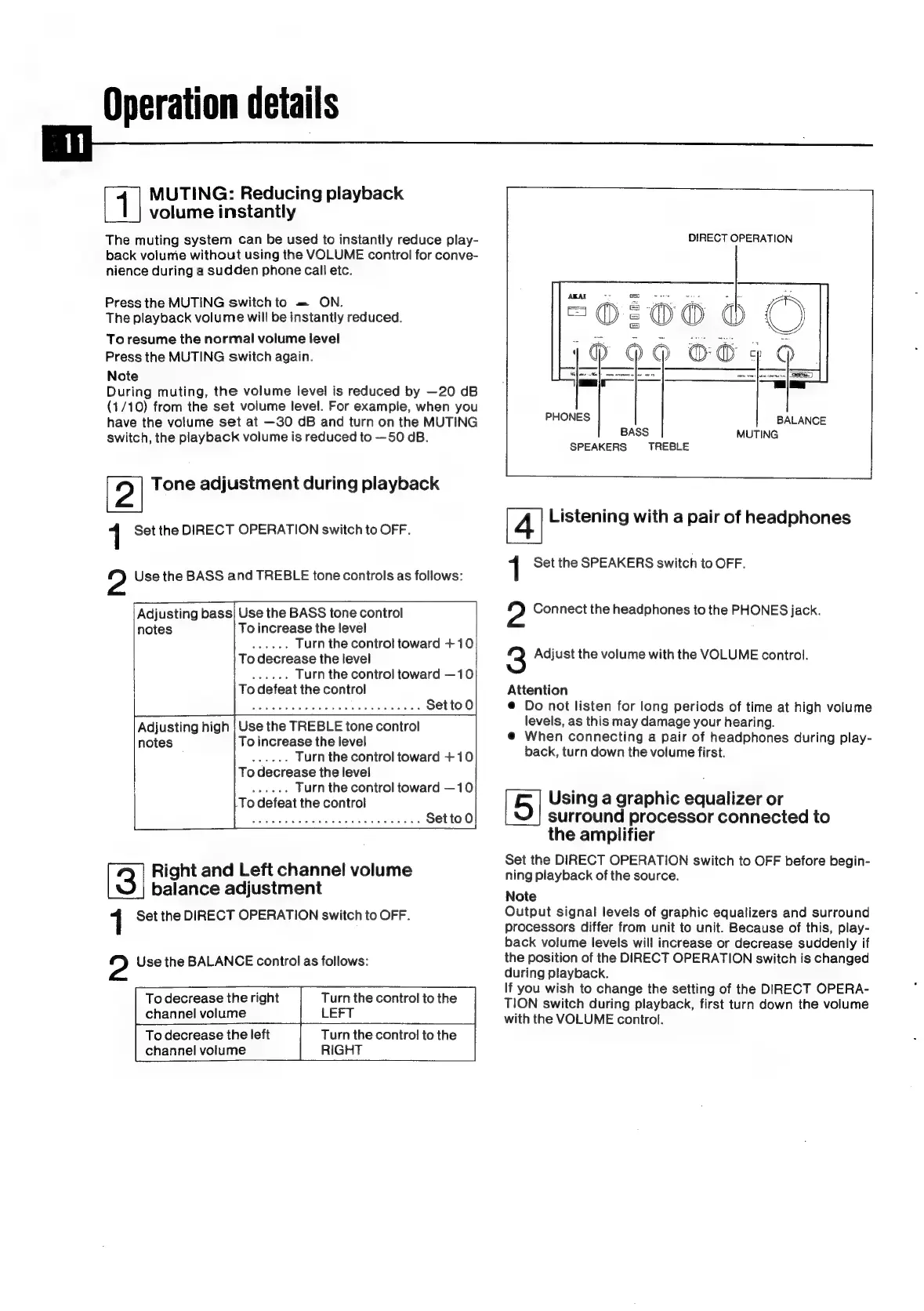
DIRECT
OPERATION
AKAI
ROEM)
o200
60
OO}
@
_
=|
PHONES
BALANCE
BASS
MUTING
SPEAKERS
TREBLE
Listening
with
a
pair
of
headphones
1
Set
the
SPEAKERS
switch
to
OFF.
?
Connect
the
headphones
to
the
PHONES
jack.
3
Adjust
the
volume
with
the
VOLUME
control.
Attention
@
Do
not
listen
for
long
periods
of
time
at
high
volume
levels,
as
this
may
damage
your
hearing.
@
When
connecting
a
pair
of
headphones
during
play-
back,
turn
down
the
volume
first.
Using
a
graphic
equalizer
or
surround
processor
connected
to
the
amplifier
Set
the
DIRECT
OPERATION
switch
to
OFF
before
begin-
ning
playback
of
the
source.
Note
Output
signal
levels
of
graphic
equalizers
and
surround
processors
differ
from
unit
to
unit.
Because
of
this,
play-
back
volume
levels
will
increase
or
decrease
suddenly
if
the
position
of
the
DIRECT
OPERATION
switch
is
changed
during
playback.
If
you
wish
to
change
the
setting
of
the
DIRECT
OPERA-
TION
switch
during
playback,
first
turn
down
the
volume
with
the
VOLUME
control.

Related product manuals