EasyManua.ls Logo

Akai Reference Master AM-73 - Page 9

Akai Reference Master AM-73
57 pages
Print Icon
To Next Page IconTo Next Page
To Previous Page IconTo Previous Page
Loading...
Graphic
equalizer
connections
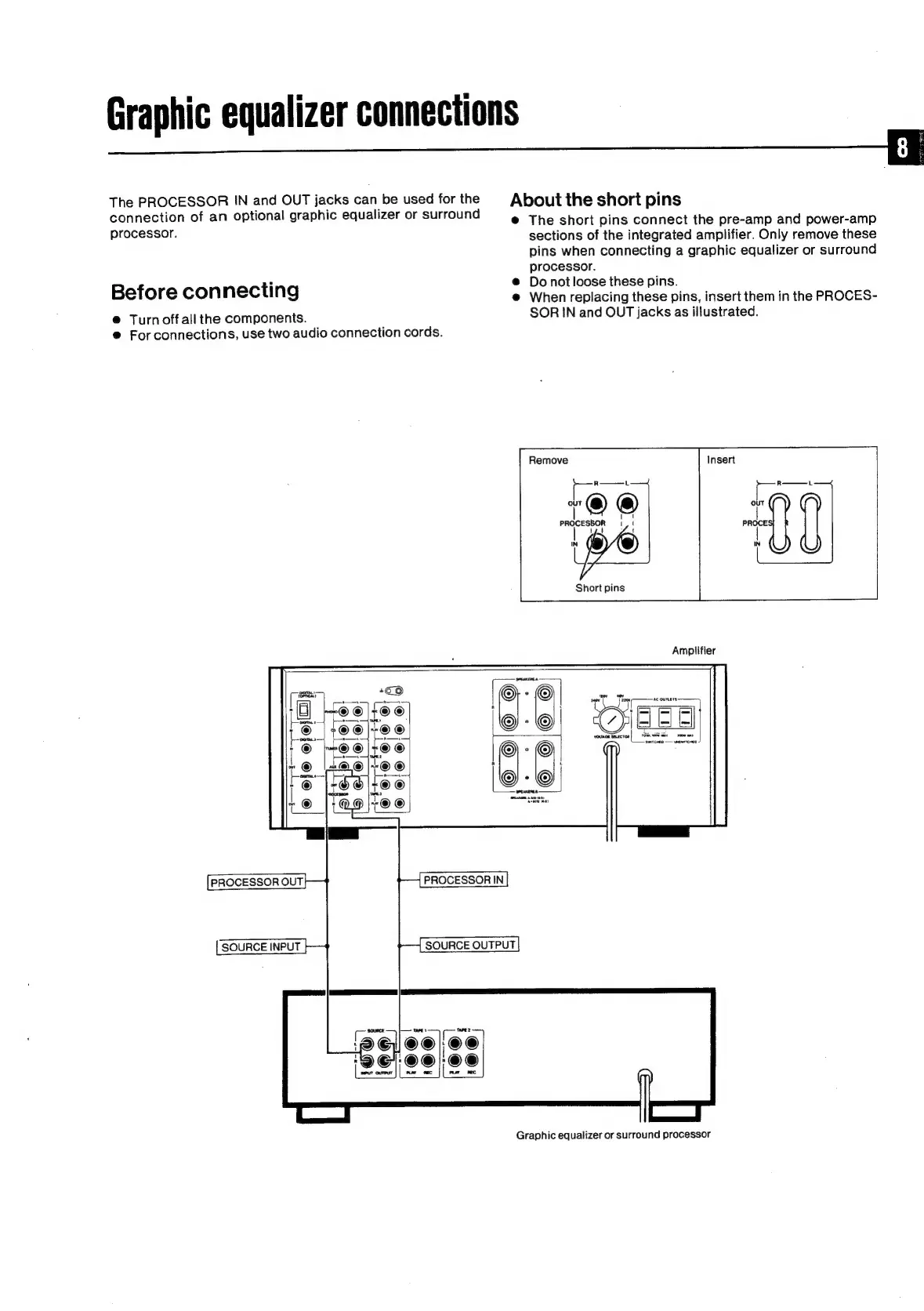
The
PROCESSOR
IN
and
OUT
jacks
can
be
used
for
the
connection
of
an
optional
graphic
equalizer
or
surround
processor.
Before
connecting
@
Turn
off
all
the
components.
®@
For
connections,
use
two
audio
connection
cords.
PROCESSOR
OUT
SOURCE
INPUT
PROCESSORIN
SOURCE
OUTPUT
About
the
short
pins
@
The
short
pins
connect
the
pre-amp
and
power-amp
sections
of
the
integrated
amplifier.
Only
remove
these
pins
when
connecting
a
graphic
equalizer
or
surround
processor.
@
Donot
loose
these
pins.
@
When
replacing
these
pins,
insert
them
in
the
PROCES-
SOR
IN
and
OUT
jacks
as
illustrated.
Remove
Short
pins
Amplifier
Graphic
equalizer
or
surround
processor

Related product manuals