DISK MODE 143
must be done by loading it into memory and saving it back elsewhere on the
disk.
NOTE: If you are using a Syquest removable cartridge or Magneto Optical
drive, the write protect switch of the cartridge must be switched to OFF in
order to save.
_______________________________________
RENAMING FILES
In the rename page, you can rename individual files on disk, or rename a
volume on disk (a floppy disk can contain only one volume, but a hard disk
can contain many volumes). If you have an internal hard disk fitted and/or
and external drive attached, select the partition, and the volume to be
renamed, or the volume containing the file(s) to be renamed, otherwise, if
you're using floppy, insert the disk which contains data to be renamed. Press
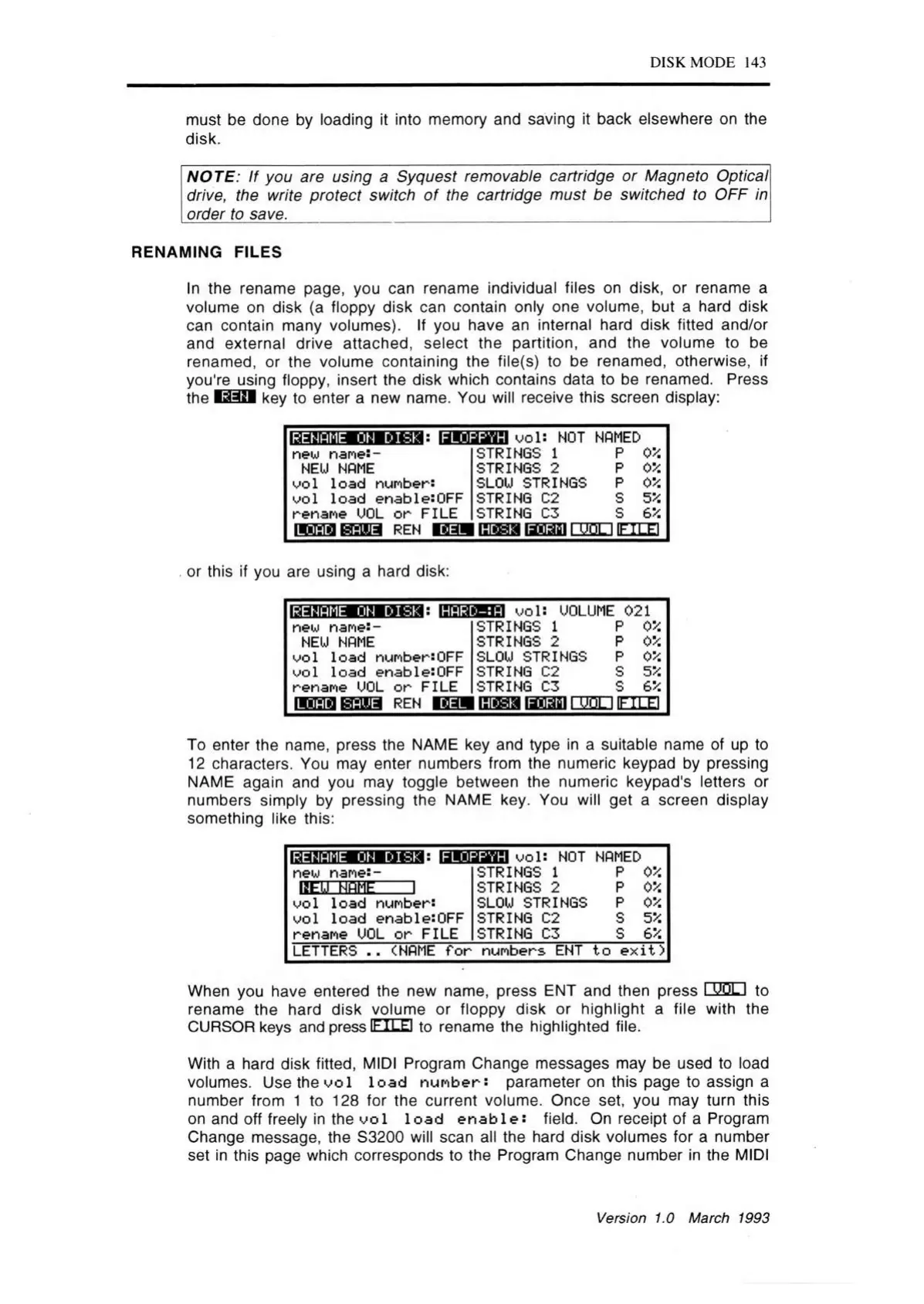
the key to enter a new name. You will receive this screen display:
Idm U ra g B Mga : BEQ333
u ol: NOT NAMED
new name:-
NEU NAME
uo l load number:
uol load enable:OFF
rename UOL o r FILE
REN
STRINGS 1
STRINGS 2
SLOU STRINGS
STRING 02
STRING 05
______________
is s s s lanasi i u o l i ifte e i
p
05S
p
0*
p
0*
s
5*
s 6 ’/.
. or this if you are using a hard disk:
RENAME ON DISKaHARD-:A
VO is UOLUME 021
new nane:-
NEW NAME
wol load numbersOFF
vo l load enablesOFF
rename UOL o r FILE
STRINGS 1
P
0*
STRINGS 2
P
0*
SLOU STRINGS
P 0*
STRING C2
s
5*
STRING C3 s
6*
DEL
liira a rsragi i u o l i if i le i
To enter the name, press the NAME key and type in a suitable name of up to
12 characters. You may enter numbers from the numeric keypad by pressing
NAME again and you may toggle between the numeric keypad's letters or
numbers simply by pressing the NAME key. You will get a screen display
something like this:
RENAME ON DISK 9 FLOPPYH
new name:-
BEH HBHEI
u ol: NOT NAMED
uo l load number:
uo l load enable:OFF
rename UOL o r FILE
STRINGS 1 P OV.
STRINGS 2 P 0*
SLOU STRINGS
P 0*
STRING C2 S 5 %
STRING C3 S e v.
LETTERS
(NAME fo r numbers ENT to e x it)
When you have entered the new name, press ENT and then press I W LI to
rename the hard disk volume or floppy disk or highlight a file with the
CURSOR keys and press if I lei to rename the highlighted file.
With a hard disk fitted, MIDI Program Change messages may be used to load
volumes. Use the u o l lo a d num ber: parameter on this page to assign a
number from 1 to 128 for the current volume. Once set, you may turn this
on and off freely in the u o l lo a d e n a b le : field. On receipt of a Program
Change message, the S3200 will scan all the hard disk volumes for a number
set in this page which corresponds to the Program Change number in the MIDI
Version 1.0 March 1993



 To Next Page