SELECT PROG 27
NOTE: It is possible to send individual keygroups to these outputs so the
results you get may sometimes be a little unpredictable if you are not sure of
the keygroup assignments.
_______________________________________________________
You may also select REB orFX and you may use this to
send programs in proportionate amounts to the internal
effects and the le v : parameter explained next allows
you to set the effects send level. You may also send the
program to both effects sections in parallel by
selecting R +F.
leo:
This sets the level of the audio appearing at the
individual outputs. If REB orFX or R+F is selected
in the
send:
field described above, this control sets
the effects send level to the internal effects.
All these parameters are available for each and every program and in a
layered or multi-timbral setup, you can set levels and effects sends very
precisely and the biggest difference between the S3200's mixer and a
'proper', external mixer is that the S3200's mixer does not have any EQ
facilities for affecting tone. If you feel this is necessary, then you may use the
individual outputs to send certain programs to an external mixer for more
elaborate level and tone control and, of course, it is possible to use a
combination of the external mixer and the internal mixer using the individual
outputs in conjunction with the main stereo output.
MIDI
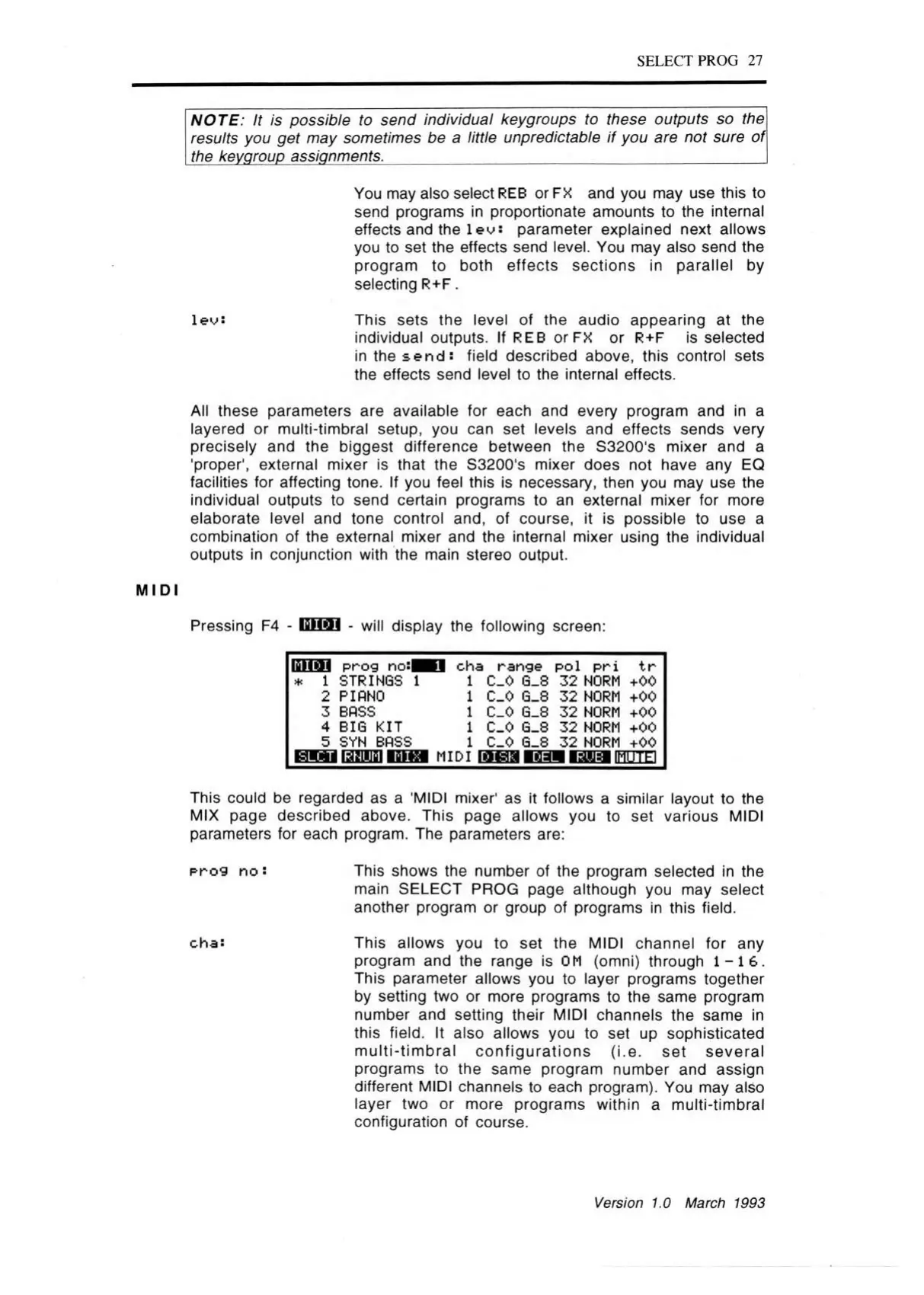
Pressing F4 - GEES - will display the following screen:
ISHfli prog no:|
STRINGS
PIANO
BASS
BIG KIT
SYN BASS
1
cha range pol pri tr
1
1
1
1
1
MIDI
C_0 G_8
C_0 G_8
C_0 G_8
C_0 G_8
C_0 G_8
32 NORM +00
32 NORM +00
32 NORM +00
32 NORM +00
32 NORM +00
■aua IMUTE1
This could be regarded as a 'MIDI mixer' as it follows a similar layout to the
MIX page described above. This page allows you to set various MIDI
parameters for each program. The parameters are:
prog n o : This shows the number of the program selected in the
main SELECT PROG page although you may select
another program or group of programs in this field.
cha:
This allows you to set the MIDI channel for any
program and the range is OM (omni) through 1 -1 6 .
This parameter allows you to layer programs together
by setting two or more programs to the same program
number and setting their MIDI channels the same in
this field. It also allows you to set up sophisticated
m ulti-tim bral co nfigurations (i.e. set several
programs to the same program number and assign
different MIDI channels to each program). You may also
layer two or more programs within a multi-tim bral
configuration of course.
Version 1.0 March 1993



 To Next Page