SELECT PROG 25
loaded in the S3200. The display will tell you how many programs are loaded
and in the above example, we can see that there are actually 8 programs in
memory even though only the first five are displayed. It is possible to be
viewing other programs whilst playing another.
RENUMBERING PROGRAMS
On the S3200, program numbers correspond to patch numbers on a
synthesizer. When a MIDI Program Change message is received, the
appropriate program is selected. However, to match S3200 programs with
the patch numbers on your synthesizer, you may want to re-number the
programs, so that selecting a brass sound on the S3200 will call up a similar
(or complementary) patch on a remote synthesizer module. To do this, press
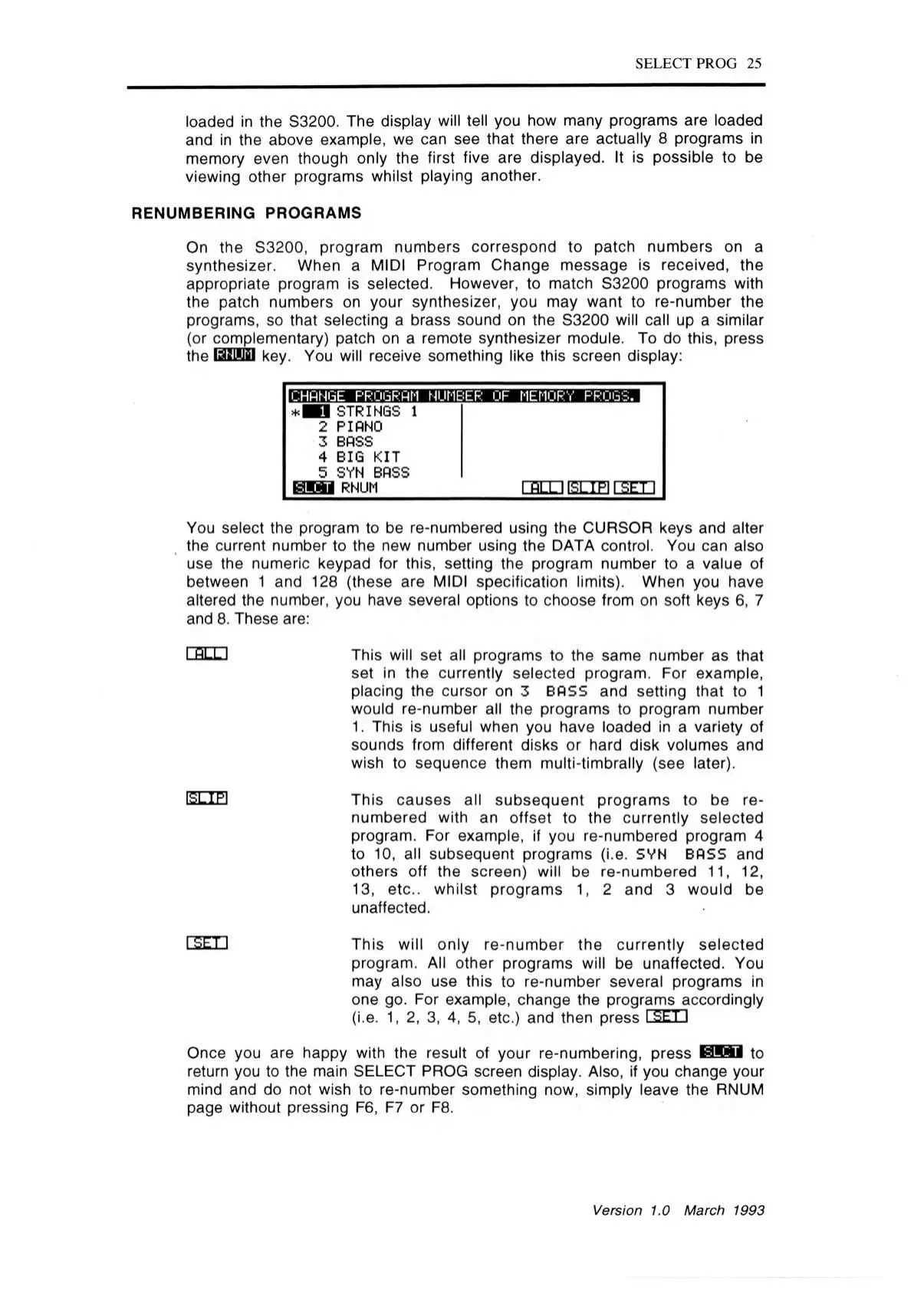
the ISLSUlil key. You will receive something like this screen display:
± M S STRINGS 1
2 PIANO
3 BASS
4 BIG KIT
5 SYN BASS
tSWSl RNUM
r n m isttfi ra m
You select the program to be re-numbered using the CURSOR keys and alter
the current number to the new number using the DATA control. You can also
use the numeric keypad for this, setting the program number to a value of
between 1 and 128 (these are MIDI specification limits). When you have
altered the number, you have several options to choose from on soft keys 6, 7
and 8. These are:
I RLLI This will set all programs to the same number as that
set in the currently selected program. For example,
placing the cursor on 3 BOSS and setting that to 1
would re-number all the programs to program number
1. This is useful when you have loaded in a variety of
sounds from different disks or hard disk volumes and
wish to sequence them multi-timbrally (see later).
E LIE This causes all subsequent program s to be re
numbered with an offset to the currently selected
program. For example, if you re-numbered program 4
to 10, all subsequent programs (i.e. SYN BASS and
others off the screen) will be re-numbered 11, 12,
13, etc., whilst programs 1, 2 and 3 would be
unaffected.
rs E n This will only re-number the currently selected
program. All other programs will be unaffected. You
may also use this to re-number several programs in
one go. For example, change the programs accordingly
(i.e. 1, 2, 3, 4, 5, etc.) and then press I SET.)
Once you are happy with the result of your re-numbering, press
H!SI
to
return you to the main SELECT PROG screen display. Also, if you change your
mind and do not wish to re-number something now, simply leave the RNUM
page without pressing F6, F7 or F8.
Version 1.0 March 1993



 To Next Page