182 ECORDING AUDIO TO DISK
PLAYING TAKES
There are a number of ways you can play a take within the S3200's DD
functions:
1 You can play a take in ANY page using the ENT/PLAY key
2 You can assign a series of takes to a SONG for sequential playback or for
triggering from MIDI
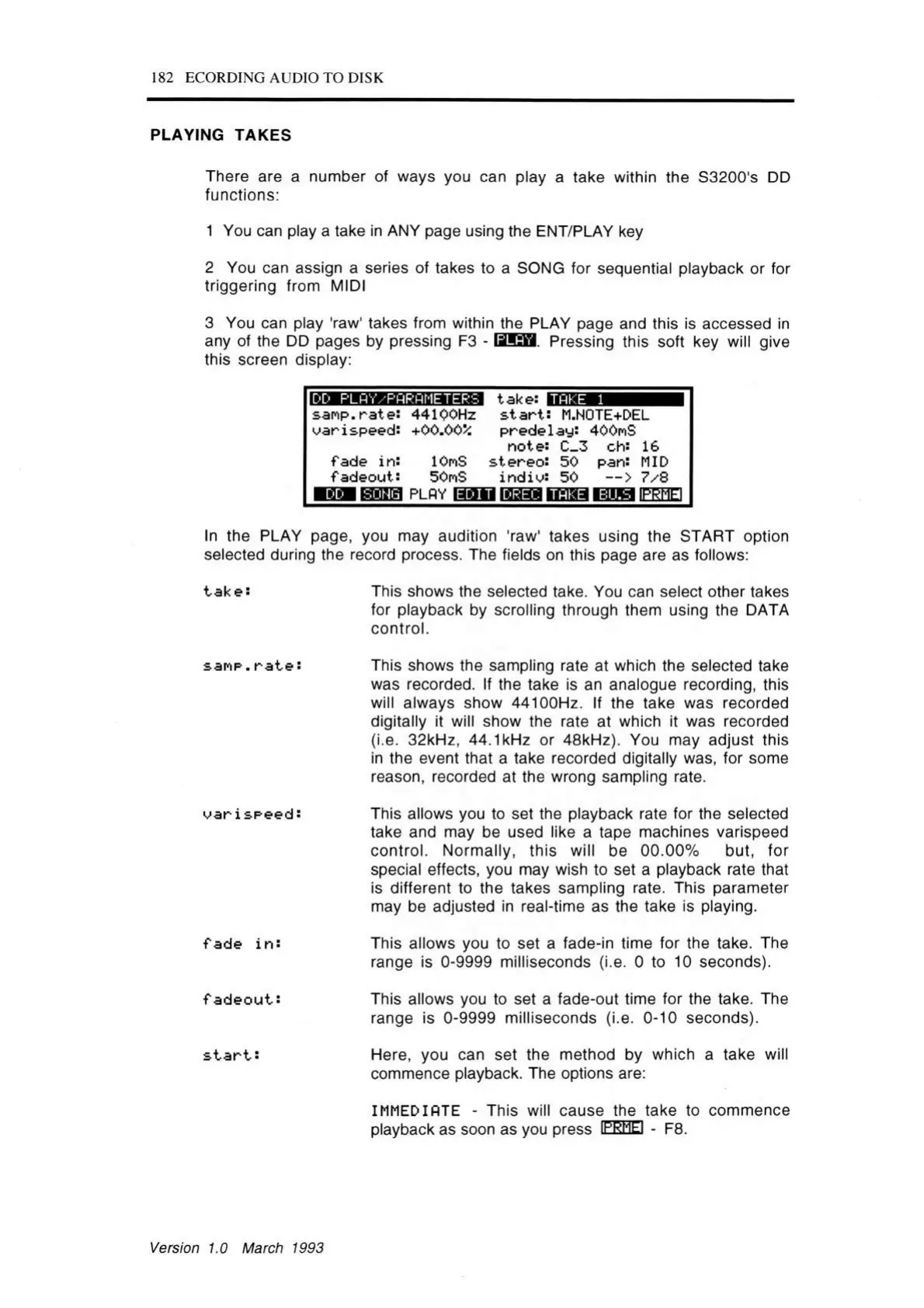
3 You can play 'raw' takes from within the PLAY page and this is accessed in
any of the DD pages by pressing F3 - SUES Pressing this soft key will give
this screen display:
H M J K IW J iiia aaiH a a take:
TAKE 1
sam p.rate: 44100Hz s ta r t: M.NOTE+DEL
oarispeed: +00.005i predela y: 400nS
note: C_3 ch: 16
fade in: lOmS stere o : 50 pan: MID
fad eou t: 50nS in d io : 50 — > 7/8
p la y H o M laaaa intiaa ■riitw iprmei
In the PLAY page, you may audition 'raw' takes using the START option
selected during the record process. The fields on this page are as follows:
take: This shows the selected take. You can select other takes
for playback by scrolling through them using the DATA
control.
sanp. r a t e :
o a ris e e e d :
fa de in :
f a d e o u t:
s t a r t:
This shows the sampling rate at which the selected take
was recorded. If the take is an analogue recording, this
will always show 44100Hz. If the take was recorded
digitally it will show the rate at which it was recorded
(i.e. 32kHz, 44.1kHz or 48kHz). You may adjust this
in the event that a take recorded digitally was, for some
reason, recorded at the wrong sampling rate.
This allows you to set the playback rate for the selected
take and may be used like a tape machines varispeed
control. Normally, this will be 00.00% but, for
special effects, you may wish to set a playback rate that
is different to the takes sampling rate. This parameter
may be adjusted in real-time as the take is playing.
This allows you to set a fade-in time for the take. The
range is 0-9999 milliseconds (i.e. 0 to 10 seconds).
This allows you to set a fade-out time for the take. The
range is 0-9999 milliseconds (i.e. 0-10 seconds).
Here, you can set the method by which a take will
commence playback. The options are:
IMMEDIATE - This will cause the take to commence
playback as soon as you press IPRMEI - F8.
Version 1.0 March 1993



 To Next Page