EDIT PROGRAM 89
the sequence is playing so that the attack time may be
adjusted so as to make the string part 'sit' right in the
track. You may also use this function to edit one layer
of a layered set of programs.
No other fields are available on this screen.
The soft keys along the bottom of the PROGRAM EDIT main screen are:
MAIN
iseraa
tam o
MIDI
B B i
PhN
QU2S
r t m
This shows the currently selected MAIN PROGRAM EDIT
page.
This takes you to the parameters concerned with
individual keygroups. These include the keyboard
spanning, filters, envelopes, sample assignments,
pitch and level adjustm ents, individual output
assignment, etc., for individual keygroups.
This takes you to the pages where you may set program
modulation parameters such as pitch bend ranges, LFO
1 and LFO 2 parameters and parameters for the
sostenuto pedal functions.
This takes you to the MIDI page where you may set the
programs MIDI channel, polyphony, transpose and
other functions.
This takes to the OUTPUT pages where you may set the
programs overall level, individual output assignment,
effects send level, pan position and other parameters.
This takes you to the AUTO PAN section where you may
set parameters that affect the program's auto pan
functions.
This takes you to the TUNE pages where you may set the
program's overall tuning as well as select and create
alternative tunings and temperaments.
This is not a page key but an 'action' key for deleting
programs. Its function is described above.
We will now look at the functions of these pages. We will skip
for the moment and look at the function of I lIU U
as these affect the program as a whole.
OUT ■ PHN
KbkPBBBI mod
and D M § first
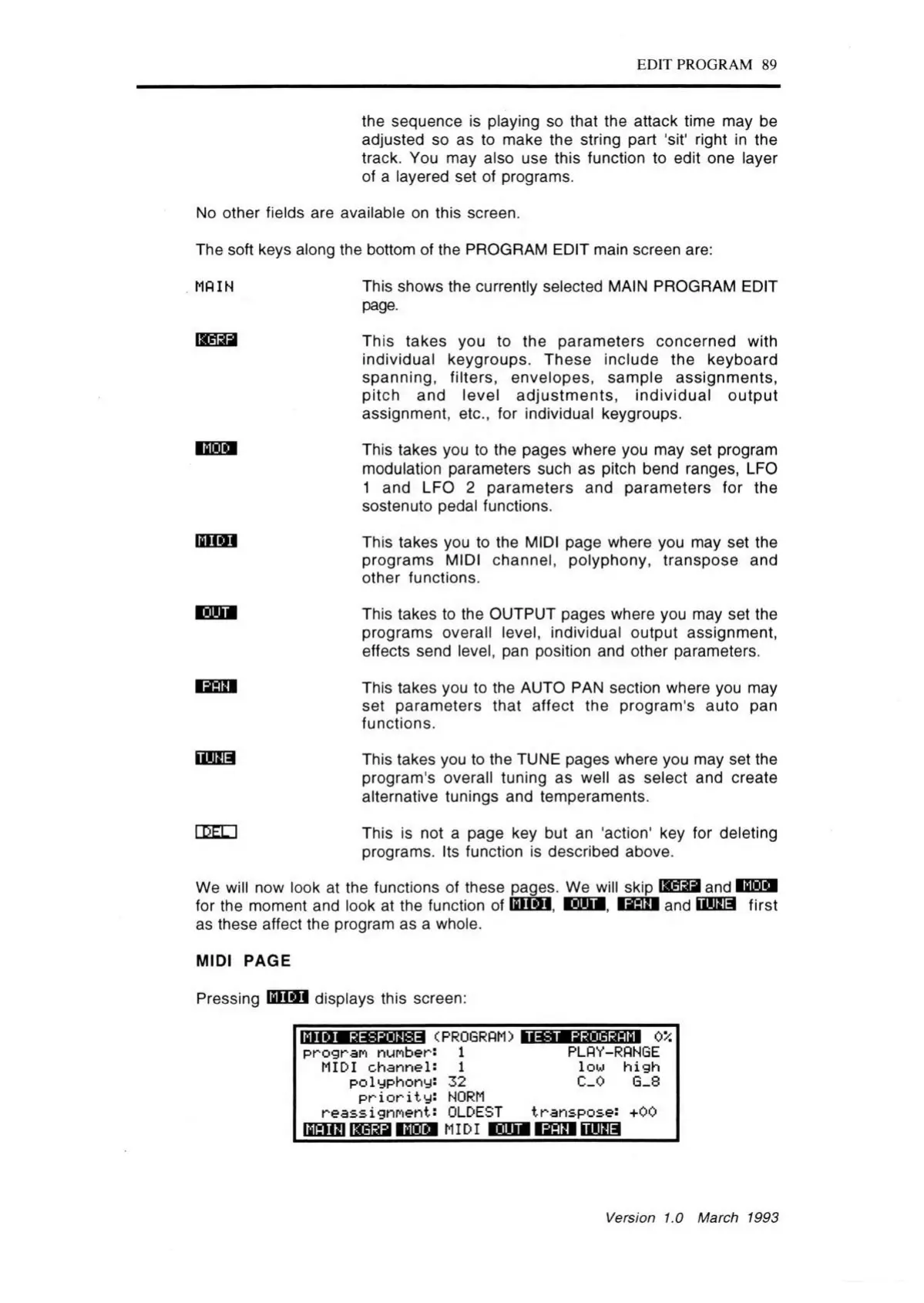
MIDI PAGE
Pressing
MIDI
displays this screen:
MIDI RESPONSE
<PROGRAM)
TEST PROGRh M
0*
program numbers 1
MIDI channel: 1
polyphony: 32
p r io r ity : NORM
reass i gnment: OLDEST
ISfellal ISMddEEBI MIDI
PLflY-RANGE
low h ig h
C_0 G_8
transpose:
mma
+oo
OUT I PAH
Version 1.0 March 1993



 To Next Page