SELECT PROG 33
Furthermore, because there are two separate effects sections, different
programs may be sent to different effects. One program may be sent to two
effects simultaneously or, in a layered or multi-timbral setup where several
programs share the same program number, different programs may be sent
to different effects. In such circumstances, it is also possible for some
programs to go to one set of effects, other programs to go to the other set of
effects and some programs to go to both. This allows a great deal of flexibility.
This method of effects assignment makes the internal effects unit behave more
like an external unit where effects can be freely assigned to any program and
you can mix and match your effects to programs as you like. If you don't like
any effect, simply select another until you find one that matches the sound
exactly (or, of course, create your own). Furthermore, it is possible to
'grab' an effect off another disk and assign it to any program.
NOTE: When you use the following internal effects: reverb, chorus, pitch
shifter and delay, the polyphony is:
With reverb: 30 voices
With chorus and pitchshifter: 28 voices
________
With delays31 voices
____________________________________________
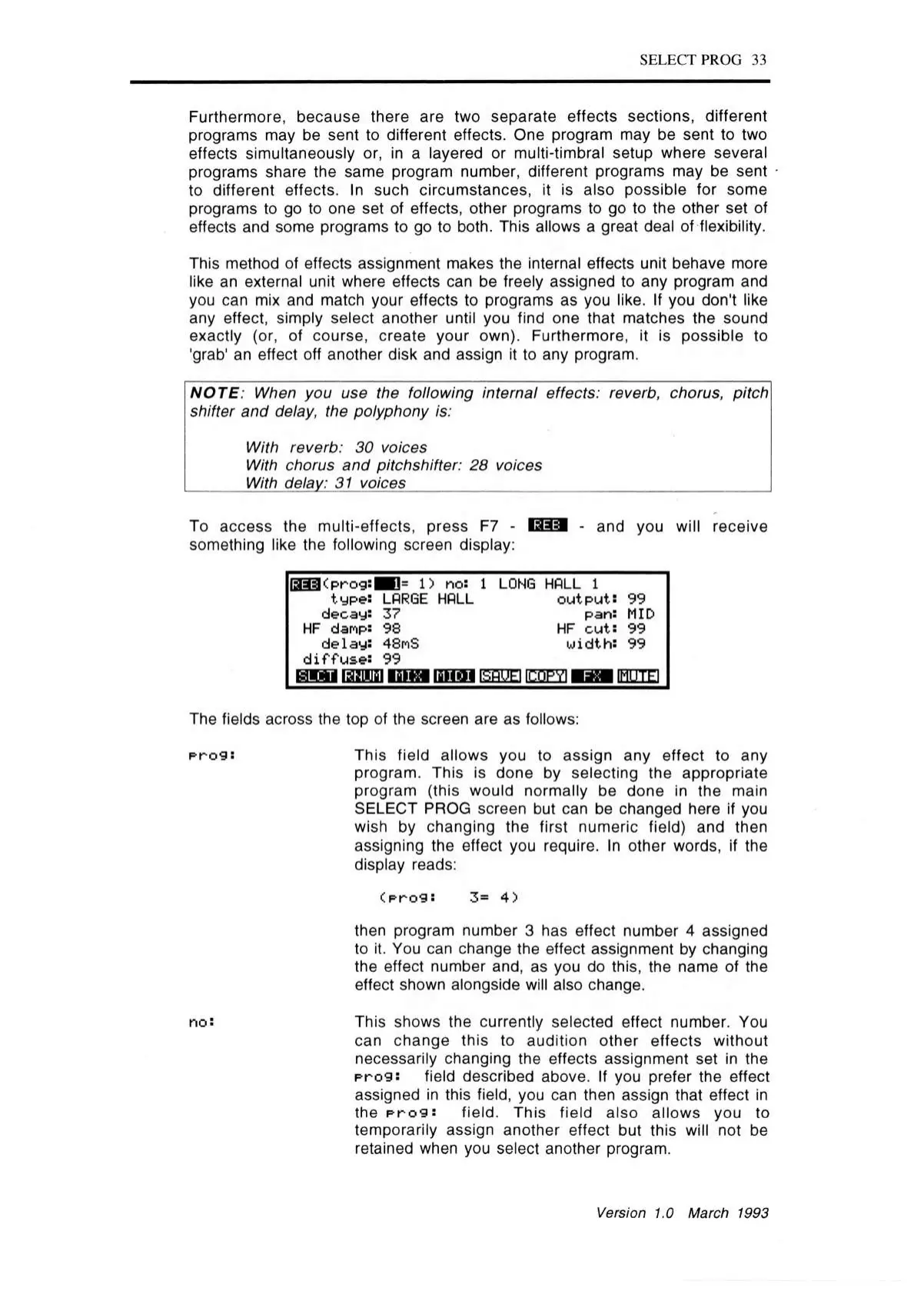
To access the multi-effects, press F7 - 133=1 - and you will receive
something like the following screen display:
OH3<prog:BH= 1) no:
1 LONG HALL 1
type: LARGE HALL
output: 99
decay: 37
pan: MID
HF danp: 98
HF cu t: 99
delay: 48mS
width: 99
d iffu se : 99
h i m lam n is b m n n a i
foFiUEl fCOPYl H 5M [FTTfTFI
The fields across the top of the screen are as follows:
prog:
This field allows you to assign any effect to any
program. This is done by selecting the appropriate
program (this would normally be done in the main
SELECT PROG screen but can be changed here if you
wish by changing the first numeric field) and then
assigning the effect you require. In other words, if the
display reads:
(pro9:
3= 4)
then program number 3 has effect number 4 assigned
to it. You can change the effect assignment by changing
the effect number and, as you do this, the name of the
effect shown alongside will also change.
no: This shows the currently selected effect number. You
can change this to audition other effects without
necessarily changing the effects assignment set in the
prog:
field described above.
If
you prefer the effect
assigned in this field, you can then assign that effect in
the
prog:
field. This field also allows you to
temporarily assign another effect but this will not be
retained when you select another program.
Version 1.0 March 1993



 To Next Page