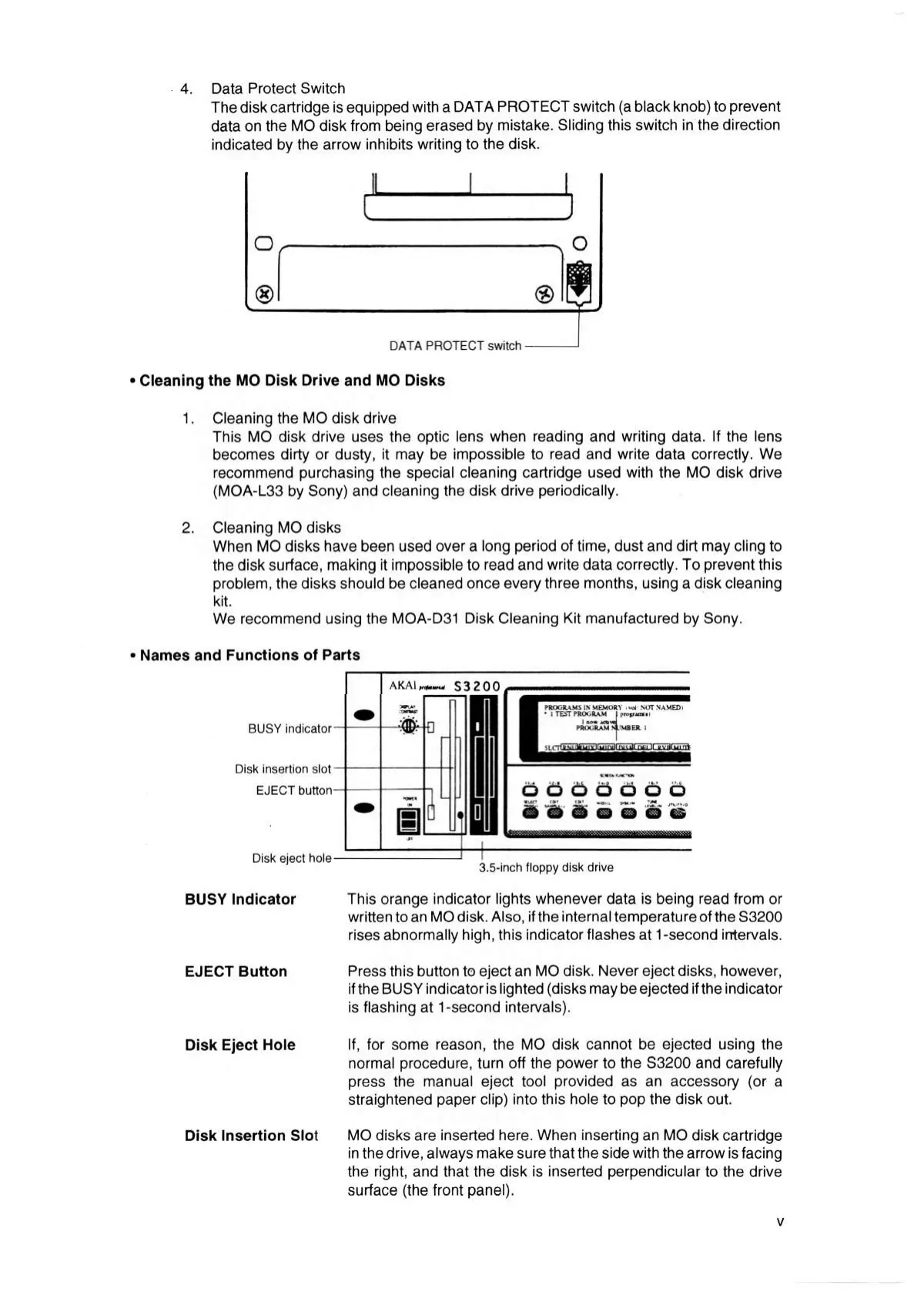
4. Data Protect Switch
The disk cartridge is equipped with a DAT A PROTECT switch (a black knob) to prevent
data on the MO disk from being erased by mistake. Sliding this switch in the direction
indicated by the arrow inhibits writing to the disk.
Cleaning the MO Disk Drive and MO Disks
1. Cleaning the MO disk drive
This MO disk drive uses the optic lens when reading and writing data. If the lens
becomes dirty or dusty, it may be impossible to read and write data correctly. We
recommend purchasing the special cleaning cartridge used with the MO disk drive
(MOA-L33 by Sony) and cleaning the disk drive periodically.
2. Cleaning MO disks
When MO disks have been used over a long period of time, dust and dirt may cling to
the disk surface, making it impossible to read and write data correctly. To prevent this
problem, the disks should be cleaned once every three months, using a disk cleaning
kit.
We recommend using the MOA-D31 Disk Cleaning Kit manufactured by Sony.
Names and Functions of Parts
BUSY indicator
Disk insertion slot
EJECT button
Disk eject hole
A K A l S3200
3.5-inch floppy disk drive
BUSY Indicator This orange indicator lights whenever data is being read from or
written to an MO disk. Also, if the internal temperature of the S3200
rises abnormally high, this indicator flashes at 1-second intervals.
EJECT Button Press this button to eject an MO disk. Never eject disks, however,
if the BUSY indicator is lighted (disks may be ejected if the indicator
is flashing at 1-second intervals).
Disk Eject Hole If, for some reason, the MO disk cannot be ejected using the
normal procedure, turn off the power to the S3200 and carefully
press the manual eject tool provided as an accessory (or a
straightened paper clip) into this hole to pop the disk out.
Disk Insertion Slot MO disks are inserted here. When inserting an MO disk cartridge
in the drive, always make sure that the side with the arrow is facing
the right, and that the disk is inserted perpendicular to the drive
surface (the front panel).



 To Next Page