72 EDIT SAMPLE - RECORDING AND EDITING
ECTIOMB DRIJNRIFF1
s ta r t: 21700 end:
to : SNARE# 1
34011 MONO 73*F
m i SECT B ffli HSBIl I ZIN I fTOUri [EXFCI
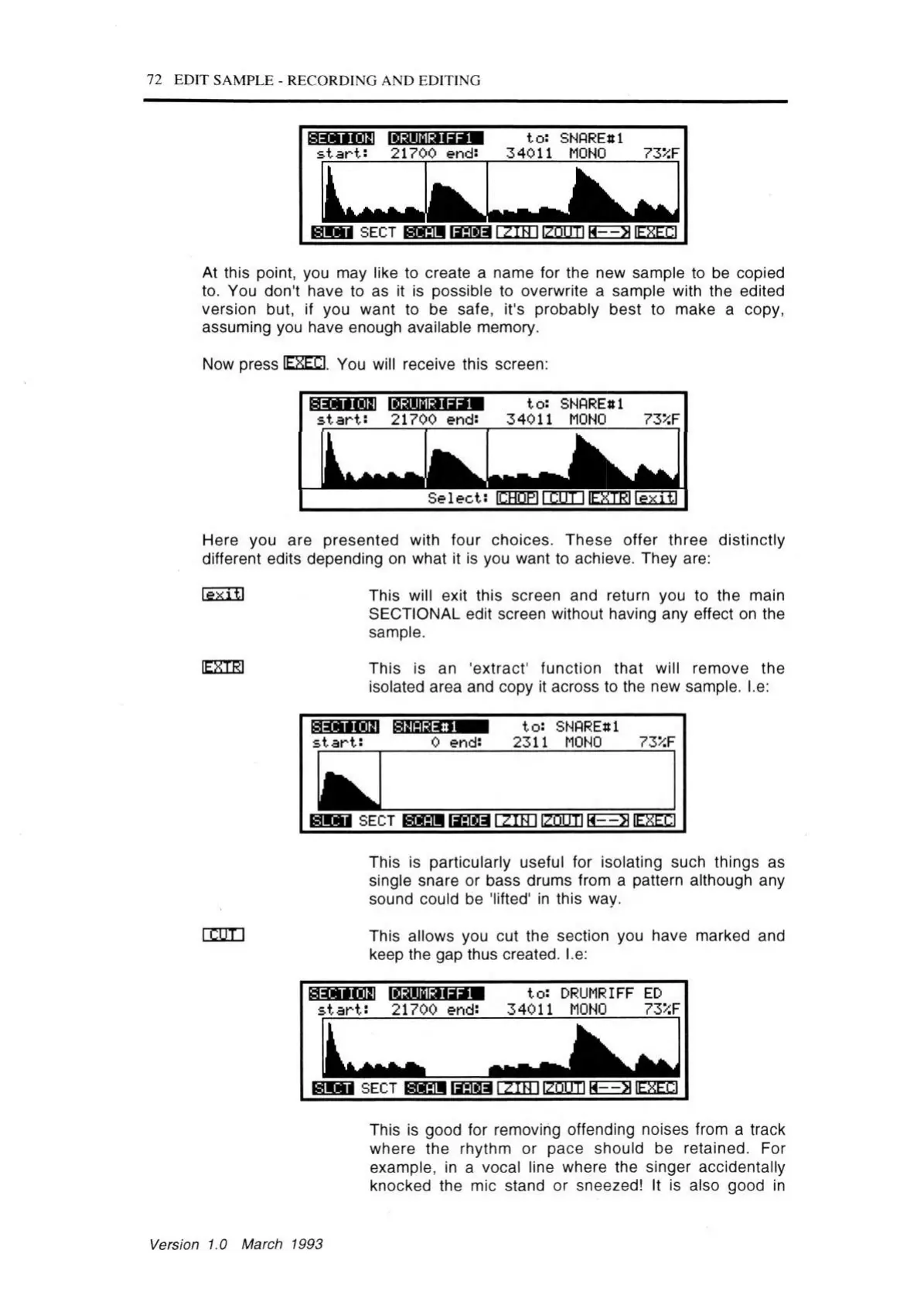
At this point, you may like to create a name for the new sample to be copied
to. You don't have to as it is possible to overwrite a sample with the edited
version but, if you want to be safe, it's probably best to make a copy,
assuming you have enough available memory.
Now press lEXECI. You will receive this screen:
ECT IONB DRUMR IFF1
s ta r t: 21700 end:
to : SNARE# 1
34011 MONO
73*F
S elect: ICHOPI l~CuT I lE^TEI le xitl
Here you are presented with four choices. These offer three distinctly
different edits depending on what it is you want to achieve. They are:
lexitl
ESCB
rw n
This will exit this screen and return you to the main
SECTIONAL edit screen without having any effect on the
sample.
This is an 'extract' function that will remove the
isolated area and copy it across to the new sample. I.e:
ECTION
s ta rts
iNOREttl
0 end:
to : SNARE# 1
2311 MONO 73*F
HM M SECT H g ^ ia ^ lT T T n i? n n T lH = ^ [E % m
This is particularly useful for isolating such things as
single snare or bass drums from a pattern although any
sound could be 'lifted' in this way.
This allows you cut the section you have marked and
keep the gap thus created. I.e:
ECT 10H1DRUMRI FF 1
s ta r t: 21700 end:
to : DRUMRIFF ED
34011 MONO 73>:F
H W l SECT I ZIN IIZOUTI H
----
>1IEXECI
This is good for removing offending noises from a track
where the rhythm or pace should be retained. For
example, in a vocal line where the singer accidentally
knocked the mic stand or sneezed! It is also good in
Version 1.0 March 1993



 To Next Page