82 EDIT PROGRAM
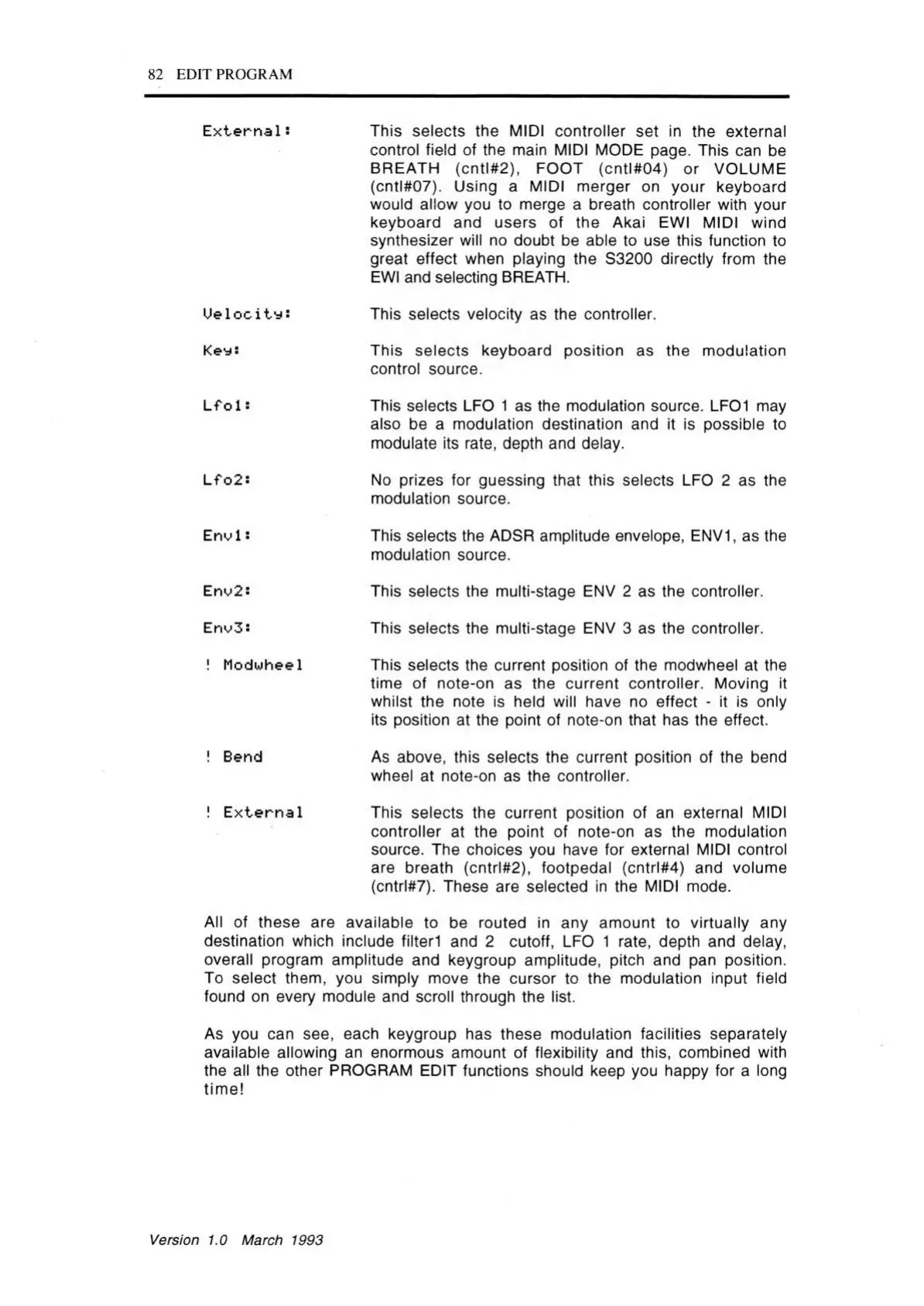
E x te rn a l:
This selects the MIDI controller set in the external
control field of the main MIDI MODE page. This can be
BREATH (cntl#2), FOOT (cntl#04) or VOLUME
(cntl#07). Using a MIDI merger on your keyboard
would allow you to merge a breath controller with your
keyboard and users of the Akai EWI MIDI wind
synthesizer will no doubt be able to use this function to
great effect when playing the S3200 directly from the
EWI and selecting BREATH.
U e lo c ity :
This selects velocity as the controller.
Keys
This selects keyboard position as the modulation
control source.
L f O 1 5
This selects LFO 1 as the modulation source. LFOI may
also be a modulation destination and it is possible to
modulate its rate, depth and delay.
L f o2s
No prizes for guessing that this selects LFO 2 as the
modulation source.
Envl s
This selects the ADSR amplitude envelope, ENV1, as the
modulation source.
Enu2s
This selects the multi-stage ENV 2 as the controller.
Enu3:
This selects the multi-stage ENV 3 as the controller.
! Modwheel
This selects the current position of the modwheel at the
time of note-on as the current controller. Moving it
whilst the note is held will have no effect - it is only
its position at the point of note-on that has the effect.
! Bend
As above, this selects the current position of the bend
wheel at note-on as the controller.
! E x te rn a l
This selects the current position of an external MIDI
controller at the point of note-on as the modulation
source. The choices you have for external MIDI control
are breath (cntrl#2), footpedal (cntrl#4) and volume
(cntrl#7). These are selected in the MIDI mode.
All of these are available to be routed in any amount to virtually any
destination which include filterl and 2 cutoff, LFO 1 rate, depth and delay,
overall program amplitude and keygroup amplitude, pitch and pan position.
To select them, you simply move the cursor to the modulation input field
found on every module and scroll through the list.
As you can see, each keygroup has these modulation facilities separately
available allowing an enormous amount of flexibility and this, combined with
the all the other PROGRAM EDIT functions should keep you happy for a long
tim e!
Version 1.0 March 1993



 To Next Page