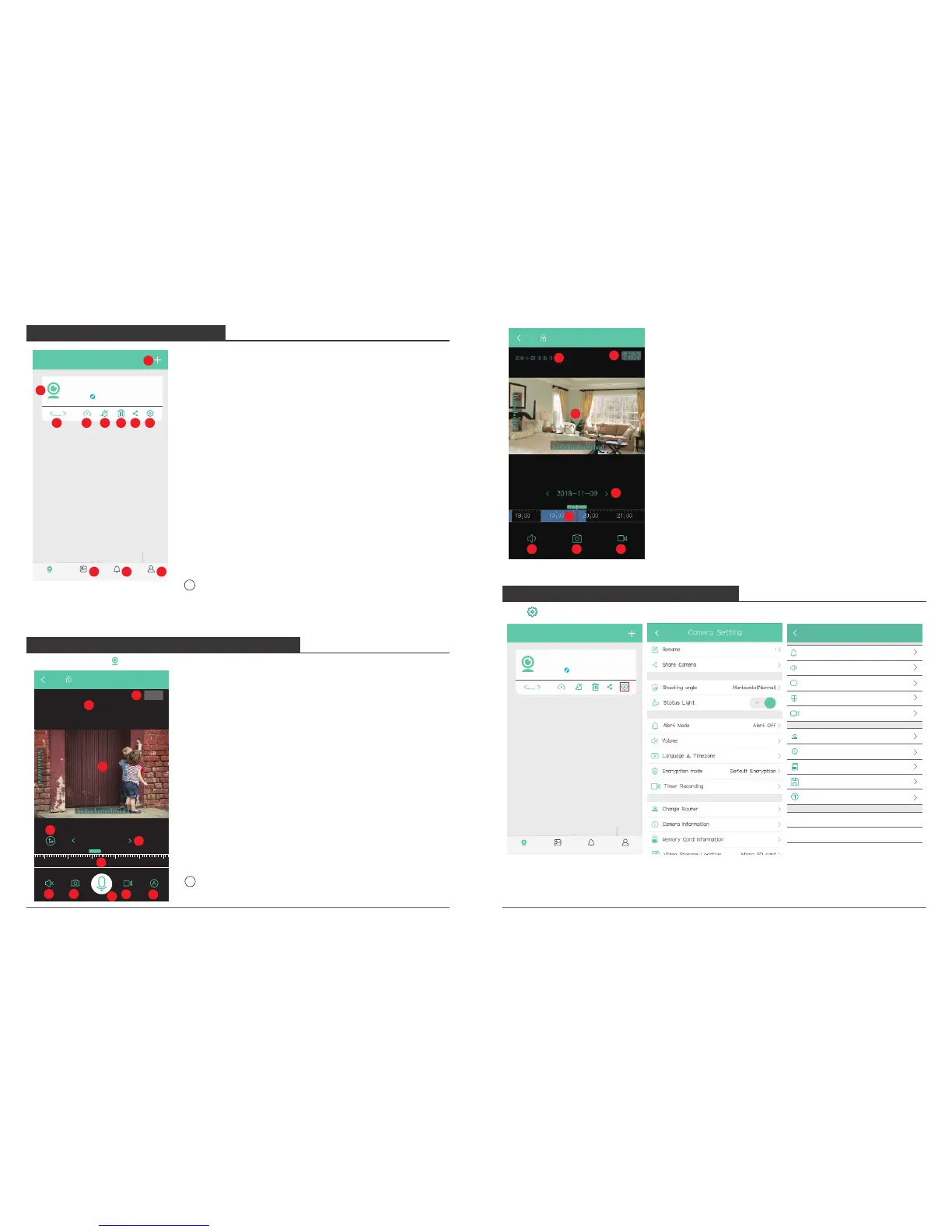
12. MY CAMERA INTERFACE
My camera
P50
Online
360°
Album AlertMy camera Setting
1
2
3 4 5 6 7 8
9
10 11
① Add Camera: Add more cameras on this APP.
② Open Live View / Playback Interface: Enter Live View
/ Playback Interface
③ 360 Panoramic Navigation: Create a Panoramic
Navigation
④ Cloud Storage: Check your cloud storage information
⑤ Alert Function: Enable/Disable Alert Function
⑥ Delete Camera: Delete this added camera from this
APP
⑦ Share the camera to another account: Share this
camera to your family or friends
⑧ Camera Setting: More functions can be set here
⑨ Album: Save footage / snapshot
⑩ Alert Messages: Check alert messages
APP Setting: Message setting, Feedback, Help (User
Manual), APP version, Purchase cloud storage service,
clean space, modify password and logout’s setting.
11
13. LIVE VIEW & PLAYBACK INTERFACE
Click camera icon to enter into live View / Playback interface.
14. CAMERA SETTING INTERFACE
Click to enter into Camera Setting interface.
2018-12-28 19:04:50
encrypted to pretect your privacy
68 KB/S
2 KB/S
2018-11-09
Talk
19:04
17:00 18:00 19:00 20:00 22:0021:00
60
40
20
220
240
260 280
P50
1
2
3
4
5
6
7
8
9
10
11
Live View Interface
① Network Speed: Show Network condition
② Live View Date/Time: Show the date/time of live view
③ Live View Video: Show live view video image
④ Shooting Angle: Set camera’s shooting angle
⑤ Playback Date: Select date to playback video
⑥ Playback Time: Select time to playback video
⑦ Off / On Audio: Turn on / off live video sound
⑧ Screenshot: Take screenshot of live video
⑨ Intercom (Press to talk): Transmit and receive sounds
⑩ Local recording: Recording video in local file
Streaming resolution: HD / SD / AUTO
11
My camera
P50
Online
360°
Album AlertMy camera Setting
Camera Setting
Alert Mode
Motion Detected
Volume
A
Language & Timezone
Encryption mode Default Encryption
Timer Recording
Change Router
Camera Information
Video Storage Location
Firmware Upgrade
Reboot Camera
Refresh Setting Information
Delete device
Micro SD card
Latest Version
Memory Card Information
17 18
Playback Interface
① Network Speed: Show Network condition
② Live View Date/Time: Show the date/time of live view
③ Playback Video: Show playback video image
④ Playback Date: Show the date of playback video
⑤ Playback Time: Show the time of playback video
⑥ Off / On Audio: Turn on / off playback video sound
⑦ Screenshot: Take screenshot of playback video
⑧ Local recording: Record video in local file
60
40
20
220
240
260 280
P50
1
2
3
4
5
6
7 8
P50



 To Next Page