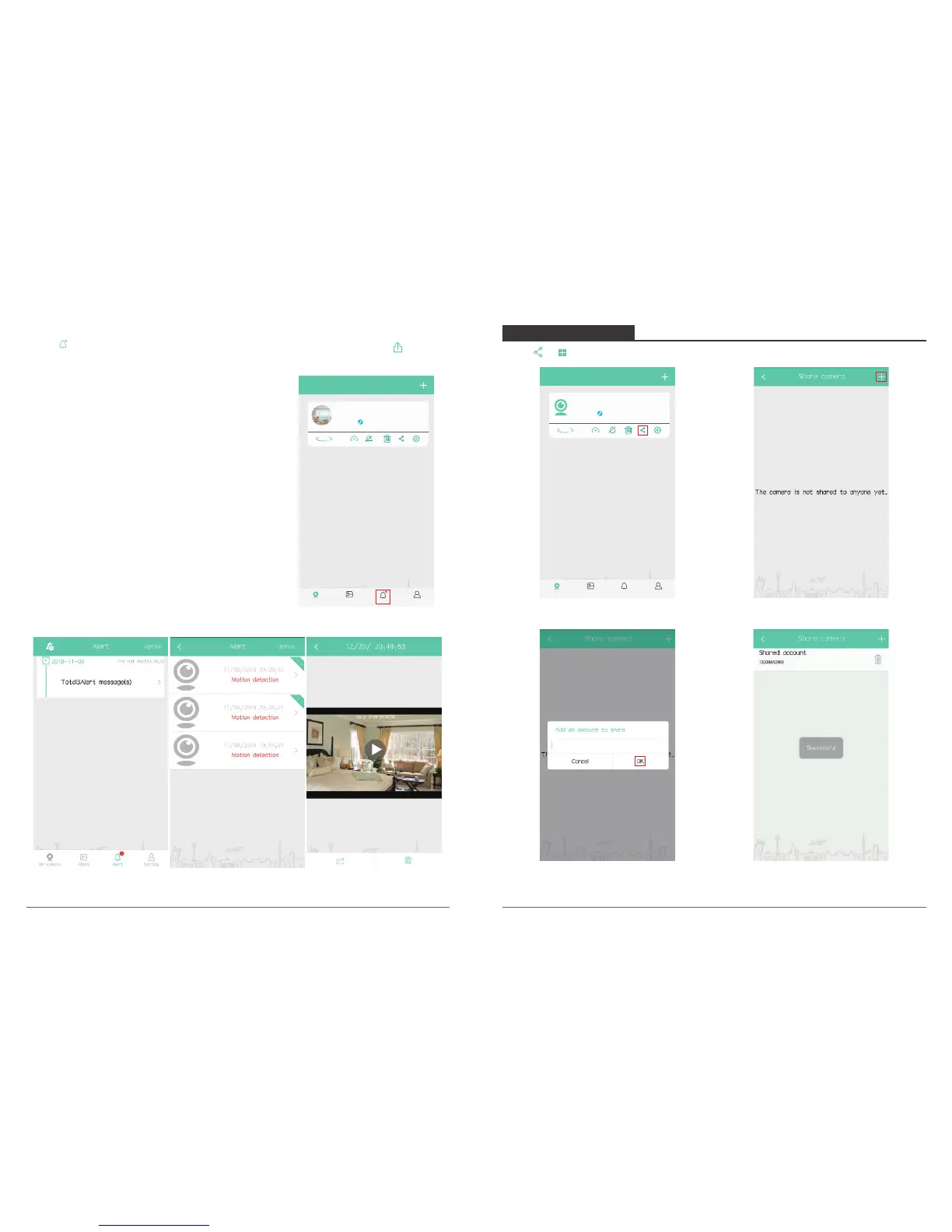
2. Message Check & Download
Click “ → Alert message” to select video flips you want to check, then click “ ” to
share this video with your family and friends or on any social platforms.
Note:
① To download the alert videos, the camera needs to
switch on Cloud service or gets a SD card insert;
without Cloud service or SD card, the APP will only
receive the alert message but cannot download
any video.
② Ensure the camera is power-off when inserting /
removing SD card; check network condition if APP
promotes message for “download failed” with SD
card inserted, return to last interface and try again.
Alert
P50
P50
P50
My camera
P50
Online
360°
Album AlertMy camera Setting
Click “ → →input an account name to share”, click “OK” to save.
8. SHARE DEVICES
My camera
P50
Online
360°
Album AlertMy camera Setting
Note: The account shared has to register an account of AKASO iEyes.
13 14



 To Next Page