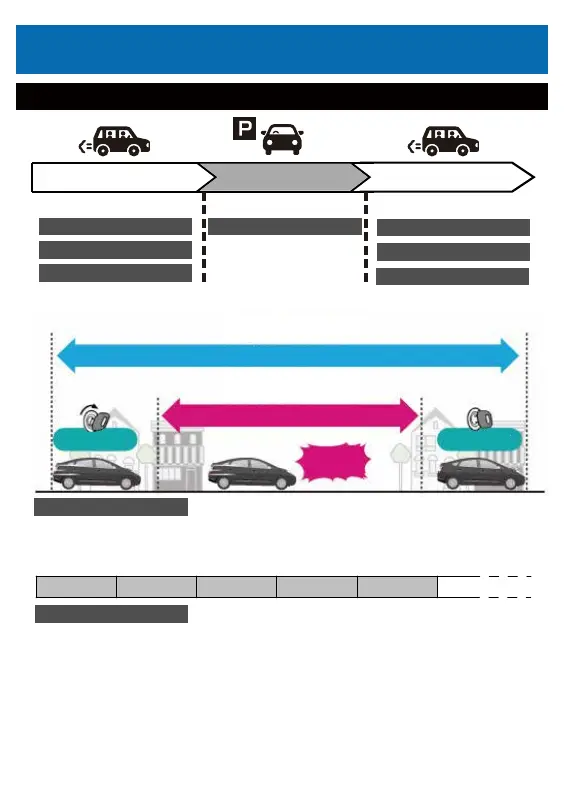
Record the video from power ON to power OFF.
You can set 1 min/2 min/5 min loop recording.
When the memory card is full, the new files will cover the old one.
When the built-in G-sensor detects any collisions during continuous recording,
it automatically starts recording a 15 seconds video clip before and after
collisions. The video clip will be locked to keep it from being overwritten.
● Collision Recording (G-sensor)
When a collision is detected, it will be automatically recorded.
● Manual recording
By touching the file lock icon, you can record the video so that it will not be overwritten.
VideoMode
Type of recording
Driving (Engine On)
Parking (Engine Off) Re-driving(Engine On)
<Driving mode>
<Driving mode>
<Parking monitoring mode>
Loop recording Loop recording
Emergency recording
Emergency recording
Emergency recording(manual)
Emergency recording(manual)
P shock perception recording
1.Driving(Engine on)
Loop recording
Emergency recording
1 file
1 file 1 file
1 file
1 file Continue recording • • •
22
[Continuous Recording]
Continuously recorded data
[G-Sensor]
Shock recording data
Power On Power Off
Shock



 To Next Page