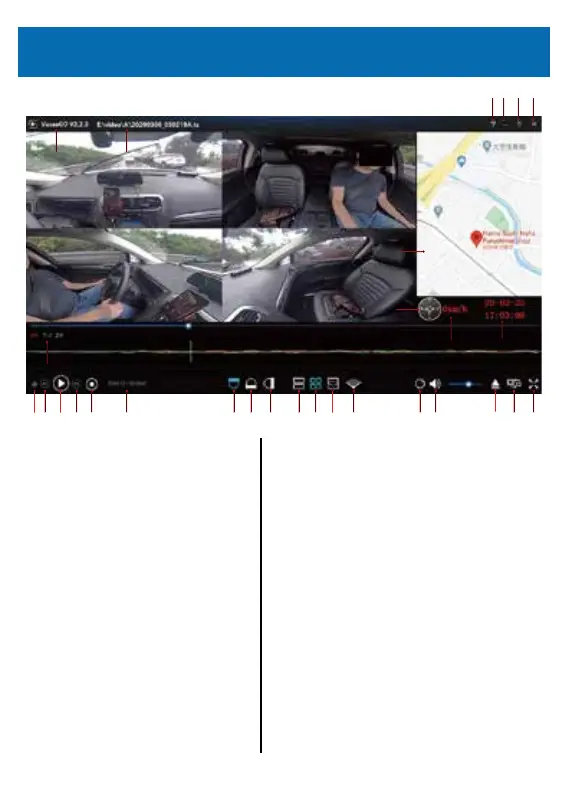
4)Start the dedicated playback software.
⑫ ⑬ ⑭ ⑮ ⑯ ⑰ ⑱ ⑲ ⑳ ㉑ ㉒ ㉓ ㉔ ㉕ ㉖ ㉗ ㉘ ㉙
⑨
⑩
⑧
⑦
①
②
③ ④ ⑤ ⑥
⑪
① The dedicated playback software
“VeSeeGo”
② The location of flied storage
③ Help: Click the question mark to display the
operation manual
④ Hide the window (minimize)
⑤ Maximum screen display
⑥ Close the window
⑦ Map/track display
⑧ Direction
⑨ G-sensor graph
⑩ Speed
⑪ Date and time
⑫ Shows/Hides playlists
⑬ Previous button: Move to the
previous from the current position in the
playlist
⑭ Pause/Play
⑮ Next button: Move to the next from the
current position of the playlist
View Video Playlist
About 2.5 m
⑯ Stop
⑰ Current/Total play time
⑱ Front upward: Displays the front upward
camera image.
⑲ Left/Right direction: Displays the camera image in
the left/right direction.
⑳ Front downward: Displays the front downward
camera image.
㉑ Around mode
㉒ Four mode
㉓ Ball mode
㉔ Wide mode
※ ⑱〜㉔ only support front camera
㉕ Display adjusting: adjust the score of display
㉖ Sound control
㉗ Choose one and open quickly
㉘ Video resolution change button
㉙ Full screen button
27



 To Next Page