Need help?
Do you have a question about the Åkerströms JUPITER 100J and is the answer not in the manual?
Checks to perform before each use of the transmitter for faults or damages, including visual inspections and button tests.
Tasks for maintaining battery contacts, charger contacts, and control panel readability.
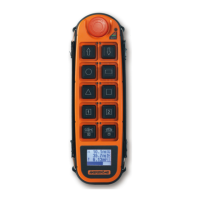
Details on using the transmitter's two joysticks for crane and trolley movements, including speed steps.
Procedure for stopping operations using the safety STOP button and using slow speed mode with joystick interlocks.
How to activate optional features and select modes like 1, 2, A, B on the 150J model.
Using the siren function and details on operating two cranes simultaneously with one transmitter.
Operating with multiple transmitters or receiving receiver data on 150JD models.
Details on the transmitter's auto shut-off feature and manual restart procedure.
Procedure for switching off the transmitter and de-energizing the main contactor.
Explanation of status indicator lights (green, yellow, red) for operational status and faults.
Displays for radio signal quality, MC status, and text fields (e.g., crane ID).
Visual representation of battery level and load weight with units.
Details on the green and yellow LED indicators for battery voltage levels.
Guidance for charging, including temperature limits, approved chargers, and battery type warnings.
Step-by-step instructions for safely removing and installing the CIM card.
Checks to ensure proper transmitter operation and safety before starting crane use.
Guidelines for safe crane movement, load handling, and workplace awareness.
Locating emergency power disconnects and securing the transmitter after use.
Procedures for reporting defects and switching to manual operation if radio control fails.
Explanation of symbols for micro/slow speed, normal speed, extra functions, siren, and selections.
Detailed explanations for Nordic, DIN, and CS symbol configurations.
 General
| Category | Remote Control |
|---|---|
| Manufacturer | Åkerströms |
| Model | JUPITER 100J |
| Operating Temperature | -20°C to +55°C |
| Protection Class | IP65 |
| Battery Type | 2 x AA |
| Range | Up to 100 m (free field) |

 To Next Page