EasyManua.ls Logo

AKG P220 - General; Pinout; Connecting the Microphone

AKG P220
15 pages
Print Icon
To Next Page IconTo Next Page
To Previous Page IconTo Previous Page
Loading...
Connecting
to
Audio
Equipment
3
Connecting
to
Audio
Equipment
General
Pinout
Connecting
the
Microphone
16
The
microphone
uses
a
condenser
transducer
designed
for
48-volt
phantom
powering
to
IEC
61
938
and
needs
an
external
power
supply.
The
microphone
provides
a
balanced
output
on
a
3-pin
ma
le
XLR
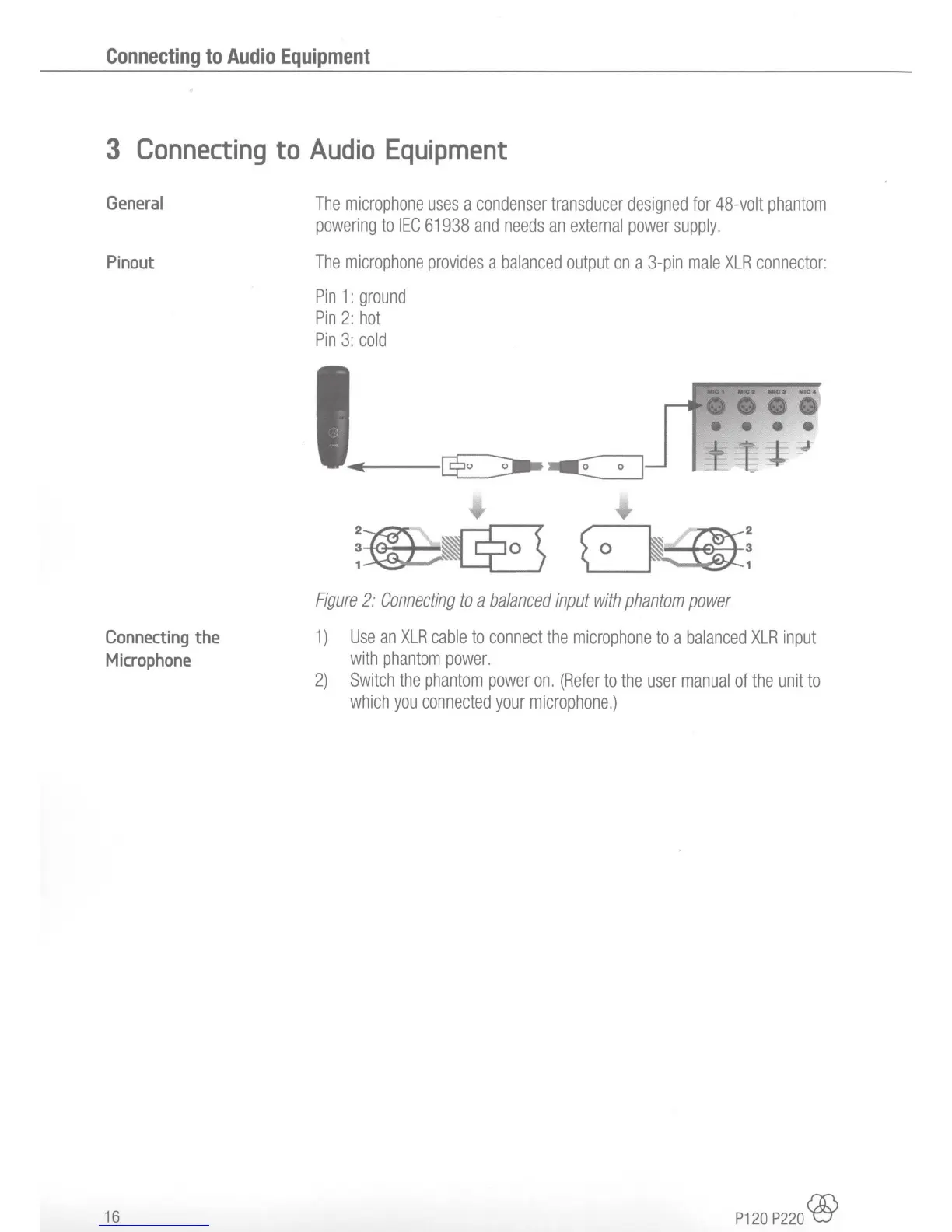
connector:
Pin
1 :
ground
Pin
2:
hot
Pin
3:
cold
;~~:
Figure
2:
Connecting
to
a
balanced
input
with
phantom
power
1)
Use
an
XLR
cable
to
connect
the
microphone
to
a
balanced
XLR
input
with
phantom
power.
2)
Switch
the
phantom
power
on.
(Refer
to
the
user
manual
of
the
unit
to
which
you
connected
your
microphone.)
P120
P2
20
®

Related product manuals