30 English
English
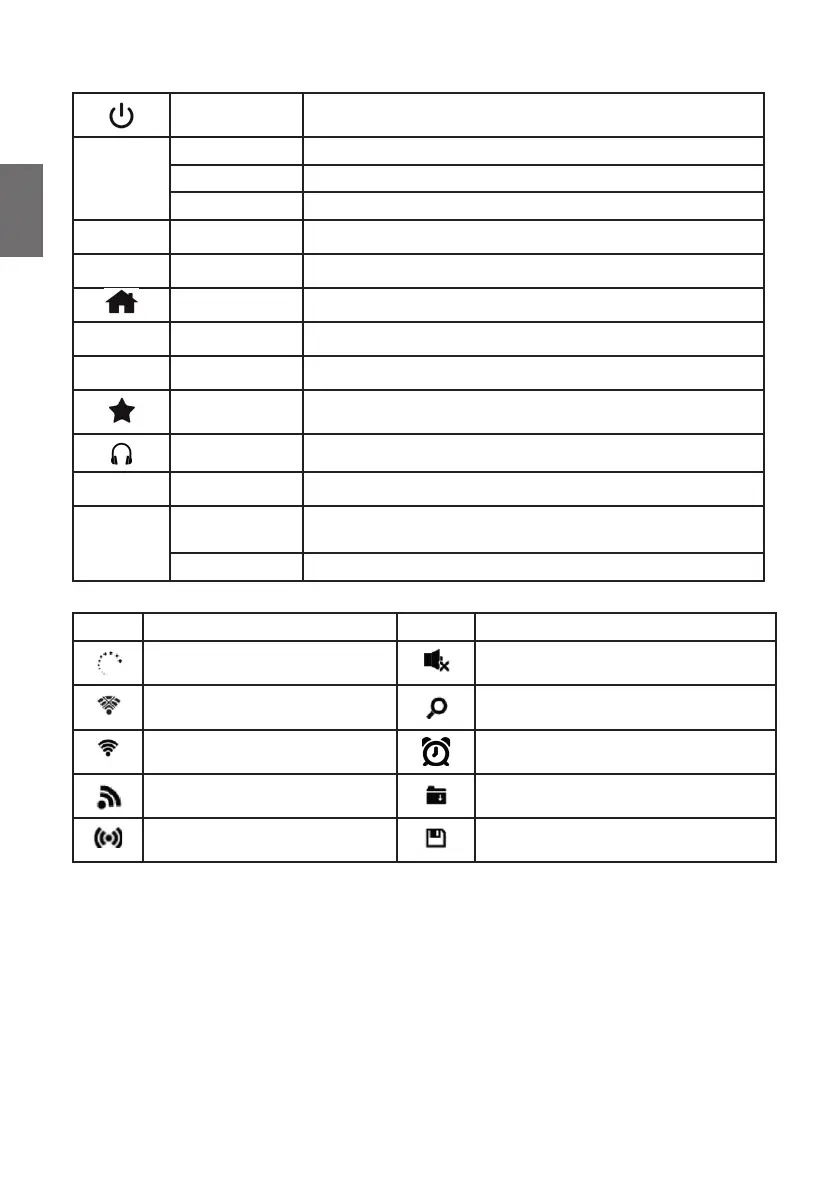
2.1. Buttons and connections
On-Off Turns the radio on or off
Turning
Knob
Volume Turn the knob to change the volume
Navigation Turning the knob navigates through the menus
Con rmation Pressing the knob con rm the current selection
DC-IN Power supply Use the included wall adapter to connect to the mains
Scan Scan Scan for available DAB+ or FM stations
Home Opens the main menu
◄
Left Go back to previous menu
►
Right Go to next submenu
Favorites Recall one of your saved favorites
Headphones 3.5mm connection for headphones
Local Local stations Shows the stations available at this location
Sleep
Sleep timer
Short press activates the timer. Repeated presses change the
timer.
Sleep radio Long press opens the sleep radio station list
2.2. Symbols in the display
Symbol Description Symbol Description
Connection is being established Mute
No Wi connection Search
Wi connected Alarm
Radio reception in mono Internet radio saved as favorite
Radio reception in stereo FM radio station saved as favorite



 To Next Page