26
English
EN
3.2. Changing stations
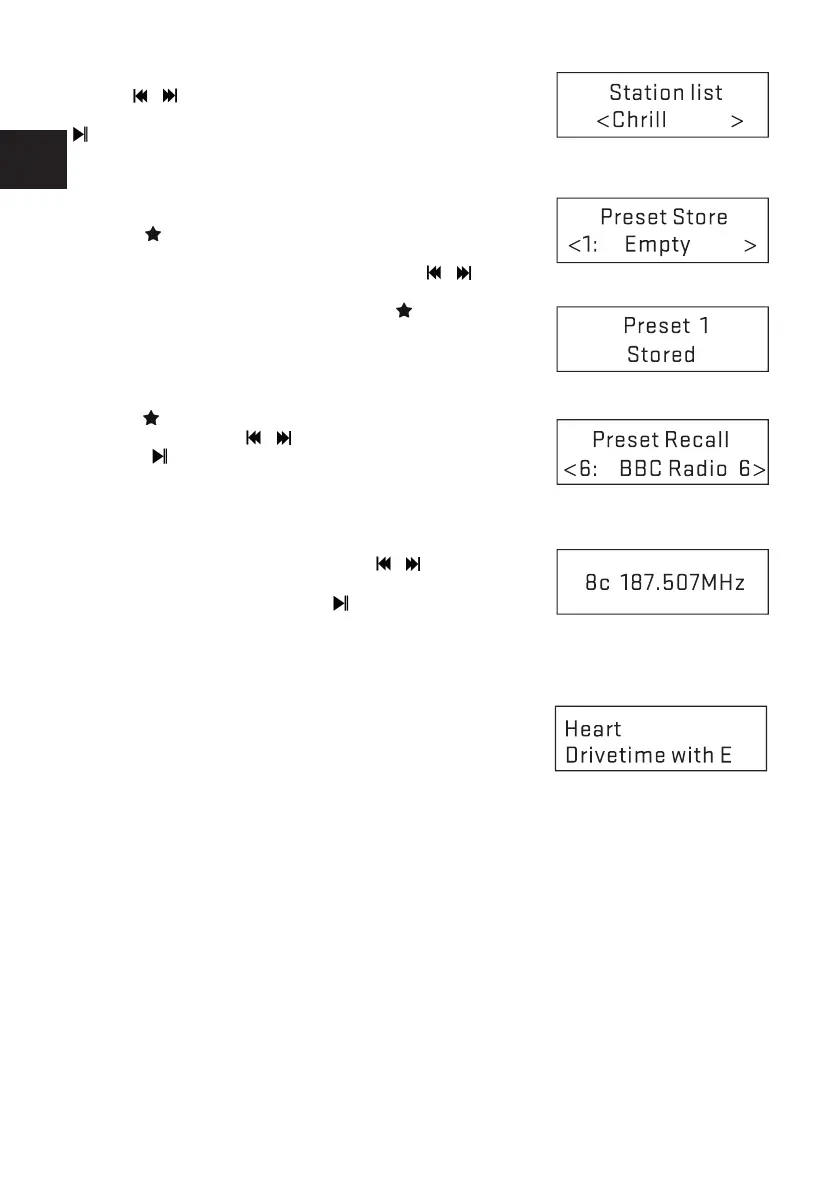
Use the / buttons on the remote control or rotate the TUNE
knob on the unit to scroll through the list of station and press the
on remote control or OK to select the desired station.
3.3. Favorites
You can save up to 40 stations in your favorites for DAB+.
3.3.1. To Store a Station as a Favorite
Press the
button on the remote control, the display shows
the Favorites. Favorites (1-40) are displayed as either Empty
or with the currently stored station name. Use the /
buttons on the remote control or rotate the TUNE knob on the
unit to choose a favorite, then press and hold on the
remote control to store the currently played station. After
conrmation, the preset station is stored and the display
returns to the Now playing screen.
3.3.2. To Recall a Favorite
Press the
button briey (the display will show the Favorites).
Select one by using the / buttons on the remote control,
then press to choose the favorite.
3.4. Manual Tune
You can manually tune to a particular channel/frequency. This
can be useful while adjusting your antenna to achieve the best possible reception and scanning a
particular channel to update the station list.
Press MENU > Manual tune then use the
/ buttons on the
remote control or rotate the TUNE knob on the unit to nd a par-
ticular channel/frequency and press
on the remote control or
OK on the unit to conrm.
The display shows a live indication of the received signal strength on the selected frequency.
Adjustments to your antenna will be shown in the received signal strength indicator.
3.5. Now playing information
While a station is playing, the display shows its name and DLS
(Dynamic Label Segment) information broadcasted by the station
such as programme name, track title, album name, etc.
If the information has over 16 characters, it will scroll across the
display.
Each time you press the INFO button, the next set of information is displayed, cycling through: DLS
text, DLS Plus information (this is only displayed if broadcast by the station), signal strength, pro-
gramme type, ensemble name, channel number/frequency, signal error rate, bit rate, time and date.



 To Next Page