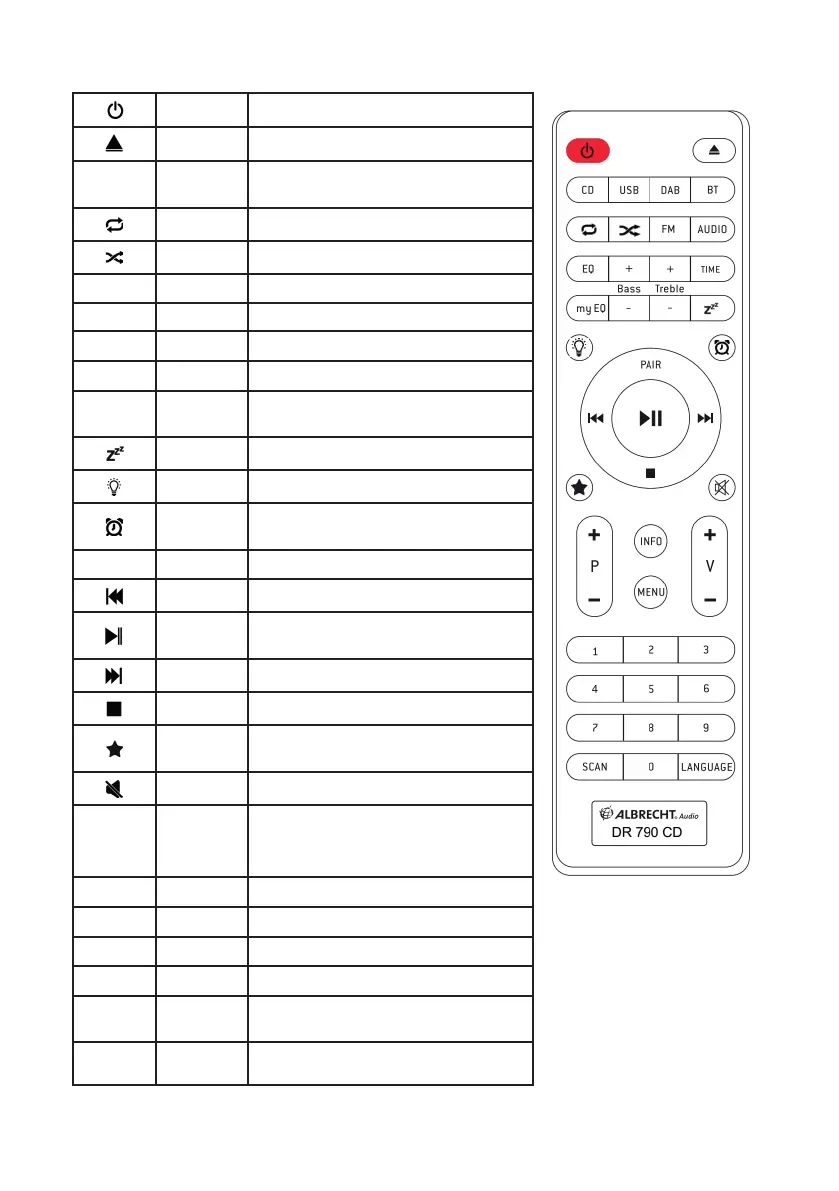
2.3. Remote Control
Standby Press to turn on/off
Eject Open/close CD disc tray
MODE
Select
Source
CD, USB, DAB-Radio, BT (Bluetooth)
FM-Radio, AUDIO (Aux-in)
Repeat Select repeat playback (CD/USB)
Random Play tracks randomly in CD/USB
EQ Equalizer Class, Pop, Rock, Jazz, Normal
my EQ myEqualizer Individual EQ setting of Bass / Treble
+ / - Bass Adjust Bass in my EQ
+ / - Treble Adjust Treble in my EQ
TIME Clock
Hold to set the clock
Short press to switch 12/24 h
Sleep Set the sleep timer
Dimmer Change brightness of display
Alarm
Long press to enter Alarm settings
Short press to de-/activate
PAIR Pair Press and hold to activate BT pairing
Rewind Rewind or go to last track
Play/Pause
OK
Play/Pause music in CD/USB/BT
Press to con rm selection
Fast forward Fast forward or go to next track
Stop Stop music in CD/USB/BT
Favorite
Recall/Save favorites
Program songs playback in CD/USB
Mute Press to mute the sound
+
P
-
CD
DAB/FM
FM
Move to next/previous album
Last/next favorite station
Hold to tune to next available station
INFO Info Show information in DAB/FM/CD
MENU Menu Open menu in DAB/FM mode
+ V -
Volume Increase / decrease volume
0-9
Recall favorites directly
SCAN
Scan
Intro
DAB/FM: start scanning for channels
CD/USB: play short intro of all tracks
LANGUA-
GE
Language
Select: German, English, French



 To Next Page