— 32 —
Advanced Settings
Continued on the Next Page
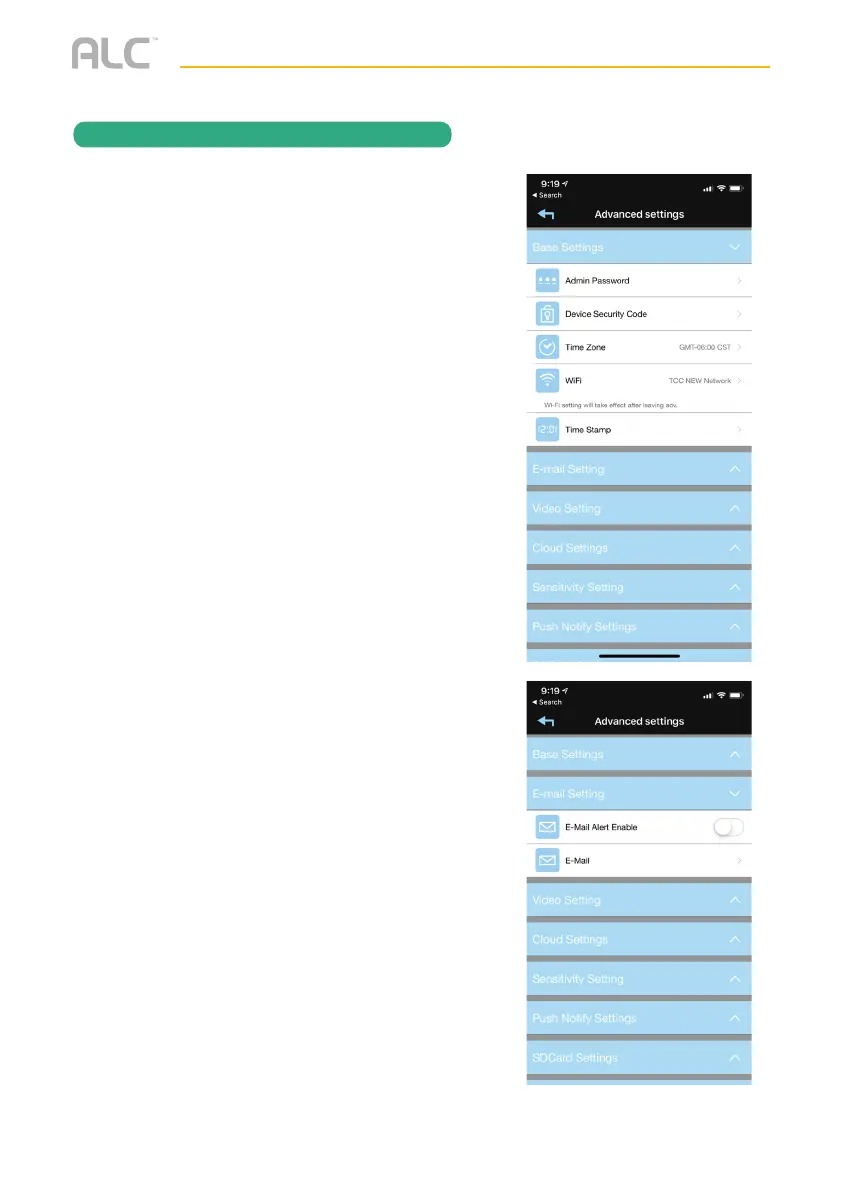
Tap on Base Settings and the Base setting
options will appear. Perform the following
on this screen:
ADMIN PASSWORD: Tap to change the
Admin Password from the default 123456.
Admin Password is used to get into this screen.
DEVICE SECURITY CODE: Tap to change
the Security Code which is used to access the
device.
TIME ZONE: Tap to change/set the Time
Zone where the camera is located.
WI-FI SETTING: The Wi-Fi setting allows
you to choose the home network and setup
the Wi-Fi environment. When you tap WI-FI
Setting, the system automatically scans the
nearby network and shows the available Wi-Fi
routers in the list. Choose the Wi-Fi router
connected to the home network and enter the
Wi-Fi router password if necessary. Due to
security concerns, it is suggested to use the
WPA/WPA2/WPA2-PSK protocol for Wi-Fi
network.
TIME STAMP: Tap to set the position and
color of the time stamp.
Tap on Email Setting and the Email setting
options will appear. Perform the following
on this screen:
EMAIL: Tap to enable the Email Alert.
EMAIL: Tap to enter your email to receive
alerts.
REMOTE ACCESS


 To Next Page