— 34 —
Advanced Settings
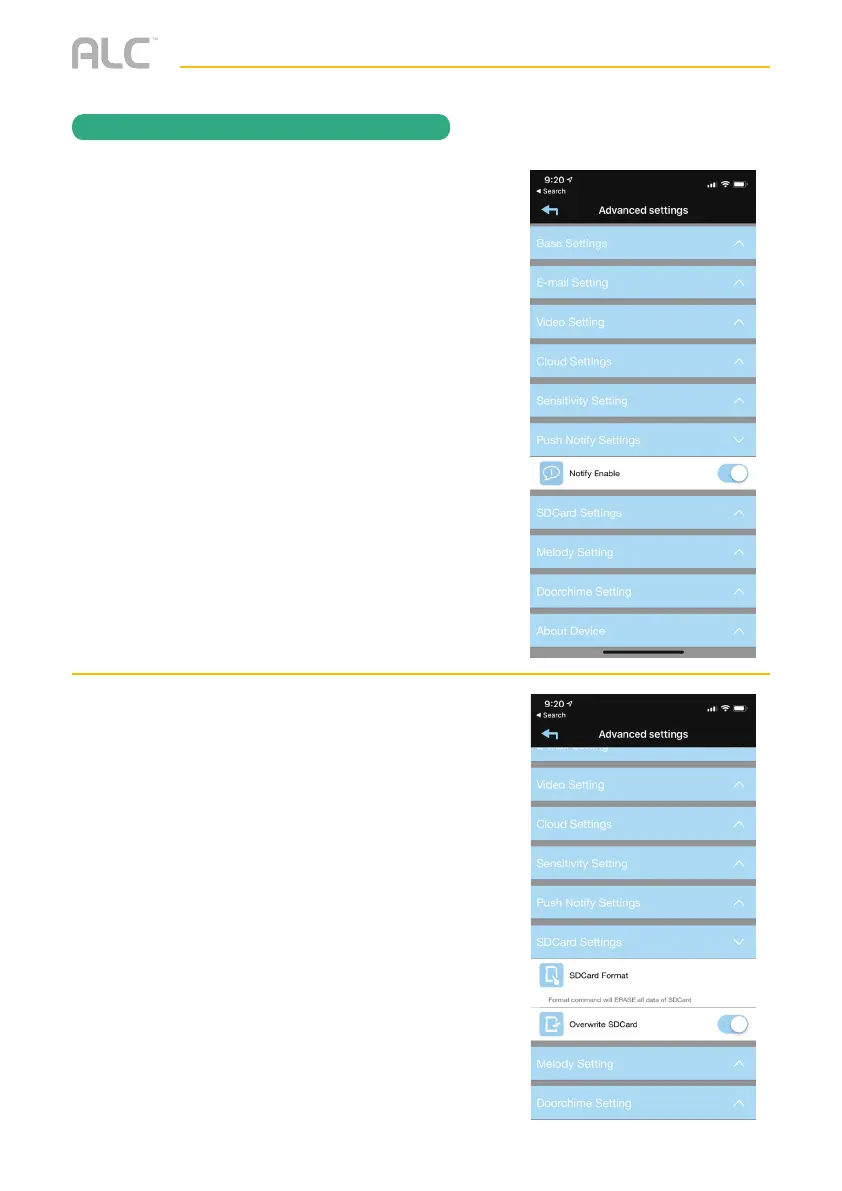
Tap on SD Card Setting and the SD Card
setting options will appear. Perform the
following on this screen:
SD CARD FORMAT Tap and then confirm
to format the MicroSD card inserted in the
camera.
OVERWRITE SD CARD: Tap this switch
to activate. When activated, the camera will
delete the oldest recordings in order to record
new files when the MicroSD card is full.
Tap on Push Notification Setting and the
Push Notification options will appear.
Perform the following on this screen:
Notify Enable: Enable this setting and when
motion is detected or the doorbell is pressed,
you will get an alert on your mobile device.
This feature is to turn notifications On or Off
from specific cameras. An example would
be to receive Notifications from your Video
Doorbell, but not your Driveway camera.
REMOTE ACCESS


 To Next Page