Home
ALC
Accessories
AWF71D
Page 40 (Cloud Account Setup: Binding)
ALC AWF71D - Cloud Account Setup: Binding; Dismissing Welcome Messages; Selecting Cloud Binding Service
50 pages
Manual
Save Page as PDF
To Next Page
To Next Page
To Previous Page
To Previous Page
Loading...
— 38 —
Cloud Account
Setup
U
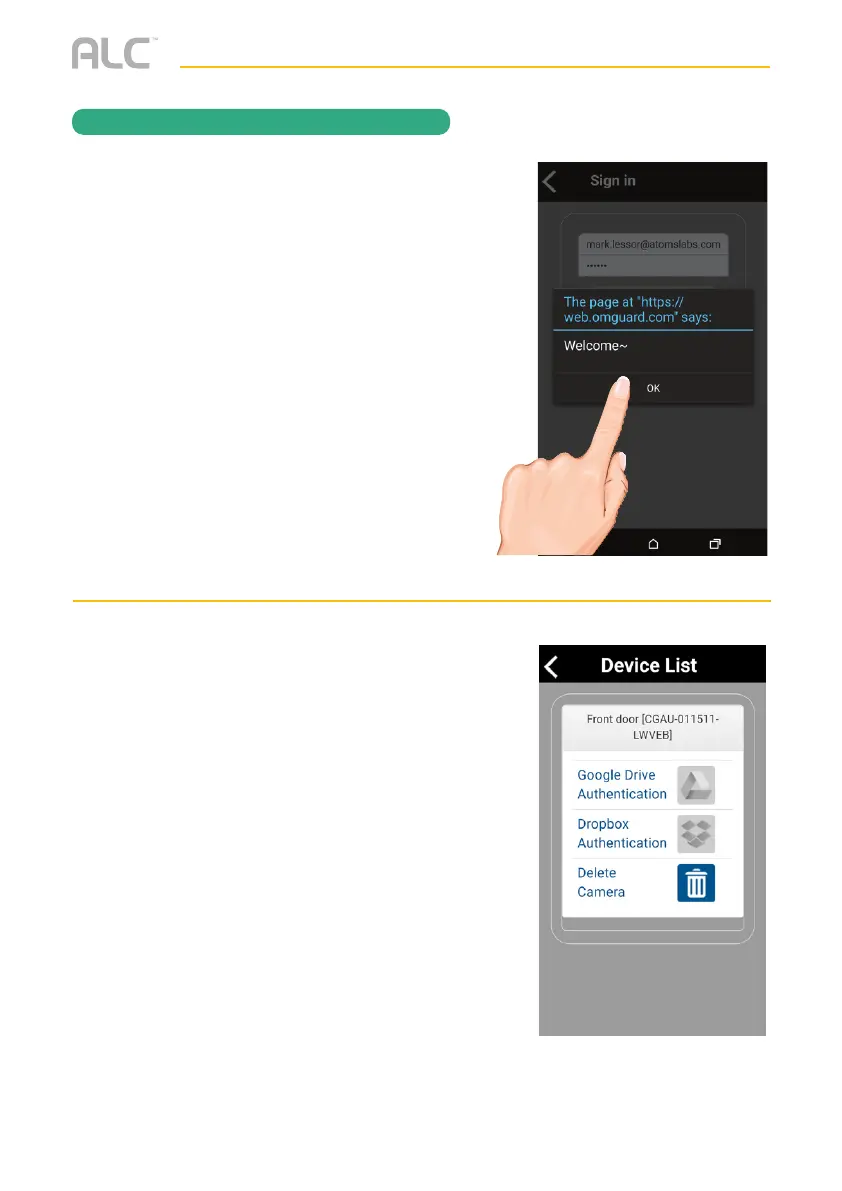
After creating the account, a welcome
screen appears. Tap
OK
to dismiss the
message.
V
When the Device List appears, tap on
the desired option; Google Drive or
Dropbox, to create the binding.
REMO
TE AC
CESS
39
41
Table of Contents
Main Page
Default Chapter
3
Table of Contents
3
Important Safety Instructions
4
Introduction
7
System Contents
7
Getting to Know Your Doorbell
8
Cloud
8
Installation
9
Installation Tips
9
Night Vision
9
Installing the Doorbell
10
Remote Access
13
Overview
13
Requirements for Remote View
13
Connecting to the Internet
14
Connecting Via the App
15
ALC Sighthd App Icons
17
To Take Snapshots
20
To View And/Or Take Videos
22
Motion Recordings
23
To Play Videos
24
To Delete Videos
27
Information Screen Options
28
Setting Screen
30
Advanced Settings
32
Cloud Account Setup
38
Maintenance
42
Troubleshooting
43
Product Specifications
46
Warranty
47
Other manuals for ALC AWF71D
Faq
4 pages


 To Next Page