5
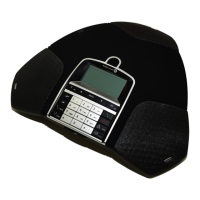
KEYPAD
Writing text
Each button contains letters and characters - more than those shown on the button (see
illustration below). Press the same key repeatedly to change to another character. If there are
two letters under the same key that you want to enter one after the other, you need to pause
slightly before entering the second letter. For selection of lowercase/uppercase characters
please use up/down arrows.
Press C to delete the last character you entered.
DESCRIPTION
(blank) . - 1
G H I 4
P Q R S 7
D E F É È 3
M N O Ö Ø Ñ 6
W X Y Z 9
A B C Å Ä Á À 2
J K L 5
T U V Ü Ú 8
0
MENU,
settings menu
UP ARROW
navigation in menus,
display of call list
C
no/end/back,
recording
Increase volume
Decrease volume
Mute
HOLD
OK
yes/conrm choice
Answer/connect
new line
Hang up/end line
CONFERENCE
automatic dialling of
conference groups
CONTACTS
phonebook
DOWN ARROW
navigation in menus,
display of call list
Alphanumerical buttons, phonebook


 To Next Page
