27 28
Tap
to open the timer screen.
• Enter time in the sequence of second, minute and hour.
• Tap
to activate Countdown.
• Tap Add timer to add another timer in panel.
• Tap
to pause Countdown.
• Tap Delete to delete current countdown.
Setting stopwatch
Tap to open stopwatch screen.
• Tap
to start the timer.
• Tap LAP to show a list of records according to the updated time.
• Tap
to pause the total and lap times. These will only restart after is tapped again.
• Tap Reset to start a new timer.
3.10 Music .................................................................................................
You can play music files stored on your phone or microSD
TM
card. Music files can be downloaded from your computer
to the phone using a USB cable.
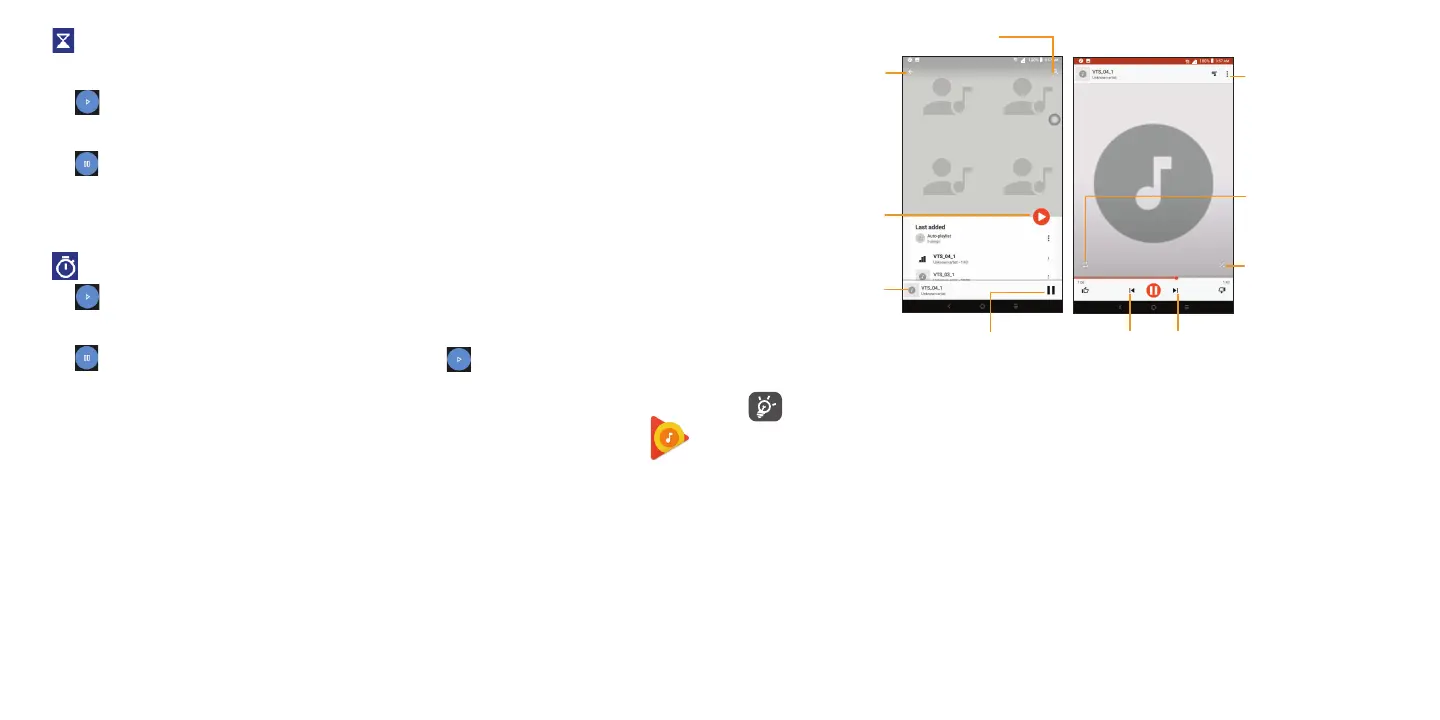
To play a music file, swipe upward from the Home screen, then tap Play Music.
Playing music
Tap on a song to play.
Back
Tap to play the album
from the first track
Search
Tap to open the now
playing screen
Pause or play
Loop all music or one song
Shuffle music
Previous
Next
Access more functions
While playing songs with Music, the operation of pause, play or skip is still available even if the screen is
locked.



 To Next Page