9 10
1.4 Status Bar
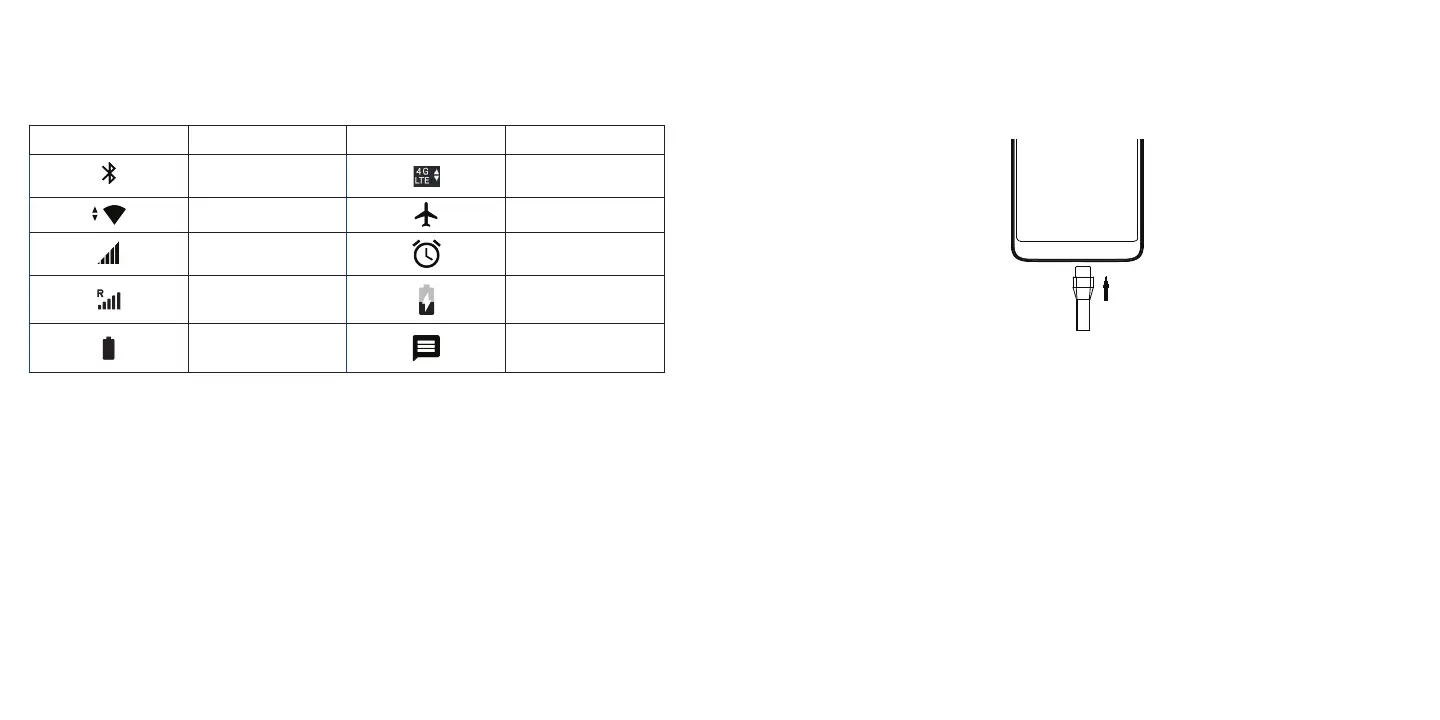
From the status bar, you can view both phone status (to the right side) and notification information (to the left side).
Here is a list of the icons you might see and their meanings:
Icon Status Icon Status
Bluetooth
®
active 4G LTE data service
Wi-Fi
®
active
Airplane mode
Network (full signal)
Alarm set
Network (roaming) Battery (charging)
Battery (fully charged) New message
2
About your Phone ............................................
2.1 Power on/off
Hold down the Power/Lock key until the screen lights up. If Lock screen settings are enabled, enter the unlock PIN,
password or pattern to access the Home screen. .
If you don't know your PIN, password or pattern, or if you have forgotten it, contact your service provider. Do not
store your unlock PIN, password or pattern within your device, instead store it in a location that is accessible without
using device.
Hold down the Power/Lock key until the device options appear, select Power off.
Charging
Insert the small end of the charging cable into the charge port, and plug the charger into an electrical outlet.
Note: Please use the cable that came with your device. Using other cables may damage the charging port or reduce
battery performance.
2.2 Battery
To optimize battery performance, make sure to fully charge your device before using it for the first time.
To optimize battery life adjust your settings:
• Brightness level: Lowering your screen brightness level can optimize your battery level. To adjust the brightness
level, swipe up from the Home screen, tap Settings > Display > Brightness level. To lower the brightness level,
slide to the left.
• Power Saving Mode: Power Saving mode minimizes battery usage to extend battery life. To turn on your Power
Saving mode, swipe up from the Home screen, tap Settings > Battery. Then turn on Standby intelligent power
saving and Battery saver.
• Screen timeout: Screen timeout will darken the display after a set time of inactivity. To change your Screen
timeout time, swipe up from the Home screen, tap Settings > Display > Sleep. Then select the screen timeout
duration.



 To Next Page