11 12
Note: The back cover and battery are not removable. Disassembling the device may damage your battery.
3
Applications ....................................................
3.1 Call ....................................................................................................
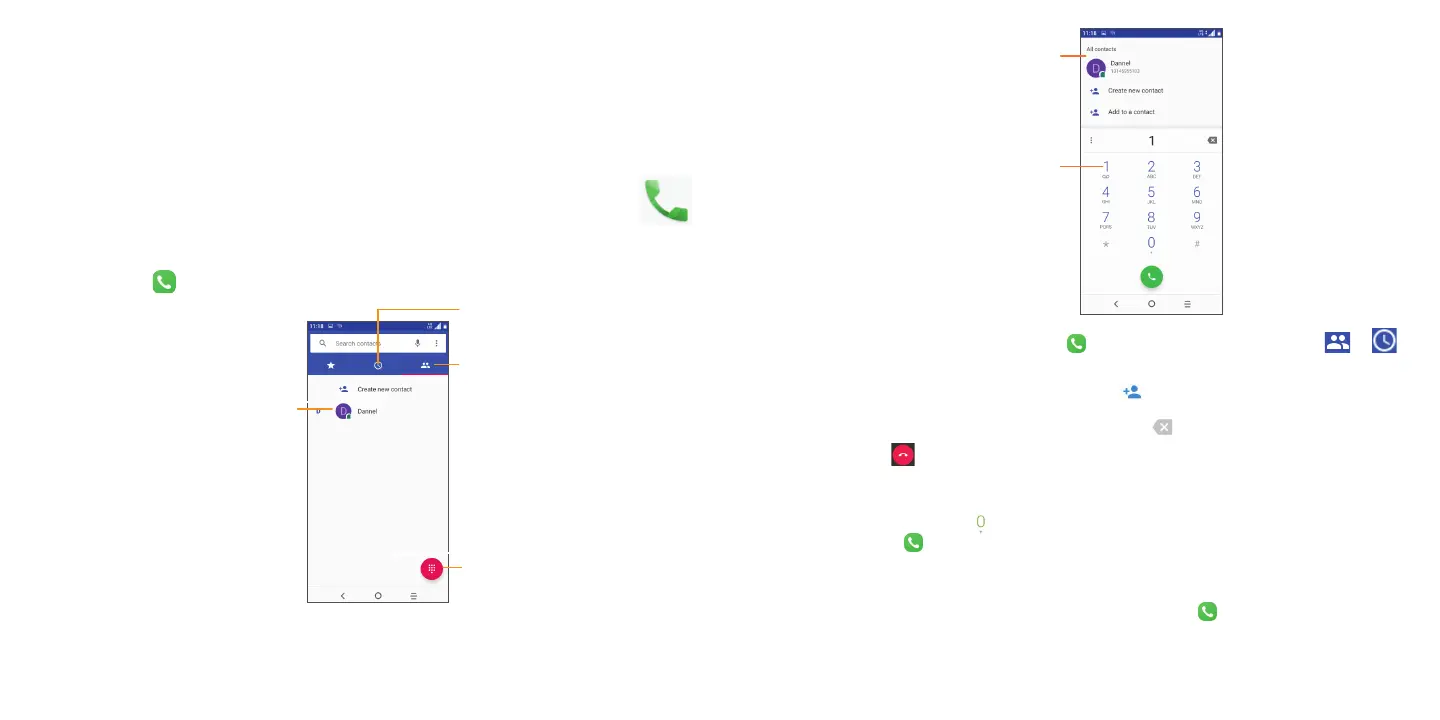
Making a call
To make a call, touch .
View the contact’s detailed
information. You can also
edit, delete, share the
contact, or send a message
to the contact.
Show the dial pad
Call log
Contacts
Display
suggested
numbers
Press and hold to
access voicemail
Enter the desired number from the dial pad and touch to place the call or select a contact from or by
sliding or touching tabs, then to make the call.
The number you entered can be saved to Contacts by touching
Create new contact.
If you make a mistake, you can delete the incorrect digits by touching
.
To hang up a call, touch
.
International call
To dial an international call, long press to enter “+”, then enter the international country prefix followed by the full
phone number and touch .
Emergency call
If your phone has network coverage, dial the emergency number and touch to make an emergency call. This
works even without a SIM card and without typing the PIN code.



 To Next Page