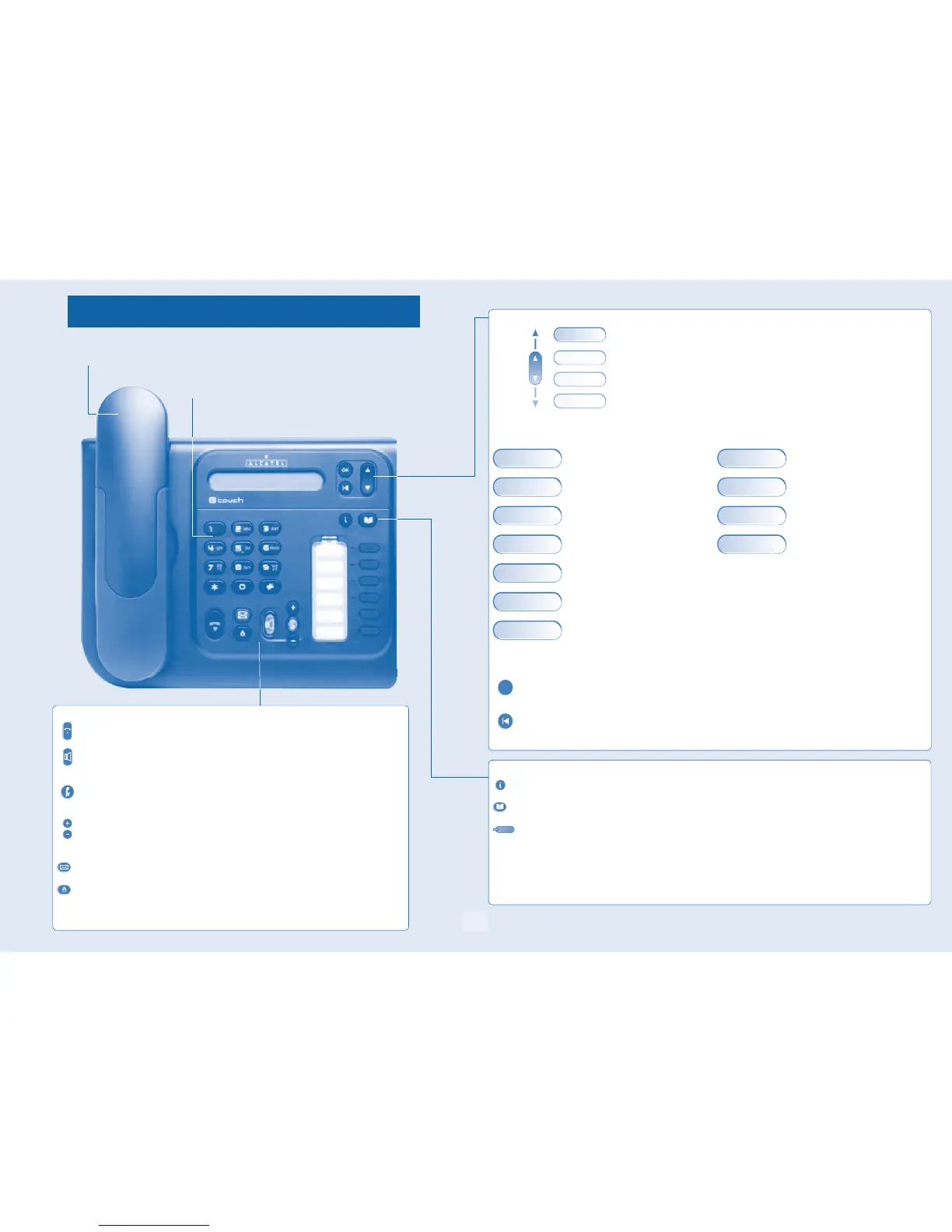
Getting to know your telephone
6
Alcatel 4018
Handset
Audio keys
Function keys
Hang-up key:
to terminate a call.
Hands-free/Loudspeaker Key:
to make or answer a call without lifting the receiver (Alcatel 4008/4018).
• Lit in hands-free mode or headset mode (short press).
• Flashing in loudspeaker mode(long press).
Intercom/Mute key:
• During a conversation: press this key so that your correspondent can no longer hear
you.
• Terminal idle: press this key to answer calls automatically without picking up the
receiver (Alcatel 4008/4018).
To adjust the loudspeaker or handset volume up or down
Messaging key to access various mail services
If the key flashes, a new voice message or a new text message has been received.
'Redial' key
• To access the 'Redial' function (short press)
• Call back on the last 10 number dialled (long press).
Alphanumeric keypad
Navigation
Up-down navigator:
used to navigate around the home page, through the menus or in a text zone
when entering characters.
The home page consists of:
• Information on the status of the set (set locked, call forward, etc.)
• Date and time
• Set programming and configuration functions
Functions accessible (set in idle position): Features accessible in conversation:
Identify the terminal you are on, Placing a call on hold (hold),
Call back on the last 10 number dialled, Sending DTMF signals,
Lock / unlock your telephone,
Store the number in the personal phone
book,
Programming an appointment reminder,
Transfer a call to the voice mailbox of an
absent party.
Divert your calls to another number. (imme-
diate forwarding, forward to voice mail,
forward to bleeper),
Configure the set (personal assistant, display,
ring tone, voice mail, etc.),
Using call by name.
.
Other features can be accessed depending on the configuration of the system.
OK key:
used to validate your choices and options while programming or configuring.
Back/Exit key:
to return to previous menu (short press) or return to first screen (long press). You can also use this key to correct
a character you entered.
WhoamI
Lock
Settings
WhoamI
Hold
Rediallist
¤MFcode
Lock
Savetorep
Appointment
TransferVMU
Forward
Settings
Dialbyname
OK
Function keys and programmable keys
Guide key:
Use to obtain information on the pre-programmed keys or to access the set programming or configuration.
Phone book key :
Phone book key to access your personal phone book (short press) or to make a call by name (long press or press
twice).
Pre-programmed function keys and programmable key
Lit when the function associated with the key is activated.
The 6-key block consists of:
two line keys,
one 'immediate forwarding or cancel call-forward' key,
one 'conference' key,
one 'transfer' key,
one direct call key to programme.



 To Next Page