77 78
6.2.3 Stopwatch
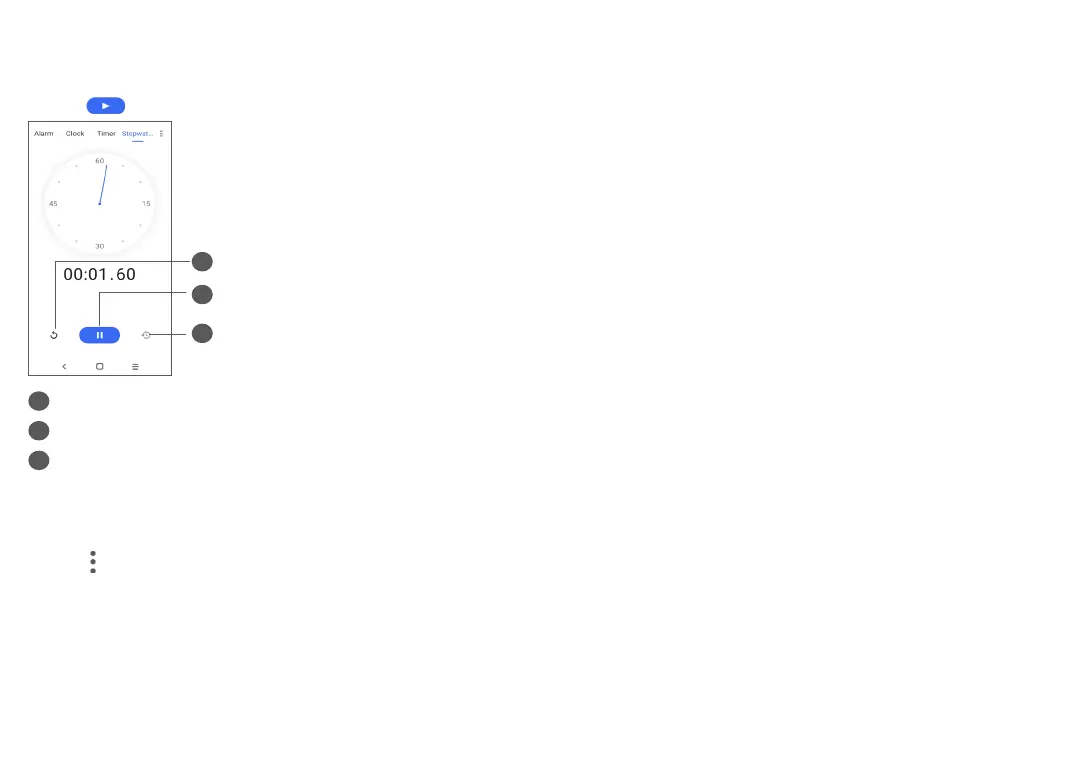
From the Clock screen, touch Stopwatch.
Touch to start the Stopwatch.
2
3
1
1
Reset
2
Pause/play
3
Touch to show a list of records according to the
updated time
6.2.4 Adjust Clock settings
Touch and then Settings to access Clock and Alarms
settings.
7
Others ...................................
7.1 Other applications
(1)
The previous applications in this section are preinstalled
on your phone. To read a brief introduction of the
preinstalled 3rd party applications, refer to the leaflet
provided with the phone. To download and install
more 3rd party applications, use the Google Play Store
application.
(1)
Application availability depends on country and operator.


 To Next Page